[LibreOffice] Installation failed
Solved
Cathozie Posted messages 106 Registration date Status Member Last intervention -
Hello,
I had an older version of LibreOffice on my PC running Windows 11 (25.8.something). When I tried to update it, I got a confusing message saying that the previous version was on the network, "managed" by CCleaner.
It was impossible to find this version and give it an appropriate path.
So, I:
- Removed LibreOffice and all its remnants from the registry (I couldn't remove it any other way),
- Did the same with CCleaner
There is no longer any trace of either on my PC... And yet, installing the latest version of LibreOffice is still impossible.
As I recall, installing such a basic software shouldn't require an older version. What about the "stuff" that you install for the first time?
I don't understand anything, and I must admit that I'm close to giving up on my idea of switching from Office to LibreOffice.
Thanks to everyone who will help me attempt my transition from one software to another with a... possible, if not easy, installation.
--
Cath :-)
5 answers
-
Hello
Some tips
check if there are any remaining data in the profile
- press the WINDOWS key (a flag) and R (simultaneously).
- -Then, type %appdata%
- -Look for the folder libreoffice
- -Rename it Oldlibreoffice
Download the stable version 25.8.7 Here
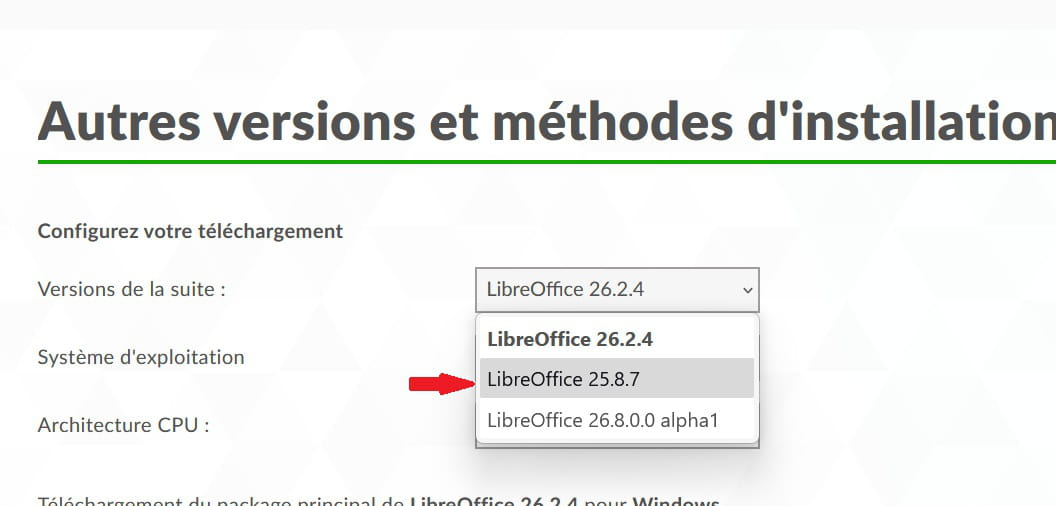
Then run the installation file as an administrator
- select your downloaded file
- right-click
- run as administrator
-
Thank you for your response,
Unfortunately, I do not have the "run as administrator" option when I right-click the file in question (and I am indeed the administrator of my PC), and if I install it normally, after having renamed the file OldLibreOffice, it’s the same issue.
--
Catherine :-)
-
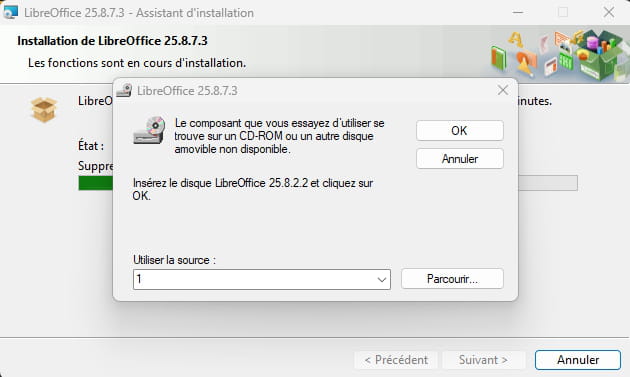
Here is the screenshot of what I get:
-
Needless to say, I have never used a CD-ROM to install LibreOffice.
-
For your information
I finally managed to remove all traces of LO with RevoUninstaller and I was able to install the latest version of LO, which is now working.