
External support tablet connection
Pierr10 Posted messages 13860 Registration date Status Moderator Last intervention -
Hello,
I want to connect an external hard drive or a USB stick to view or retrieve the data contained on these devices on a tablet. How do I do it?
2 answers
-
Hello
It's actually quite simple, you need a USB-A to USB-C adapter.
On the app side, you need a media player capable of reading external drives. VLC should do it. Otherwise, use a file explorer and then read with the media player app available if there is one. If not, add such an app.
If in doubt, use Exodus Privacy to check the freshly installed apps to see if they pose too big a threat to your battery and your data. Note that such apps inevitably need access to all files but not necessarily to SMS, to name just one example.
Regarding external hard drives, noting that it requires a larger power source in input, something the phone may not provide, I do not recommend it.
The MAMAA may not have oil but they have data!
Do you feel my Big Data?
Sacrifice some freedoms for more security and you lose ALL OF THEM.
ALL YOUR DATABASE ARE BELONG TO US -
Hello,
You can directly connect a USB flash drive or an external hard drive to the tablet. The power supplied by the tablet is sufficient for a (recent) hard drive.
There are still some limitations depending on the formatting of the device used:
- With a flash drive formatted in FAT32, you can read the contents of the drive and write to it.
- With a hard drive formatted in NTFS, you will not be able to write to the drive. Reading is possible with the latest versions of Android (maybe starting from Android 12). So you may be able to copy the data onto the tablet.
You sometimes need to use an OTG adapter like this:
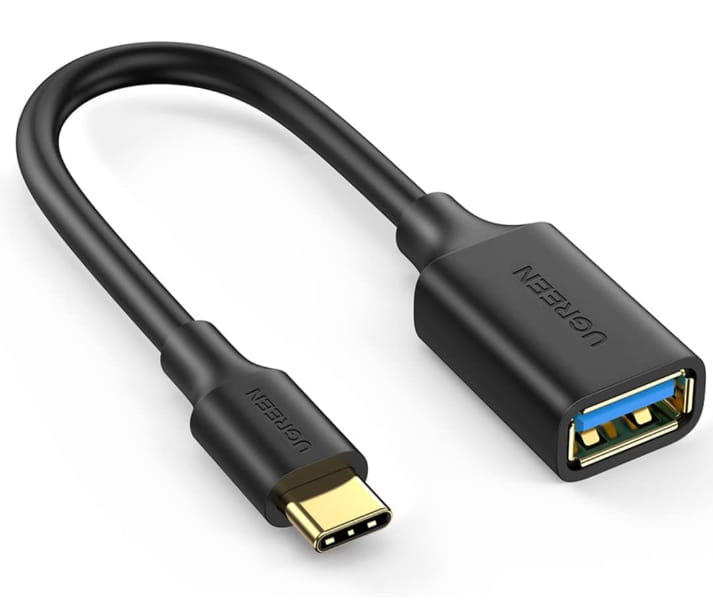
You choose it based on the USB port of your tablet (USB C or micro USB).
What is well conceived is clearly expressed,
And the words to say it come easily.
(Boileau)

