How to get the decimal point on the numeric keypad?

Royal52 Posted messages 163 Registration date   Status Membre Last intervention   -  
Royal52 Posted messages 163 Registration date   Status Membre Last intervention   -

Hello, probably due to a mistake, the decimal point on the numeric keypad has disappeared and is now a comma. How can I restore the point?


4 réponses

georges97 Posted messages 14506 Registration date   Status Contributeur Last intervention   2 896
 

Hello,

The switch between decimal point and comma is made by pressing the Numlock key on the numeric keypad.

0
brucine Posted messages 24389 Registration date   Status Membre Last intervention   4 099
 

Hello,

Note that in some software, such as Excel, this point returns a comma no matter what you do, possibly due to the default decimal separator; you then need to use on an AZERTY keyboard Shift of the semicolon key and the period located above the space bar and Alt Gr.

0
georges97 Posted messages 14506 Registration date   Status Contributeur Last intervention   2 896 > brucine Posted messages 24389 Registration date   Status Membre Last intervention  
 

Hello brucine,

Similarly in LibreOffice Writer, the period is not activated on the numeric keypad but by the shift on the semicolon.

0
contrariness Posted messages 338 Registration date   Status Membre Last intervention   6 240 > brucine Posted messages 24389 Registration date   Status Membre Last intervention  
 

Hello Brucine,
For Excel, it's indeed in the modification of the decimal symbol..
"Control Panel / Region / Additional settings" (Decimal symbol)
C.

0
yclik Posted messages 3865 Registration date   Status Membre Last intervention   1 603
 

Hello

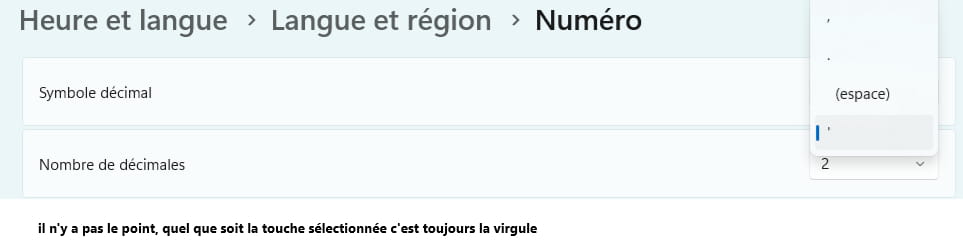
Also check in the language settings

  1. Windows key + I
  2. Time & language
  3. Language & region
  4. Regional format
  5. Number format
  6. Decimal symbol

See what is selected, or.

0
Royal52 Posted messages 163 Registration date   Status Membre Last intervention   3
 

Hello Brucine, before it used to display in Writer (I don't remember which manipulation), but following probably a wrong manipulation now it becomes a comma.

Yclik, see the image, it doesn't work.
0
Royal52 Posted messages 163 Registration date   Status Membre Last intervention   3
 

Hello, it hasn't made any difference; the comma still appears in LibreOffice.
Thank you

0