
Backlit keyboard
Solvedbaladur13 Posted messages 47388 Registration date Status Moderator Last intervention -
Hello,
The keyboard of an ASUS GL752VW laptop lights up at startup but doesn't light up once I'm in Windows 11.
I may have accidentally made a wrong move while entering data, resulting in the keyboard backlight being turned off.
I have tried the FN + F4 F5 F6 F7 F8 F9 F10 right arrow keys but without any positive results.
Thank you in advance for your help.
Best regards.
5 answers
-
-
Hello,
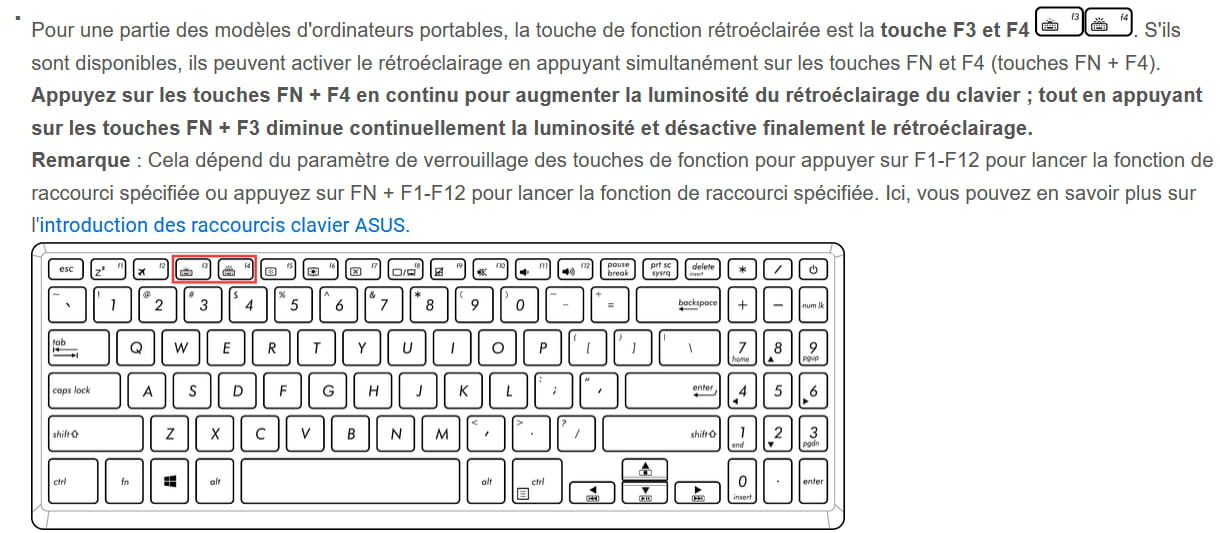
According to the manual on page 35, Fn+F3 and Fn+F4 control the keyboard backlighting.
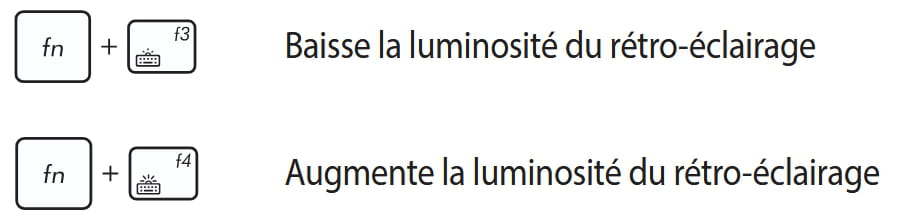
see also the excerpt from https://www.asus.com/fr/support/faq/1014790/
It's very difficult to catch a black cat in a dark room.
Especially when it's not there... -
Good evening,
The brightness management program might be called Armory Crate, like on my Asus TUF Gaming A17.
It may need to be updated for PCs running Windows 11. I have no certainty about this, as my machine is natively running W11.
-
Hello Baladur13, & Georges97
Thank you for the information that Baladur13 has provided, but I have already tried these operations without success.
I will rely on the information from Georges97, whom I thank.
I will give you the positive or negative result.
Best regards.
-
Hello Baladur13 and Georges 97,
Based on your responses, I tried to download the ASUS updates for this Gaming laptop.
After loading and decompressing all the proposed software, the installation of the ATK update was successful.
The keyboard lights up again.
Thanks again for your support and best wishes to you.
I'm marking it as Resolved.
Sincerely,
