How to get rid of the msn.com page
Solved
MisteryBean Posted messages 8947 Registration date Status Modérateur Last intervention -
Hello,
For several weeks, I have been trying in vain to get rid of an unwanted pop-up from an unknown source to me, which turns out to be from msn.com.
Can you help me?
19 réponses

Oh okay, I'll check that tomorrow, I'm leaving for work now.
Do you have the weather widget in the taskbar?

Hello,
I finally disabled the widget in question and since then... nothing. It's been about an hour and still no sign of MSN. I hope that's it, otherwise I'll continue to follow your troubleshooting instructions with FRST.
Thank you very much for your support and for finding this "little oddity" in Windows.
Take care and maybe see you next time,
Capdec
Hello,
Here are the 2 requested links:
https://pjjoint.malekal.com/files.php?id=FRST_20251027_e15v9o14b15z11
https://pjjoint.malekal.com/files.php?id=20251027_y8r13n9e7h5
Thank you!
RE_ @Capdec StatutMembre
--> Copy what is here https://textup.fr/878657Yq from start:: to end:: (without pasting it anywhere)
--> Open FRST (or FRST64) as an administrator and click on Fix
If FRST seems to freeze or is not responding, let it run
--> The PC will ask to restart, accept it
--> A fixlog file is created in the same location as FRST, post it like the other reports
--> Let me know if you still have the problem.
Security contributor.
Hi,
Here is the latest link:
https://pjjoint.malekal.com/files.php?id=20251027_s6q11o7i12h14
For now, the problem seems to be gone... Thank you very much!!!
Hello,
Here is the link to my screenshot:
https://pjjoint.malekal.com/files.php?id=20251027_e128y511o15
Thanks again and see you soon.
RE_
I presume it’s Firefox?
Copy and paste about:preferences#home in the address bar and hit enter
Check what is indicated under "Home page and new windows" and "New tabs"


On "Home Page and New Windows": https://www.google.fr/?pli=1
On "New Tabs": Firefox Home Page (default)
RE_
OK, try this:
Windows key => Settings => Personalization => Lock screen.
Under "choose an app," click on the cross and select "None."
Do the same for "Choose apps" if you have icons.
Restart the PC and see what happens.
RE_
For Win11, it's almost the same:
Windows button => Settings => Personalization => Lock screen.
If Widget is enabled, disable it and see what happens.
*******
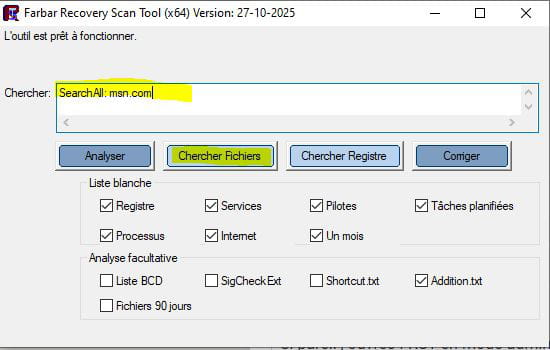
If it's the same, open FRST in administrator mode (right-click) then copy and paste:
SearchAll: msn.com in the FRST search box.
Click on "Search files" and let the tool work.
A text file is created, post it like the others