
How to get rid of epibrowser
bazfile Posted messages 58540 Registration date Status Moderator Last intervention -
Hello,
for some time now, Google search has been redirected to Yahoo. This may be due to the presence of epibrowser.
3 answers
-
Hello.
Download FRST .
Once downloaded, save FRST on the desktop then right-click on FRST and choose Run as administrator which looks like this:


Wait for the message the tool is ready to operate to appear, then click on Scan
Warning, wait for the messages saying that the scan is complete to appear.


At the end of the scan, the two reports FRST and Addition will be on the desktop.


Send the FRST and ADDITION reports to cjoint.com or to https://pjjoint.malekal.com/.
Then include the two links generated by https://www.cjoint.com/ or https://pjjoint.malekal.com/ in your reply.
bazfile
Moderator/Security Contributor.
A hello, a reply, a thank you are always appreciated. -
Hello,
Every time I start Windows, it tells me that epibroswer.exe is missing, which I am trying to remove. But I also have Windows protection that detects unwanted items every time, as well as Hitman. I clean it every time but it keeps coming back.
Below are the links
https://pjjoint.malekal.com/files.php?id=20250914_f8n13m14m8y9
https://pjjoint.malekal.com/files.php?id=FRST_20250914_y14m8j13y10c12
Thank you!
-
Hello Francis.
Procedure to follow in the order indicated:
First uninstall Epistart using RevoUninstaller, see this page.
Also uninstall Wondershare Helper Compact, it's adware.
Then do the following.
1- Open FRST as an administrator by right-clicking on FRST and choosing run as administrator
2 - Copy the entire script that is in the box below:Start:: CreateRestorePoint: CloseProcesses: HKLM\...\Print\Monitors\Canon BJ Language Monitor iP4700 series: CNMLMA1.DLL (File not found) Task: {EFE2F107-498D-4B00-8AC3-552A40FC2F4A} - System32\Tasks\EpiBrowserStartup-S-1-5-21-1426357500-3815237846-3040142672-1001 => C:\Windows\system32\cmd.exe [289792 2024-05-15] (Microsoft Windows -> Microsoft Corporation) -> /C "START /MIN /D "%LOCALAPPDATA%\EPISoftware\EpiBrowser\Application" epibrowser.exe --from-task-scheduler" Task: {A511A3C5-2A11-40B1-A3C2-7739057C9352} - System32\Tasks\CCleaner Update => F:\BusakiV5\App\Rep\ccsetup563\CCUpdate.exe (File not found) Task: {65664A29-4E32-4BF4-93CA-DD404C495B18} - System32\Tasks\CCleanerSkipUAC - User => "F:\BusakiV5\App\Rep\ccsetup563\CCleaner.exe" $(Arg0) (File not found) Task: {7F9A3AF2-E4E1-4D5B-B260-0E0366CB9291} - System32\Tasks\ChromiumUpdateTaskUserS-1-5-21-1426357500-3815237846-3040142672-1001Core => C:\Users\User\AppData\Local\Chromium\Update\ChromiumUpdate.exe /c (File not found) Task: {43756C62-E2A7-45C6-9E9F-5CC846EBA3D3} - System32\Tasks\ChromiumUpdateTaskUserS-1-5-21-1426357500-3815237846-3040142672-1001UA => C:\Users\User\AppData\Local\Chromium\Update\ChromiumUpdate.exe /ua /installsource scheduler (File not found) Task: {341E9535-2A0B-4CF5-A378-120E032A742B} - System32\Tasks\OneDrive Standalone Update Task-S-1-5-21-1426357500-3815237846-3040142672-1001 => %localappdata%\Microsoft\OneDrive\OneDriveStandaloneUpdater.exe (File not found) FF Plugin HKU\S-1-5-21-1426357500-3815237846-3040142672-1001: @chbrowserupdate.com/Chromium Update;version=3 -> C:\Users\User\AppData\Local\Chromium\Update\1.3.99.0\npChromiumUpdate3.dll [File not found] FF Plugin HKU\S-1-5-21-1426357500-3815237846-3040142672-1001: @chbrowserupdate.com/Chromium Update;version=9 -> C:\Users\User\AppData\Local\Chromium\Update\1.3.99.0\npChromiumUpdate3.dll [File not found] CustomCLSID: HKU\S-1-5-21-1426357500-3815237846-3040142672-1001_Classes\CLSID\{A2C6CB58-C076-425C-ACB7-6D19D64428CD}\localserver32 -> "C:\Users\User\AppData\Local\EPISoftware\EpiBrowser\Application\130.0.6723.147\notification_helper.exe" => File not found HR Notifications: Default -> hxxps://bricolagefr.ru; hxxps://calendar.google.com; hxxps://droit-finances.commentcamarche.com; hxxps://es.aliexpress.com; hxxps://fr.aliexpress.com; hxxps://investir.lesechos.fr; hxxps://jardinerfacile.fr; hxxps://maincaptchanow.top; hxxps://manager.solocal.com; hxxps://messages.google.com; hxxps://moto.auto-doc.fr; hxxps://objectif-languedoc-roussillon.latribune.fr; hxxps://overcoked.xyz; hxxps://ovoko.fr; hxxps://play.qobuz.com; hxxps://pro.manomano.fr; hxxps://shop.sosh.fr; hxxps://test.psychologies.com; hxxps://tester-depanner-vos-services.orange.fr; hxxps://tv-programme.com; hxxps://universites-numeriques.fr; hxxps://web.whatsapp.com; hxxps://www.125attitude.com; hxxps://www.50factory.com; hxxps://www.alltricks.fr; hxxps://www.auto-doc.be; hxxps://www.avis-sportifs.com; hxxps://www.caroom.fr; hxxps://www.carter-cash.com; hxxps://www.cdiscount.com; hxxps://www.cleanrider.com; hxxps://www.conrad.fr; hxxps://www.decathlon.fr; hxxps://www.electrotechnique-fr.com; hxxps://www.euautopieces.fr; hxxps://www.facebook.com; hxxps://www.futura-sciences.com; hxxps://www.jng-web.com; hxxps://www.joom.com; hxxps://www.la-becanerie.com; hxxps://www.laredoute.fr; hxxps://www.lemonde.fr; hxxps://www.lesitedelapiece.com; hxxps://www.lesnumeriques.com; hxxps://www.liligo.fr; hxxps://www.lionhillaryplus.com; hxxps://www.luminaire.fr; hxxps://www.manomano.fr; hxxps://www.materiel-velo.com; hxxps://www.mathon.fr; hxxps://www.michelin.fr; hxxps://www.mondialrelay.fr; hxxps://www.monkitsolaire.fr; hxxps://www.nouvelr-energie.com; hxxps://www.oscaro.com; hxxps://www.pagesjaunes.fr; hxxps://www.piecesauto.fr; hxxps://www.piecesauto24.com; hxxps://www.renovablesverdes.com; hxxps://www.retraite.com; hxxps://www.techadvisor.fr; hxxps://www.techno-car.fr; hxxps://www.tf1.fr; hxxps://www.totalenergies.fr; hxxps://www.tutos-informatique.com; hxxps://www.ubaldi.com; hxxps://www.wish.com; hxxps://www.youtube.com FirewallRules: [TCP Query User{0B22F82E-89D1-47D2-B3B3-8EB9C059AFE0}C:\users\user\appdata\local\qobuz\app-6.1.0-b020\qobuz.exe] => (Allow) C:\users\user\appdata\local\qobuz\app-6.1.0-b020\qobuz.exe => File not found FirewallRules: [UDP Query User{B926A6ED-7D0A-4D75-B4E1-2FE490F9C8EF}C:\users\user\appdata\local\qobuz\app-6.1.0-b020\qobuz.exe] => (Allow) C:\users\user\appdata\local\qobuz\app-6.1.0-b020\qobuz.exe => File not found FirewallRules: [TCP Query User{9BFC897B-9489-499E-B1F6-855B32874619}C:\users\user\appdata\local\discord\app-1.0.9164\discord.exe] => (Block) C:\users\user\appdata\local\discord\app-1.0.9164\discord.exe => File not found FirewallRules: [UDP Query User{A45E05A9-4FAB-469D-A0FF-3A6E3A11BBF3}C:\users\user\appdata\local\discord\app-1.0.9164\discord.exe] => (Block) C:\users\user\appdata\local\discord\app-1.0.9164\discord.exe => File not found FirewallRules: [TCP Query User{A54E20D2-8661-4880-B510-67BD381003DE}C:\users\user\appdata\local\episoftware\epibrowser\application\epibrowser.exe] => (Block) C:\users\user\appdata\local\episoftware\epibrowser\application\epibrowser.exe => File not found FirewallRules: [UDP Query User{86C8A05C-3D0D-4168-B7C3-54D1A1F56503}C:\users\user\appdata\local\episoftware\epibrowser\application\epibrowser.exe] => (Block) C:\users\user\appdata\local\episoftware\epibrowser\application\epibrowser.exe => File not found FirewallRules: [{FA5BC363-8840-496C-B697-9040CA9A993B}] => (Allow) C:\Users\User\AppData\Local\Temp\unpacksos\1\SRManagerSOS.exe => File not found End::3- Once the script is copied, click on Fix, FRST automatically takes the script that is in the clipboard.
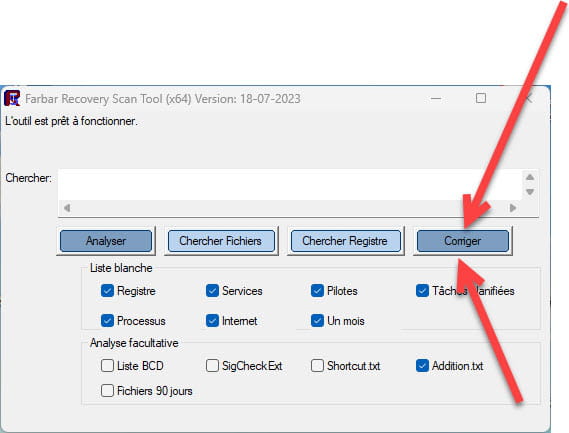

Let the fix process complete, once finished you will be asked to restart your PC, do so as soon as prompted, see below.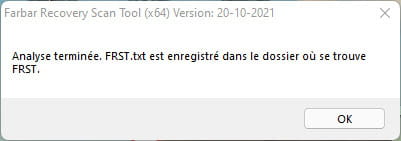

Then once your computer has restarted:
4- You will have a Fixlog file on your desktop, then send this fixlog report to https://pjjoint.malekal.com/ or https://www.catupload.com/.Then provide the generated link from https://pjjoint.malekal.com/ or https://www.catupload.com/ in your response.
5- CHECK AND TELL ME IF YOUR PROBLEM IS STILL PRESENT.
bazfile
Moderator/Security Contributor.
A hello, a response, a thank you are always appreciated.
