The desktop tab has disappeared from the File Explorer on Windows 10.

patrick bordeaux Posted messages 75 Status Membre -  
fabul Posted messages 42100 Registration date   Status Modérateur Last intervention   -

Hello everyone

Is there an easy way to restore this tab in the browser? I found out how to do it... but it's for pros.

Do you have a solution?

3 réponses

fabul Posted messages 42100 Registration date   Status Modérateur Last intervention   6 035
 

Hello,

This question is not clear enough, "The Desktop tab," in Quick Access?

The desktop for Windows is located at
C:\Users\UserName\Desktop

1
patrick-bordeaux
 

Sorry..

Yes ...in my explorer..quick access..there was "desktop "...that has disappeared.

Apparently it's common...following an update..

0
fabul Posted messages 42100 Registration date   Status Modérateur Last intervention   6 035
 

ReHello,

If you go to the location C:\Users\YourName\

And right-click on Desktop, do you see "Add to Quick Access"?

0
patrick bordeaux Posted messages 75 Status Membre 1
 

Hello

Sorry... but it's not working.

Already.. on the access path.. C... Users...

my name is not listed there.

I did run a search for C...

the "Desktop" found are not working

0
fabul Posted messages 42100 Registration date   Status Modérateur Last intervention   6 035 > patrick bordeaux Posted messages 75 Status Membre
 

What is the name of your session if it's not your name (for example),

In your personal folder, I mean.

In the right-click menu, is there no "pin" or something like that?

These are things that I remove on mine.

(The quick access, and the Pin to... menu)

0
brucine Posted messages 24411 Registration date   Status Membre Last intervention   4 105 > fabul Posted messages 42100 Registration date   Status Modérateur Last intervention  
 

Hello,

The system files are probably hidden, which explains why we can't see them.

https://www.pcastuces.com/pratique/astuces/4563.htm

After that, just explore in This PC, C:, Users, MyName, and pin:
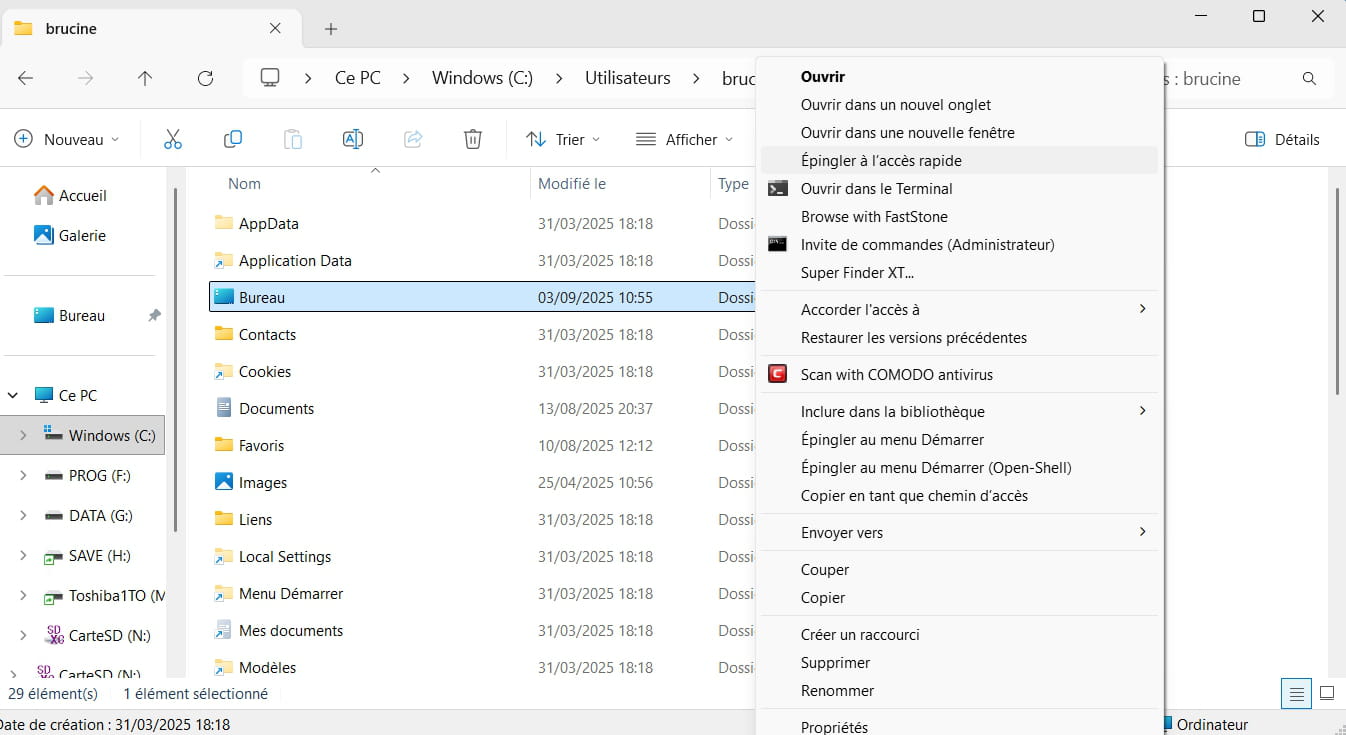


0
patrick bordeaux Posted messages 75 Status Membre 1 > fabul Posted messages 42100 Registration date   Status Modérateur Last intervention  
 

I found what seems to correspond to my desk under the name Desktop..

Which I put in quick access...

I couldn't rename it..

I hope I didn't do something stupid..?

0
fabul Posted messages 42100 Registration date   Status Modérateur Last intervention   6 035 > patrick bordeaux Posted messages 75 Status Membre
 

Right-click on the Start button, and in Terminal (Admin), enter this command

attrib +s +r "%userprofile%\desktop"

0