
Problème Ubuntu "Aucun périphérique amorçable"
SolvedKori-Kori Posted messages 2404 Registration date Status Member Last intervention -
Hello, while cleaning my various USB sticks on my Ubuntu session and deleting what was on them, I accidentally crashed my Ubuntu operating system.
When restarting my computer, there’s a notification that says “No Bootable Device”.
I don’t really know much about computers.
I have an Acer Aspire 5 i5 128GB SSD bought 5 years ago, based on Windows 10. I installed Ubuntu 18.04 in 2023 in a single session (no dual boot), and since then I haven’t had any particular problems except for the old version of Ubuntu needing to change.
I simply tried to reinstall Ubuntu with a 3.0 USB stick, the latest downloadable version Noble Numbat 24.03.3.
Using Rufus… but the computer doesn’t detect the USB stick, so I tried to go into the BIOS to change the “priority order” so that the computer boots directly from the USB stick, but I can’t change anything… in the BIOS, there’s “Boot mode:” UEFI” and that’s all… I can’t change anything.
There’s “secure boot” enabled or disabled (it doesn’t change anything).
While browsing the forums (including similar topics here), I have some leads but I don’t understand everything, repair GRUB, reinstall GParted… from Windows or the terminal but I have no access to the Ubuntu terminal or Windows (which I no longer have) since the OS won’t boot… or installing Ubuntu in EFI, I would need an EFI version since my boot mode is UEFI… again, I don’t understand, I didn’t have to worry about this before.
Not being able to access the terminal, change the priority order in the BIOS, or reinstall Ubuntu via a USB stick that isn’t detected, I don’t see what I can do…
Can someone guide me?
5 answers
-
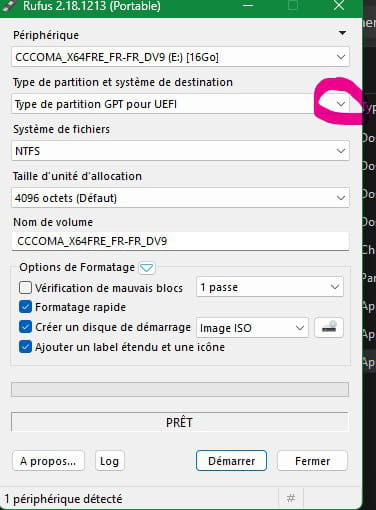
Good evening, let's check if the installation key has also been properly prepared, as bazfile points out (always good advice) in MBR OR GPT.
Rufus offers:
-
Hello.
A UEFI BIOS can only boot from a GPT hard drive; if your hard drive is in MBR format, it's normal that it doesn't work.
bazfile
Moderator/Security Contributor.
A hello, an answer, a thank you are always appreciated. -
Thank you for the response, I don't see how I could have switched from MBR to GPT (probably by messing around with USB drives ..)
But how can I get back to a normal MBR partition without UEFI since I don't have access to the terminal or can't restart in admin command prompt (recommended to switch from one to the other)?
I've also been told to reboot an Ubuntu version from a USB drive without using Rufus?
-
Thank you for the reply, I don't see how I could have switched from MBR to GPT
I didn't say that, I said that IF your disk is in MBR it cannot be booted via a UEFI mode BIOS, for it to boot the BIOS must be in LEGACY mode.
It’s up to you to check if your disk is in MBR or GPT OR to set the BIOS to Legacy mode.
-
-
Okay thank you, I don't see any info on whether I'm in GPT or MBR or legacy mode, I have an Acer Aspire 5 and I've never had to look into this information before, I only have access to the BIOS and can't change anything in boot nor access CSM
-
Thank you both, I didn’t realize since the term MFR never stood out to me, but it was simply a bad selection of MfR instead of GPT in Rufus when I prepared the key... you were right, I was able to reboot easily with the new version, thank you.

