
Photoshop Elements 10.
brucine Posted messages 25337 Registration date Status Member Last intervention -
Good evening,
I bought myself a new PC this morning.
I started reinstalling all my programs, the only hitch is with Photoshop Elements 10.
How can I retrieve this old version from my PC to install it on my new one?
Thank you in advance.
4 answers
-
Good evening,
for that you need the serial number of the previous version and to follow this Adobe tutorial.
-
Hello and thank you.
Where can I find my serial number?I managed to turn on my old PC that has bugs, but when I'm in Adobe Photoshop 10, I can't find where to locate this number?
When I go to "help" to register the product, I try to log in to my Adobe account, but there's always a network error message that pops up.
-
-
For your information, I found a backup key for the software.
I have the impression that it is no longer compatible with Windows 11.During the installation, I get these 2 error messages that appear.
If I restart my PC, I have to do a full restore of Windows, as the PC has crashed completely...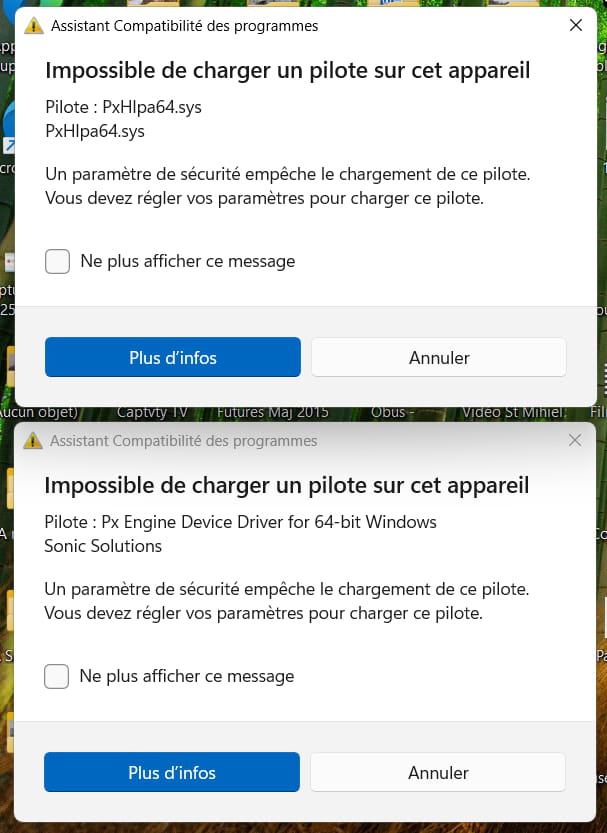
-
Hello,
It seems that it is not the software in general that is incompatible, but this particular driver that just needs to be removed.
https://community.adobe.com/t5/photoshop-elements-discussions/is-photoshop-elements-10-compatible-on-windows-11/td-p/13542346?profile_language=fr
We don’t know to what extent this moves things forward, starting with knowing whether the software in question is eligible for the procedure mentioned in <1>.
Even if this is the case, it must be uninstalled from the old PC and the serial number retrieved, which will be more or less complicated depending on where it was purchased.
If it was purchased directly from Adobe, no problem by logging into the account; if it's from a boxed reseller, no problem there either; however, if it’s an electronic license, we might have a hard time retrieving it from the reseller or sometimes even if we find it for reuse (some "lifetime" licenses are only valid for the support ones and are not reinstallable).
https://helpx.adobe.com/fr/photoshop-elements/kb/find-serial-number-elements.html
-
Thank you.
I just got back from vacation.I can't find "pxhlpa64.sys".
Will this appear during the software installation? Because for now, I don't have anything like that... the same when using PowerShell.
I prefer to have all the elements before reinstalling the software for the umpteenth time and having to format the PC if it doesn't work.
-
-
Hello,
Not sure that the system files are not hidden.
Show and restart.
https://www.pcastuces.com/pratique/astuces/4563.htm -
Incidentally, a number of utilities, Autoruns among others, visually show everything that starts on the PC.
Run as administrator, uncheck the box next to the guilty driver in the Drivers section.
https://learn.microsoft.com/fr-fr/sysinternals/downloads/autoruns
-
-
Re Good evening,
Open an administrator terminal and:
Get-WmiObject Win32_PnPSignedDriver | Format-List
then:
CTRL + Alt + F search for all sys points .sys
Start menu search for sigverif if installed start it once the scan is finished advanced and display the log also search here.
The search will be quick but since it is not compatible with W11 they may have simply not installed it.
PS:
depending on the power of your PC nothing prevents you from installing an earlier version of Windows in a virtual machine and continuing to use Photoshop.
-
Good evening,
This does not answer the question.
In the link I provided in <4>, one of the authors reports that it is under Program Files but that he upgraded from Windows 10 to Windows 11, in other words, the famous driver was already there under Windows 10.
If, due to its presence in the installation routine, it crashes the compatibility assistant, it is indeed likely not to be installed, and we still have it on our backs unless we can recompile the installer to remove it, take the step mentioned (install Windows 10 and the software with it, remove the driver and upgrade to Windows 11), use a more recent version of the software, or indeed why not install it in a Windows 10 virtual machine, which does not require overwhelming RAM (16 GB is enough) but takes up disk space and is not very convenient, if only to export your work from the virtual machine to Windows 11 via "network sharing" where, since the software is not installed, some extensions may not be read and usable.Other sources report that if the famous driver does not install, it is because it is not compatible with the security requirements of Windows 11 drivers, which the screenshots in <3> may suggest.
The publishers of older software (and not only those) do not always rewrite the drivers in question to comply with these requirements, especially since this certification by Microsoft, which places them on a suitable list, comes at a cost.
One can then try to see if in Security Center, Device Security, Core Isolation, disabling memory integrity resolves the issue.
This security feature is a Windows patch that would not be necessary if Windows were coded correctly and is meant to protect against somewhat outdated rootkits. Moreover, it is not mandatory to download potentially malicious code; the average person's PC runs perfectly well without it, and abstaining can certainly be a necessary step, not only in the somewhat caricatural cases here (a DVD driver that is no longer useful) but for somewhat older hardware (for example, a printer) whose drivers may not comply with this security.
However, the "normal" behavior in this scenario is that the installation of a single problematic driver proceeds correctly while alerting in the security center and consequently disabling the entire core isolation.
-
Hello,
What supports what is said in <11> and <12> is that it is not installed because it prohibits the installation.
The solutions would therefore either be to remove Windows 11, reinstall Windows 10, install the software, remove the problematic driver, and then migrate to Windows 11 as mentioned above, or try the installation under Windows 11 by disabling memory integrity check.Hello,
I came to deactivate the kernel for testing purposes... Windows started up normally but when I wanted to reactivate it, I found myself unable to.
This is due to a leftover driver in the registry, just renaming it and reactivating the kernel.
You can try to deactivate it, install Photoshop Elements. If everything goes well, then we can just provide him with 2 .reg files that will rename this driver before and after each activation or deactivation of the kernel. Unless he wants to leave it deactivated.
If the installation goes smoothly....
-
-
It's all complicated for a computer novice like me.
What if I simply copied my software folder from the old PC to the new one, is there a chance that it would work?
-
No, there is no omelette without breaking eggs.
If we don't want to mess around (and without any certainty of the result), we either have to break the piggy bank for a newer version of Photoshop, or assume that an older version won't necessarily be up to date and that a number of free software (Xnview, Gimp...) can probably provide the desired services.
-
