
VLC playback failure with subtitles

Skippyskip Posted messages 11 Status Member -
Hello,
I can play .ts (like France TV replay) or .mkv videos without any problems with my VLC player, but as soon as I try to add the corresponding .srt file, VLC spins idly for a few seconds (black screen with the VLC logo and an orange stripe crossing the progress bar below, then the play/pause button switches back to "start playback") or VLC keeps spinning continuously without displaying anything, and I can't play a video with an added subtitle while the video works fine as soon as I remove the .srt file.
Playback of the same video files and associated subtitles works perfectly on the Windows player, but I don't like the Windows player....
I can't find a solution; I uninstalled and reinstalled VLC with no results, and I have the same issue on my desktop computer (W11 64 bit with AMD Radeon graphics card) and on my laptop (W10 64 bit).
Can you help me? Thank you very much in advance.
14 answers
-
Hello,
This is a known limitation of VLC
see here https://forum.videolan.org/viewtopic.php?p=321530#p321530But there is a solution described here:
https://jhaxce.medium.com/play-ts-files-with-subtitles-on-vlc-a-guide-to-fixing-common-issues-9ec6b5560dfeIn French:
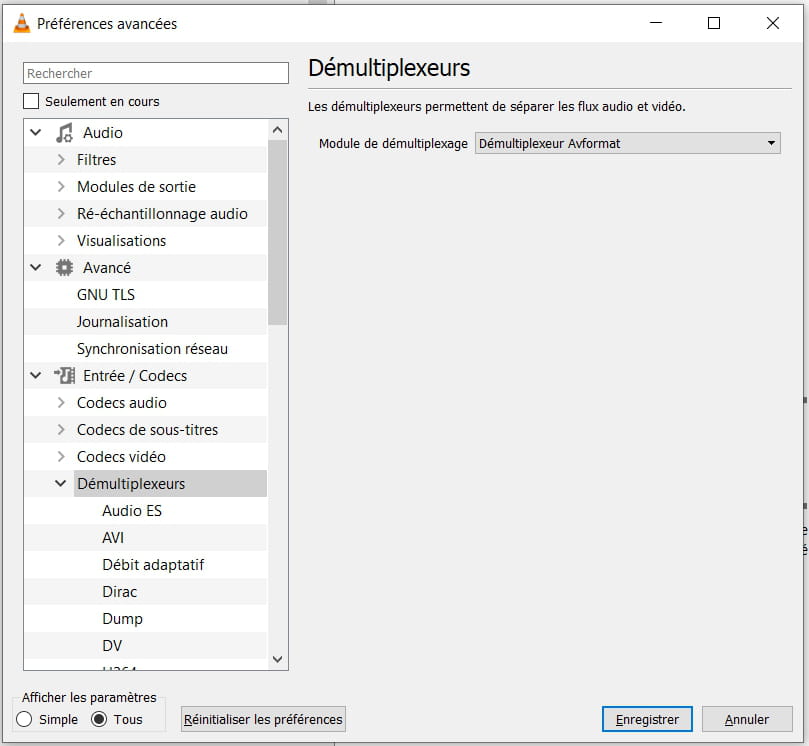
Menu / Tools / Preferences
select at the bottom of the window:
Show settings All (instead of Simple)
Then:
Input/Codecs
Demultiplexers
Demultiplexer: Avformat
Correlation of games and international strategies:
The Chinese play Go, the Russians play chess, the Americans play poker, and the Europeans play tic-tac-toe. -
jeannets Posted messages 28454 Registration date Status Contributor Last intervention Ambassador 6 618
Hello,
I found a player that works for these cases.
SMplayer https://www.smplayer.info/fr/download-windows
It works on Linux and Windows, it subtitles without a hitch... and automatically if the SRT file is in the same folder.
You can also remove it from the menus or the context menu.
Hoping to bring some water to the mill..!!
Have a great weekend
-
jeannets Posted messages 28454 Registration date Status Contributor Last intervention Ambassador 6 618
Hello,
Where and how is the SRT file added..? Where does this SRT file come from..?
Is this subtitling also from videos coming from FranceTV..?
It is likely that these "Replay" videos already have the subtitling..
What is the version of VLC..?
A view of MediaInfos (text format) would be welcome.
-
Hello,
thank you for your response, I will try to clarify:
My VLC was uninstalled and reinstalled yesterday, so the latest version from the official site for Windows 11 64 bits: version 3.0.21 Vetinari, default settings, I deleted all my preferences during the reinstallation to ensure that the problem did not come from there.
The ts and srt files come from France TV via Captvty (v2.10.8.2) with subtitle download when they are available (the software retrieves the srt and vtt files at the same time as the video with the same name.
I cannot play the video unless I move the subtitle files to another directory or change the name so that VLC does not load it with the video.
If the subtitles are in the same directory, the video fails to launch and I have no information in media info.If the srt file is not added, the VLC subtitle option does not detect any subtitles to display in the ts file which works normally, and if I click on add a subtitle file my already launched video will not play anymore, but I have media info here is what is displayed for my test:
Stream 0
Original ID: 34,
Codec: ADTS,
Type: audio,
Channels: Stereo,
Sample rate: 48000 Hz,
Bits per sample: 32Stream 1:
Original ID: 33,
Codec: H264 - mpeg-4 AVC (part 10) (h264),
Type: video,
Video resolution: 640x360
Buffer size: 640x368
Frame rate: 25,
Decoded format:
Orientation: Top-left
Chroma location: LeftStream 2
Codec: Text subtitles with various tags (subt)
Language: 2\videos\Les enquêtes du commissaire Van Der Valk - Season 3 episode 1 - Liberté à Amsterdam_France 3_2025_01_05_21_05
Type: Subtitles(I removed the "n" from "saison" in the subtitle file name to be able to add the subtitles manually and get the media info because if I open the video without renaming the subtitles, the media info is empty).
If I just launch the ts file without subtitles, I get the same thing without stream 2.
I hope this answers your requests, thank you for your help.
-
jeannets Posted messages 28454 Registration date Status Contributor Last intervention Ambassador 6 618
Hello,
I downloaded the same replay on both Windows 7 and Windows 10... with different versions of Captvty... including version 3, and I'm getting the same result.
The video alone, without subtitles, works... As soon as we turn on the subtitles, everything stops and VLC turns into a white screen... I have no answer to that.
I note that in Captvty 3, there is no subtitle file in the folder... and yet it still blocks.
-
Good evening,
Thank you, so the problem doesn’t come from my end. I don’t understand why it works on the Windows player and not on VLC, which is usually so effective where other players stumble. I will have to resort to using the Windows player for this purpose, hoping that a solution comes up. Thank you very much for taking the time to look into my issue and have a good evening.
-
jeannets Posted messages 28454 Registration date Status Contributor Last intervention Ambassador 6 618
Yes, I just checked with another movie, it's the same...
I also started a movie with subtitles from something else and that crashed too.
I tried with another video player (MPC-HC64)... the video starts, without the subtitles... if I look for the SRT file, it is grayed out; not recognized.
I suspect that the SRT file is not good.... there’s a mystery there..?
-
Your message made me think..
The srt file works when I run it on a video of a different format (mp4, mkv...)
On the other hand, if I use another srt file that works on a different video, it doesn't work with my ts video, so VLC cannot associate an external srt file with the ts format for a reason I don't know, while Windows Media Player succeeds.
This doesn't solve my problem, but at least I've made progress in understanding the issue, thank you.
-
jeannets Posted messages 28454 Registration date Status Contributor Last intervention Ambassador 6 618
OK, I tried the "hypothelix" setting, it works... but not without difficulty, the video suffers, it advances in successive jumps, lags... and creates artifacts...
In short, it's not ideal... maybe I should try another setting..??
In my readings yesterday, I also came across information suggesting to save the file, using the option to convert to MP4, right away...
I tried converting to MP4 and then adding subtitles in VLC, it doesn’t change anything...
Next, I need to try recording with immediate conversion to MP4...
Beyond that, I would have to go through re-encoding (with Avidemux for example)
-
In the first attempt, I also had frozen images and pixelation, but after closing and restarting VLF, my video playback was smoother. However, the video quality does seem a bit worse, to be seen in practice.
I want to avoid re-encoding all my videos and I also don't want to hardcode subtitles that aren't useful for the whole family, so I think using the demultiplexer for each use will help me, hoping that one day a VLF update will bring a more convenient solution for everyone.
I use Avidemux to re-encode my recordings made on Hauppauge WinTv while keeping 2 audio tracks, VO and VF, but I've never found out how to retrieve optional or hardcoded subtitles from my output MKV file when they are present in the original recording. So either I search for subtitles via VLSub and struggle with the synchronization during playback, or I use Captvty when the videos are available, version 3 to retrieve the multilingual video and version 2 to get the subtitles with the VF. And then I struggle to play the TS files with the SRT subtitles.
In both cases, I struggle with those darn subtitles.
Thank you for your time and your help.
-
-
Hello,
Thank you, changing the demuxer from "automatic" to "avformat" works, my ts file is played correctly with subtitles, problem solved.
One last question, can I leave avformat as a permanent setting or is there an advantage to switching back to "automatic" when I'm playing other formats or when I don't need the subtitles?
Thanks again
-
Hello,
If I understood correctly, avformat is a bit like the generic demultiplexer,
so less optimized, therefore reserved for this particular case: ts file with subtitlesAll you need to do is create a new VLC shortcut on the desktop with the target:
"C:\Program Files\VideoLAN\VLC\vlc.exe" --demux=avcodec
Correlation between games and international strategies:
The Chinese play Go, the Russians play chess, the Americans play poker, and Europeans play noughts and crosses. -
Hello,
If I understand correctly, I could have 2 versions of vlf with each having auto/avformat settings?
How do I do this? Do I just need to create a subdirectory avformat and duplicate the vlf exe file with the avformat setting in it? But the shortcut path will be different...
If I create a shortcut "C:\Program Files\VideoLAN\VLC\vlc.exe" --demux=avcodec
I get an alert that the target does not exist.
If my assumption is correct, do I just need to duplicate the vlf.exe file or should I do a second complete installation with a completely different path? I would like to avoid conflicts. Thank you.
-
No, there is nothing to install and no need to create another directory.
Only the shortcut on the desktop is duplicated.
In the original, the target does not change "C:\Program Files\VideoLAN\VLC\vlc.exe"In the copy, the target will be "C:\Program Files\VideoLAN\VLC\vlc.exe" --demux=avcodec
"C:\Program Files\VideoLAN\VLC\vlc.exe" is the default installation directory on my PC,
Make sure it is the same on your PC.Have a good evening
-
-
Good evening,
I managed to duplicate my VLC shortcut and copy your path for the target, both shortcuts work but VLC opens with the last demultiplexer chosen in the preferences, no matter which shortcut I click. I don't understand how following two different shortcuts can lead to the same exe with different settings, something is escaping me, I'm sorry, I must be missing something.
Have a good evening
-
In the preferences, set the demultiplexer back to automatic
Or more simply, at the bottom of the Preferences window, press the button
Reset preferences.
The message "--demux=avcode" is taken into account in the dynamic configuration, so VLC will use it directly and it does not appear in the Preferences window.
What appears in the Preferences window is static, which is why you need to restart VLC for it to be recognized in the dynamic configuration.
Good evening
-
-
jeannets Posted messages 28454 Registration date Status Contributor Last intervention Ambassador 6 618
Just so you know, I wanted to re-encode this video to MP4 with the subtitle file included, using AVIdemux... it works, but when it came to providing the SRT, it refused it and suggested converting it to SRA; which I accepted... the subtitling is exactly the same, except that it is integrated into the file... So..? what is the reason for this refusal..? the files being simpler, lighter, and also very widespread...
I am quite surprised and a bit disappointed..!! that VLC does not handle this feature well.


