Get rid of socialize.eu1.gigya
Solvedbazfile Posted messages 58506 Registration date Status Moderator Last intervention -
Hello,
how can I get rid of it: socialize.eu1.gigya.com/
and what should I do
thank you
3 answers
-
Hello @OiseauColore70 StatusMember.
If your popups appear at the bottom right of the screen, it's simply because these are nuisance notifications that are recorded in the concerned internet browser.
Two solutions are available to you.
- Either remove the nuisance notifications yourself, for that read this page.
- Or if you can't do it, follow these steps.
Download FRST.
Once downloaded, save it to your desktop then right-click on FRST and choose Run as administrator and you will see this:


Wait until the message the tool is ready to operate appears and then click on Analyze
Note, wait for the messages saying that the analysis is complete to appear.


At the end of the analysis, you will have two text files on your desktop, FRST and Addition.


Then send the FRST and ADDITION reports to https://www.cjoint.com/ and provide the two links generated by https://www.cjoint.com/ in your reply.
bazfile
Moderator/Security Contributor.
A hello, a response, a thank you are always appreciated. -
@OiseauColore70 StatusMember .
The Addition report is missing, well we will manage without it.
Procedure to follow in the indicated order:
1- Open FRST as administrator by right-clicking on FRST and selecting run as administrator
2 - Copy the entire script shown in the box below:Start:: CreateRestorePoint: CloseProcesses: HKU\S-1-5-21-1133680194-3109073748-1975085430-1003\...\Run: [utweb] => "C:\Users\Domy\AppData\Roaming\uTorrent Web\utweb.exe" /MINIMIZED (No file) ShortcutTarget: Send to OneNote.lnk -> C:\Program Files\Microsoft Office\root\Office16\ONENOTEM.EXE (No file) Startup: C:\ProgramData\Microsoft\Windows\Start Menu\Programs\Startup\PCReady.lnk [2022-03-17] ShortcutTarget: PCReady.lnk -> C:\ProgramData\PCR\PCReady-win32-x64\PCReady.exe (Dwayne Boumann) [Unsigned file] Task: {99407C9F-F469-4791-B5EE-554CF7A66DA5} - \OneDrive Standalone Update Task-S-1-5-21-1133680194-3109073748-1975085430-1001 -> No file Task: {FE9C8541-F266-4879-B5A5-9C2471883E14} - \Agent Activation Runtime\S-1-5-21-1133680194-3109073748-1975085430-1001 -> No file Task: {56949B5E-B98E-4AB8-A9BD-3EEC07CD3B57} - System32\Tasks\Lenovo\Vantage\Schedule\NotificationCenter => C:\Program Files (x86)\Lenovo\VantageService\3.13.72.0\ScheduleEventAction.exe NotificationCenter (No file) Task: {DF6430AC-D4F2-459C-AF60-97ED965EC26F} - System32\Tasks\Meta\Messenger-WSP-Helper-S-1-5-21-1133680194-3109073748-1975085430-1003 => MessengerHelper.exe --lassie (No file) Task: {E0F10DCF-44AD-40E8-9370-FB5DA59F93FB} - System32\Tasks\Microsoft\Windows\UpdateOrchestrator\USO_UxBroker => %systemroot%\system32\MusNotification.exe (No file) Task: {BEF668AF-0AE6-44BF-A5DA-B67117525E16} - System32\Tasks\OneDrive Reporting Task-S-1-5-21-1133680194-3109073748-1975085430-500 => %localappdata%\Microsoft\OneDrive\OneDriveStandaloneUpdater.exe /reporting (No file) Task: {21A07D95-7B70-4858-8AA0-E86F27F6FCFF} - System32\Tasks\OneDrive Standalone Update Task-S-1-5-21-1133680194-3109073748-1975085430-500 => %localappdata%\Microsoft\OneDrive\OneDriveStandaloneUpdater.exe (No file) CHR Notifications: Default -> hxxps://getshowads.com; hxxps://s.sulseerg.com; hxxps://u.sulseerg.com; hxxps://www1.notifpushnext.com S1 nordlwf; \SystemRoot\system32\DRIVERS\nordlwf.sys [X] S1 WinSetupMon; system32\DRIVERS\WinSetupMon.sys [X] EmptyTemp: End::3- Once the script is copied, click on Repair, FRST will automatically take the script from the clipboard.

Let the repair process complete, once finished you will be prompted to restart your PC, do it as soon as requested, see below.
Then once your computer has restarted:
4- You will have a Fixlog file on your desktop, then upload this fixlog report to https://www.cjoint.com/ or https://pixeldrain.com/
Then provide the link generated by https://www.cjoint.com/ or https://pixeldrain.com/ in your response.
5- CHECK AND TELL ME IF YOUR PROBLEM IS STILL PRESENT
-
@OiseauColore70 StatusMember .
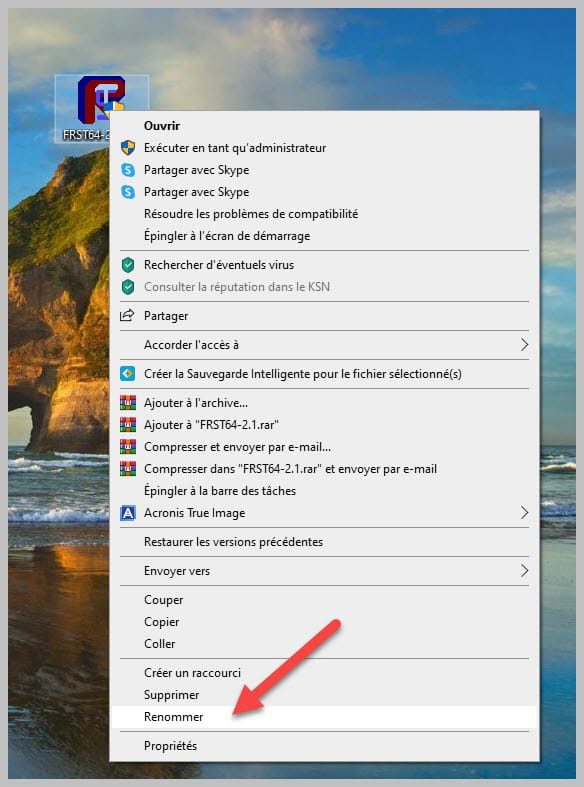
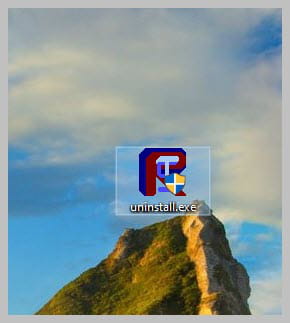
Uninstall FRST, rename the FRST file you downloaded to uninstall, then once the file is renamed, open it; the uninstallation will occur automatically upon restarting the PC.