
Microsoft Fake Support Scam at 0184131190.
SolvedCraftyfox Posted messages 395 Registration date Status Membre Last intervention -
Hello,
This morning, I was "hit" by a virus hidden in my emails (regarding France Connect).
Full alert, sound warnings, etc. I called the provided number. A technician took control of my PC. An engineer worked online for nearly 2 hours. The technician called me back and everything is good.
Can I find out if Microsoft partner; 128 rue Joubert Paris 08 exists, please?
Phone number: 0184131190
Everything seemed clear and straightforward, but since I paid €650 for:
- The troubleshooting
- Lifetime support, etc., I would like to know if there's not a scam within the scam.
At this hour (6:54 PM), everything is closed, and you’ve been such a help...
I checked my bank account: the expected amount was debited. But I can still block it...
Thank you all
21 réponses
- 1
- 2

Hello @Craftyfox StatutMembre.
But still, did "they" "work" on my PC or not?
I noticed that a lot of things work better.
Given that your PC probably had no issues, it's just pure chance or an impression, nothing more, they know nothing about computers, all they care about is your money, they don't care about your PC.
Moreover, and finally, are they entitled to demand the €650 I put a stop payment on?
No, they are entitled to nothing, they are scammers posing as a "Microsoft partner" when they have no right to do so, this scam is very well known, it's been on the internet for many years, the worst part is that it still works, see this page.
Also see this page.
Since this is a scam and not an infection, I am redirecting your post to the appropriate forum.
For your information:
You can report it to the PHAROS platform:
https://www.internet-signalement.gouv.fr/PharosS1/
https://www.internet-signalement.gouv.fr/Pharos scam.
Some advice:
When your internet browser is stuck on the scam page, here are the solutions to unblock the situation .
Also see this video.
To avoid this kind of thing install an ad blocker on your browser.
.
Hello,
I only saw the message from RED5 this morning, but I can only confirm bazfile's response.
Indeed, my PC was not infected, and I received help from CCM for the detection of a potential infection. Kudos to them.
Just a word about the financial aspects. For the lost amount, I have an official document from the police station (equivalent to a complaint), and I sent a file from my bank to a specific service for this kind of matter (paper mail). However, despite the assurances from the card companies, I don't know if I will be reimbursed. I'm waiting for a response.
In any case, my PC is working very well. However, I still see the fraudulent email from time to time in my mailboxes (Thunderbird). These manage to get past the "junk" filter; and it’s still from "France Connect"... So, vigilance is needed.
Best regards
Hello,
As for the money, if you can still dispute it with your bank in an emergency, no.
Generally, this kind of hassle ends up with the installation of a number of programs that aren’t viruses: remote control software, real or supposed cleaning utilities to justify the bill: cleaning by uninstalling.
The moral is that I never click on an attachment that I haven’t requested, even if it’s supposedly from my grandmother.
Just so you know, I called emergency services. The advisor has blocked the €650. I will therefore have a brand new card.
But, all the same, did “they” “work” on my PC or not?
I have noticed that many things are working better.
Furthermore, and finally, would they be entitled to claim the €650 that I blocked?
Thanks again
Just for your information: my account has been credited with €650... The bank is efficient.
Oh, yes, I also immediately changed my bank PIN. I will still be on my guard for a few days.
A close friend advised me to change all or part of my passwords... I might not do it for obsolete sites.
What do you think?
Thanks again.
Hello,
Just one or two more details
I have "cleanly" uninstalled AnyDesk, as well as Avast which they had stuck me with.
Furthermore, I am attaching a partial screenshot.
Since the date and time correspond to the "intervention", I wonder if I shouldn't do the same and remove them. Otherwise, what is SWSETUP?

Thanks again
Thank you, but what intrigued me are the date and the time as mentioned earlier.
If I save, is it onto a USB stick?
I ran Windows Defender: no threats.
I am currently doing a thorough scan with Multi Virus Cleaner. Nothing to report so far. So if everything is fine, can I delete Found Direct?
I have the impression that it’s primarily my money that caught their interest...
@Craftyfox StatutMembre .
In general, this type of scam does not infect the PC; I thought I had been clear about this in my previous message.
But since you seem worried, follow these steps.
Download FRST .
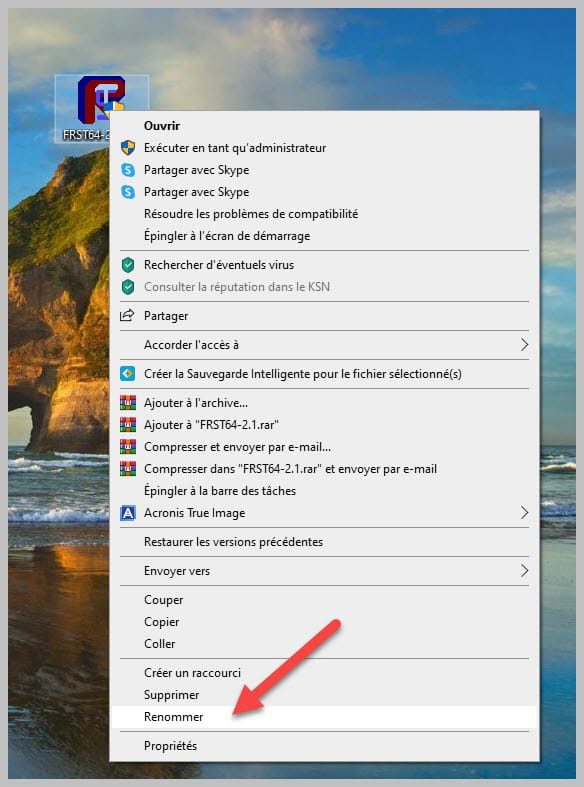
Once downloaded, save it to your desktop, then right-click on FRST and choose Run as administrator, you will see this:

Wait until the message the tool is ready to operate appears, then click on Scan
Warning, wait for the messages saying the scan is complete to appear.

At the end of the scan, you will have two text files on the desktop: FRST and Addition.

Then send the FRST and ADDITION reports to https://www.cjoint.com/ , then provide the two links generated by https://www.cjoint.com/ in your reply.
bazfile
Moderator/Security Contributor.
A hello, a reply, a thank you are always appreciated.
I see that you are still as responsive, efficient, and friendly here :))
First of all, I'm not worried, but since I use a PC as best as I can without being a computer expert, I prefer to turn to those who know.
Well, here I go...
Despite the 2 addresses copied in my previous message, I received 2 emails regarding FRST and ADDITION. Should I let it go or should I take action on one or the other of the emails?
No infection on your PC.
bazfile
Moderator/Security Contributor.
A hello, a response, a thank you are always appreciated.
Everything works very well, but I found the files a bit suspicious which I am attaching. What do you think?
Thank you in advance

No need to create a new post as it would be redundant.
As for the files that concern you:
connectwisecontrol is the software that was used to take control of your PC to install other software; this software is no longer active or present on your PC.
The folder PrivacyShield is a remnant of a software that was installed on your PC, it is just leftover, the software is no longer active, you can delete the folder PC Privacy Shield 2018 located in
C:\Users\Charles HOURI\AppData\Roaming\PC Privacy Shield 2018 As for gcapi.dll this dll is no longer active and is not linked to any processes; it is located in:
C:\Users\Public\Documents\gcapi.dll I don’t know how many times I have to tell you that your PC is not infected and that in this kind of scam it’s your money that they are interested in, not what’s on your PC.
bazfile
Moderator/Security Contributor.
A hello, a response, a thank you are always appreciated.
Thank you.
For my uninfected PC, that's fine, but I didn't know what to do with the software in the attachment. I'm a PC user, but not a professional... That's why I appreciate your presence. That being said, aside from the "slips on banana peels" like what happened to me with that scam, I'm doing quite well...
Moreover, I didn't want to create a duplicate, because I thought everything had been moved to another forum.
So I have my answers.
Thank you again.
Hello,
My mother just got exactly the same scam for 480€ only for her! :)
Microsoft partner
128 rue Joubert Paris 08
Tel: 0184131190
Etc
Everything is inconsistent in this fake invoice.
- the SIRET address 32773318400516 is fake (it's the one for Microsoft France)
- with an ugly fake logo IT support...
- the postal address is fake, not the right district.
She just filed a complaint and had the PC cleaned by a specialist.
For cleaning the PC, you should have come to the forum; it would have been free, especially since they don't infect the PC, they only install fake software that they sell at exorbitant prices, and it's enough to uninstall them. As I said earlier, it's the money that interests them, not what's on the PC; they are scammers, not hackers.
See my message 6, everything is explained there.
- 1
- 2