File PHOTO 018.exe on USB drive
Solved/Closedbazfile Posted messages 58540 Registration date Status Moderator Last intervention -
Hello,
For several months now, one of my USB drives has a file named PHOTO 018.exe. This file reappears every time we try to delete it, and since then, all the USB drives that are plugged into a PC that had this drive also have the same file.
I feel like I'm dealing with a virus, but I don't know what to do ...
I've run virus scans with Windows Defender and Avast, but neither of them detects anything.
I tried reformatting the drive, but it doesn't help; as soon as I plug it back into the computer, it comes back. I've searched online, but I haven't found anything that helps me fix this problem.
Thank you in advance.
Have a nice day,
7 answers
-
Hello.
Download FRST.
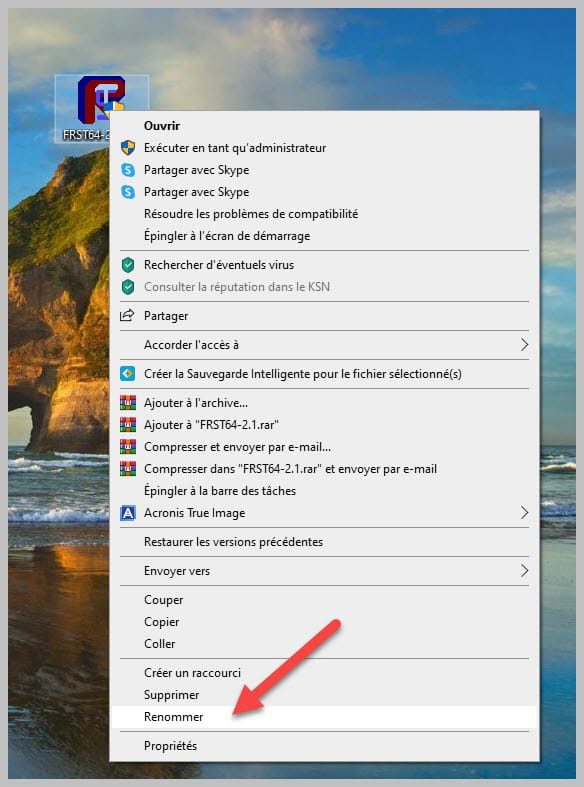
Once downloaded save it to the desktop then right-click on FRST and choose Run as administrator you will have this:

Wait for the message the tool is ready to work to appear then click Analyze
Warning, wait until the messages saying the analysis is complete appear.

At the end of the analysis you will have two text files on the desktop FRST and Addition.

Then send the FRST and ADDITION reports to https://www.cjoint.com/ then provide the two links generated by https://www.cjoint.com/ in your reply.
bazfile
Moderator/Security Contributor.
a hello, a reply, a thank you are always appreciated. -
Hello again, here are the links to the FRST reports: https://www.cjoint.com/c/NDun2mMT6yC
And ADDITION: https://www.cjoint.com/c/NDun3P4J3qC
Thank you
-
Before creating a disinfection script, I need to verify a suspicious file, which will allow me to understand the nature of the infection. Please follow these steps:
Procedure to be done in the order indicated:
1- Open FRST as an administrator; to do this, right-click on FRST and choose run as administrator
2 - Copy the entire script that is in the box below:Start:: CloseProcesses: File: C:\ProgramData\Systeme\Systeme.exe End::3- Once the script is copied, click on Fix; FRST will automatically take the script from the clipboard.

Let the correction proceed. Once it is finished, you will be asked to restart your PC; do so as soon as you are prompted, see below.
Once your computer is restarted:
4- You will have a Fixlog file on your desktop; then send this fixlog report to https://www.cjoint.com/ and then give the link generated by https://www.cjoint.com/ in your response.
bazfile
Moderator/Security Contributor.
A hello, a response, a thank you are always appreciated. -
-
Procedure to follow in the order indicated:
1- Open FRST as an administrator by right-clicking on FRST and choosing run as administrator
2 - Copy the entire script from the box below:Start:: CreateRestorePoint: CloseProcesses: HKLM\SOFTWARE\Microsoft\Windows Defender: [DisableAntiSpyware] Restriction HKLM\SOFTWARE\Microsoft\Windows Defender: [DisableAntiVirus] Restriction HKLM\SOFTWARE\Policies\Mozilla\Firefox: Restriction HKU\S-1-5-21-2166674176-2844527832-3129200145-1002\...\Run: [Poisson18] => C:\ProgramData\Systeme\Systeme.exe [742871 2012-08-02] () [Unsigned file] Task: {96683067-6267-4EEB-A4A9-CDAFDADE2A24} - \Microsoft\Windows\UNP\RunCampaignManager -> No file Task: {CCEA7D7A-63F6-45E6-BAC5-B40729A87088} - System32\Tasks\Hewlett-Packard\HP Support Assistant\WarrantyChecker_CN5641J205 => C:\Program Files (x86)\Hewlett-Packard\HP Support Framework\Resources\HPWarrantyCheck\HPWarrantyChecker.exe /ForDevice:CN5641J205 (No file) Task: {5EC45957-7974-4658-8941-4E79D2A197E6} - System32\Tasks\Hewlett-Packard\HP Support Assistant\WarrantyChecker_DeviceScan => C:\Program Files (x86)\Hewlett-Packard\HP Support Framework\Resources\HPWarrantyCheck\HPWarrantyChecker.exe /DeviceScanR6 (No file) ContextMenuHandlers5: [igfxcui] -> {3AB1675A-CCFF-11D2-8B20-00A0C93CB1F4} => -> No file Handler: sacore - {5513F07E-936B-4E52-9B00-067394E91CC5} - No file FirewallRules: [{3A99F18A-6B01-4BBD-B2B6-D4B056A9ADA6}] => (Allow) C:\Program Files\WindowsApps\SpotifyAB.SpotifyMusic_1.196.785.0_x86__zpdnekdrzrea0\Spotify.exe => No file FirewallRules: [{6CC30902-C2CA-4B7D-8E89-C07296E340FB}] => (Allow) C:\Program Files\WindowsApps\SpotifyAB.SpotifyMusic_1.196.785.0_x86__zpdnekdrzrea0\Spotify.exe => No file FirewallRules: [{B51D9B6F-A259-4C98-89A6-89C10B1D86B8}] => (Allow) C:\Program Files\WindowsApps\SpotifyAB.SpotifyMusic_1.196.785.0_x86__zpdnekdrzrea0\Spotify.exe => No file FirewallRules: [{185922E6-9DA6-4363-9D78-477062E34F2B}] => (Allow) C:\Program Files\WindowsApps\SpotifyAB.SpotifyMusic_1.196.785.0_x86__zpdnekdrzrea0\Spotify.exe => No file FirewallRules: [{CDB02841-BC2E-4E9B-8B6C-CAA109C2B117}] => (Allow) C:\Program Files\WindowsApps\SpotifyAB.SpotifyMusic_1.196.785.0_x86__zpdnekdrzrea0\Spotify.exe => No file FirewallRules: [{56CD90DA-4230-49DB-8FE2-00E756FE30AA}] => (Allow) C:\Program Files\WindowsApps\SpotifyAB.SpotifyMusic_1.196.785.0_x86__zpdnekdrzrea0\Spotify.exe => No file FirewallRules: [{F61BD601-E7D8-478B-AA7B-8CF216D8BD0C}] => (Allow) C:\Program Files\WindowsApps\SpotifyAB.SpotifyMusic_1.196.785.0_x86__zpdnekdrzrea0\Spotify.exe => No file FirewallRules: [{BEB5F3D1-4C3D-42E3-9C8D-C36C12349589}] => (Allow) C:\Program Files\WindowsApps\SpotifyAB.SpotifyMusic_1.196.785.0_x86__zpdnekdrzrea0\Spotify.exe => No file FirewallRules: [{53FDBEC7-6F40-4408-AD17-5151C0A885DF}] => (Allow) C:\Users\HP\AppData\Roaming\Zoom\bin\airhost.exe => No file FirewallRules: [{7F774775-5814-4127-9075-FBCAA79AA6A0}] => (Allow) C:\Users\HP\AppData\Roaming\Zoom\bin\airhost.exe => No file AV: Kaspersky Anti-Virus (Enabled - Up to date) {4F76F112-43EB-40E8-11D8-F7BD1853EA23} AV: Kaspersky Anti-Virus (Enabled - Up to date) {0AB30972-4BAC-7BEE-CBCA-B8F9E68797D8} AS: Kaspersky Anti-Virus (Enabled - Up to date) {B1D2E896-6D96-7460-F17A-838B9D00DD65} C:\ProgramData\Systeme End::3- Once the script is copied, click on Repair, FRST will automatically take the script from the clipboard.
Let the correction take place; once it is finished, you will be asked to restart your PC. Do it as soon as prompted, see below.Then once your computer has restarted:
4- You will have a Fixlog file on your desktop, then upload this fixlog on https://www.cjoint.com/ and provide the generated link from https://www.cjoint.com/ in your response.5- CHECK AND LET ME KNOW IF YOUR PROBLEM IS STILL PRESENT
bazfile
Moderator/Security Contributor.
A hello, a response, a thank you are always appreciated. -
Here is the new link: https://www.cjoint.com/c/NDuq2bqfrdC.
Thanks again, for now I can't be sure that the problem is still there because the photo file 018.exe sometimes reappears even when it was gone.
-
Great, thank you very much and congratulations on your skills!
I wish you a good evening and thank you for the time you spent on my issue.