
How to delete quarantine files in Defender?
fabul Posted messages 42288 Registration date Status Moderator Last intervention -
Hello
It doesn't work like it used to. For example, a recent video explains that you have to go to Security, Protection, History, then FILTER while keeping the Quarantine. Then afterwards, and this can only be done line by line by clicking on the top right, two options appear: Delete and Restore.
Well no. It shows 9 options but not those.
Where it used to be:
c programdata microsoft windows defender quarantine.
To access the rest, since it's protected, you have to use Powershell.
You arrive at the content of Quarantine, and there are 3 protected files to open in command line:
entries resourcesdata and resources
But these folders contain quarantine files, the most recent of which are 1 year old.
Do not confuse the list of quarantine files in Defender (I have a good hundred that are totally unremovable) and the location of the real files in C, which hasn't corresponded to anything for a year now.
Any idea? Uh, there's no need to consult the Internet. EVERYTHING regarding the location of the files has become false.
Another thing; I plan to buy a paid antivirus. Before Windows 10, I used to have Kaspersky, but now BitDefender is coming out on top everywhere.
What doesn't work with Defender is, for example, it deletes a whole case of attacks before their execution. Yes, but HTA-type trojans that use the mshta system file are not blocked upon arrival. Defender lets them execute and then puts them in quarantine. To solve it, you need to use FRST64.
There you go. I NEVER WANT QUARANTINE. ALWAYS DELETE.
Etc. Can modern antivirus like BitDefender be configured to NEVER put anything in quarantine? I forgot how Kaspersky worked, just like I forgot how Symantec worked 30 years ago on floppy disks.
It's not easy to answer with certainty except for experienced users. If it were easy to find on the web, I would have solved it.
So, Defender expert and paid antivirus expert????
I want to avoid spending hours on this. E
Thank you.
11 answers
-
Hello,
I'm not an expert at all. If I understood the question correctly...
Before:
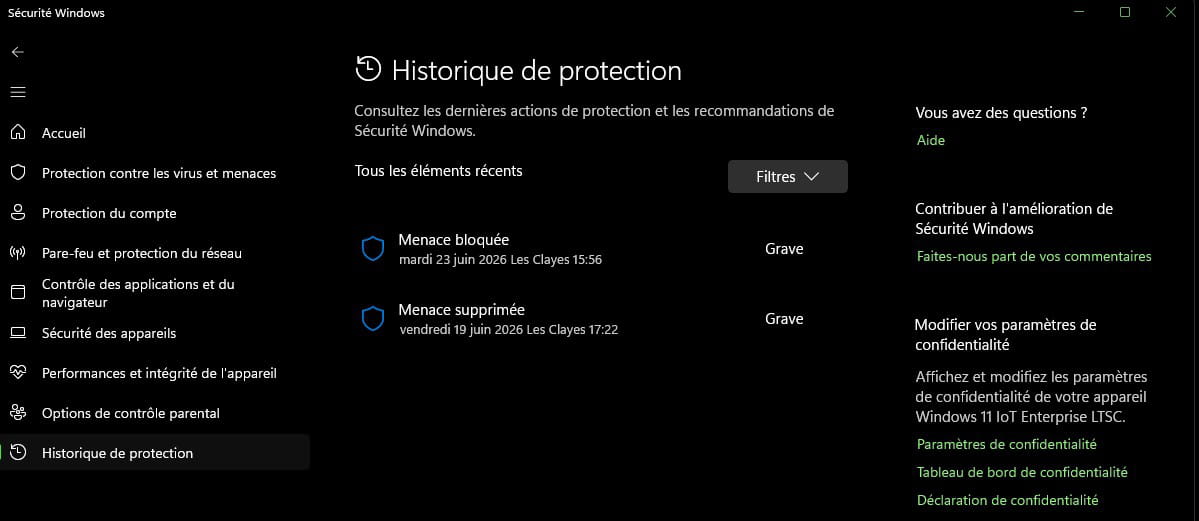
Starting in Safe Mode,
as you say: c programdata microsoft windows defender quarantine (quarantine) and Scans become accessible.
After erasing and normal startup:
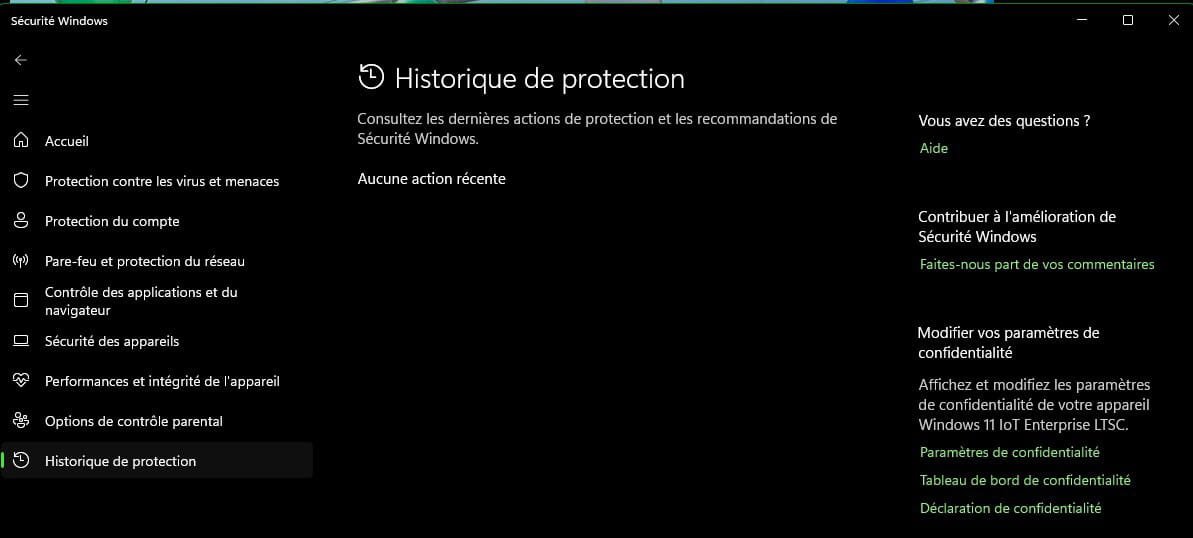
-
Hello,
Personally I don’t use Defender (Totally Disabled), but when I use it on PCs other than my own, I’m glad I can restore the “Threats” that aren’t actually threats sometimes.
It would be unwise or badly viewed for an antivirus to delete your personal files (If you’re a developer especially).
As for mshta A1RunGuard Ultimate monitors the execution of the mshta.exe file and many others, such as PowerShell, etc., and blocks certain malware by default.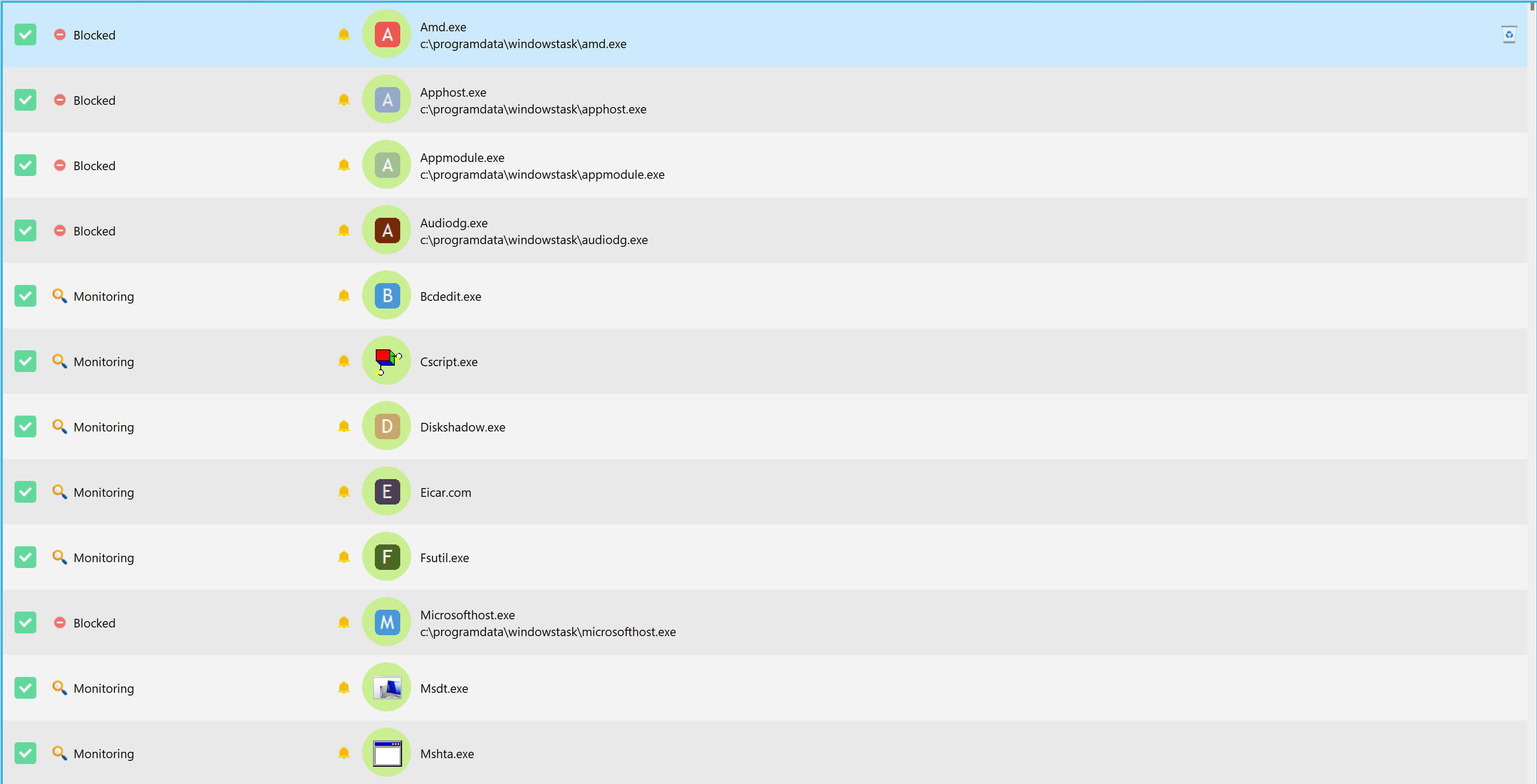
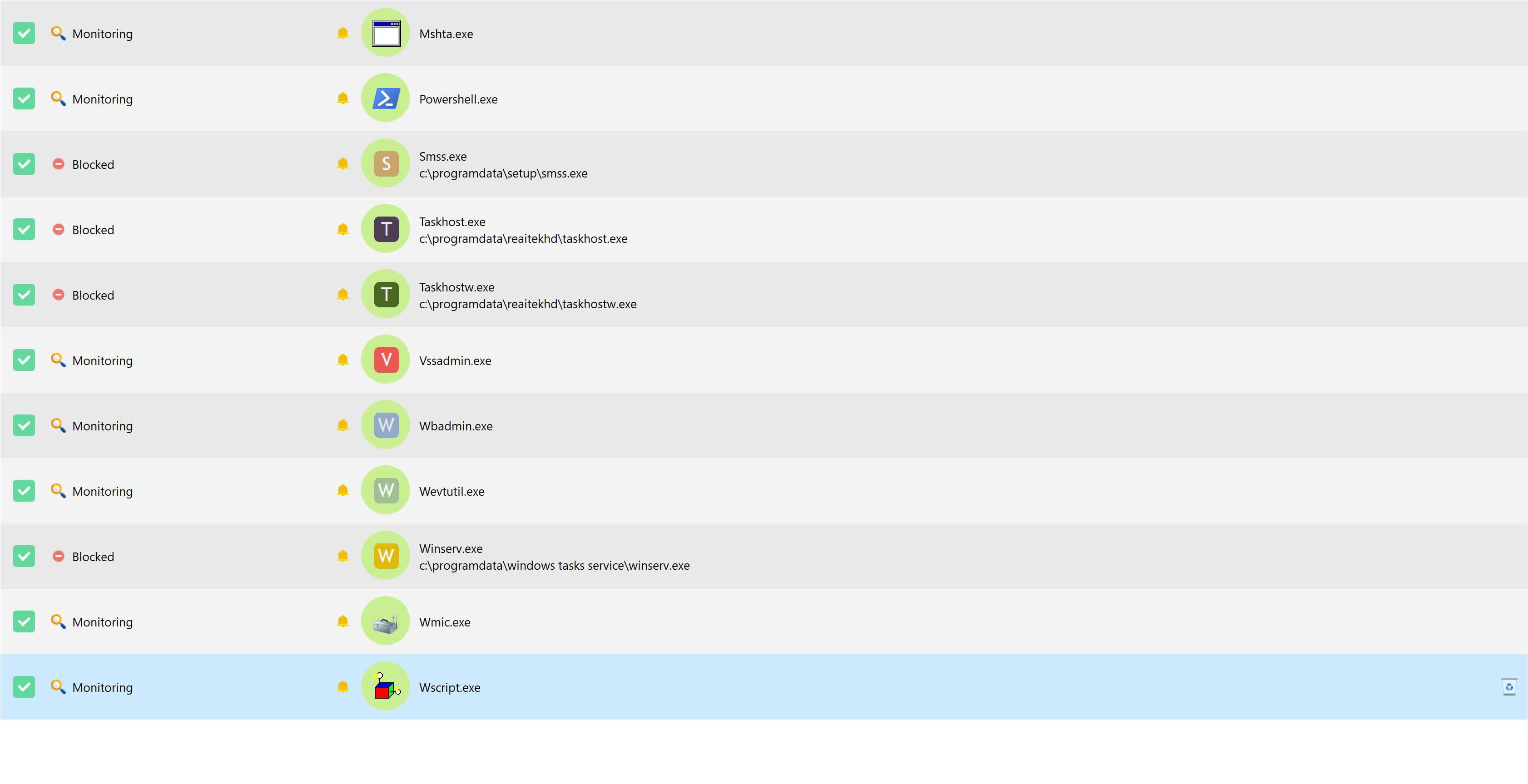
In addition to RegRun Security Suite Platinum with lifetime license for a long time, Comodo Firewall, NoScript (For Firefox), A1RunGuard was what I needed to strengthen my PC’s security.
I started by testing it in Giveaway, then I ended up buying the Ultimate version.-
Hello fabul,
For your information, threats created by me for testing purposes.
Thanks for the good tips.
Have a good afternoon.
Hello,
An antivirus is not necessarily logical or indispensable, but an antivirus without quarantine is not at all, since that would mean that suspicious files could then be executed unless the antivirus prevented them from being downloaded; they would then be neither in quarantine nor elsewhere.
It is not the antivirus's role, but that of a defense component, to prevent a program on the disk that is not signed or that would request abnormal calls to other programs from executing, and for the firewall to prevent it from communicating, of course, if the malicious executable does not start by disabling these defenses.
-
-
With a bit of a delay
There exist complete topics about these new Powershell-type viruses. Very complete and hyper well explained.
I understood why Defender lets them through and then puts them in Quarantine.
Experts say that even the best antivirus can fail and they explain how they work.
I like to know. It is constantly said in comparisons that BitDefender is the best AV available.
I signed up on the BF forum even though I am not a client (yet?). No assurance that BF can block Powershell trojans that also pass through mshta.
They are bothered about the subject.
They go through known system components that they do not modify and AVs are unable to always tell the difference between those viruses and our own uses of Powershell
In any case Defender is unable to stop them.
Furthermore the latest trojan named Malefic that I had hides itself under the name GoogleChrome in schedulers. And so in this case not in our added schedulers but in the system one.
And for example PROCMON which traces everything that happens on the PC (in one minute there can be 10,000 but in my case only 500 and seeing GoogleChrome pass by how to know that it is that).
FRST64 mandatory to generate the fix.
Well. To finish with the erasure of Defender notifications, having to boot into Safe Mode. Microsoft is sometimes stingy about certain things. It is not about erasing the files themselves but the notifications. I have 300. They are completely ravaged. Must do it without and without safe mode.
With Kaspersky that I had five years ago the history would erase in 1 click.
So be careful with Powershell trojans. Not at all certain to be detected by AVs and they have been known and catalogued for a long time
Thanks for your attention and looking forward
-
Hello, I don’t know about BitDefender, but any security software worthy of the name is capable of either completely blocking PowerShell (which isn’t necessarily a good idea) or intercepting its use and not allowing it either manually or automatically from a firewall perspective (what it communicates with and in what direction) or from a defense perspective (whether it authorizes its call to a given executable, for example mshta.exe). The role of the antivirus proper is limited to prohibiting, before other components intervene, the remote execution of a PowerShell script or of an executable calling it, or its download to disk. We can easily disable MSHTA locally, by means that for some also disable PowerShell, which isn’t some crazy idea, or simply by blocking it in the firewall and defense component, without focusing on it or imagining that it would be a unique or systematic threat. https://www.malekal.com/mshta-exe-fichier-hta-malwares/ There is no "better" antivirus than its zealous advocates; at least half a dozen are roughly comparable in terms of effectiveness, which is never 100%, and whose tests are judged by ergonomics and subjective resource consumption and not by a single antivirus, but by the synergy of the different components of security suites, making tests even more difficult since they vary by suite and, in any case, tests are conducted in vitro on a limited number of known samples.
-
-
Hello again,
Have you seen this tutorial
https://forums.commentcamarche.net/forum/affich-38206831-alors-vous-voulez-supprimer-les-virus-vous-meme-comment
If you want a more advanced version, you can try UnHackMe) which is in Giveaway for version 18.40 (Free but without updates)*
Giveaway https://softopaz.com/giveaway/greatis/unhackme/
Web Page https://greatis.com/unhackme/index.html
* Attention, the free period (Giveaway) does not last long, install it quickly or it won’t install anymore)
Or better yet, you seem a bit of a security geek like me, there is only RegRun Security Suite Platinum (which includes UnHackMe) that has served me well for more than 15 years now.
https://greatis.com/security/download.htm
Then Autoruns, which doesn’t show everything, but helps manage startups quickly.
https://learn.microsoft.com/en-us/sysinternals/downloads/autoruns
https://learn.microsoft.com/fr-fr/sysinternals/downloads/autoruns
FRST I have known for a long time, before it was another one called RSIT, and HiJackThis (Totally outdated these two last ones) FRST is up to date and about as good (Depends why) but it tires the eyes reading long reports, especially when you’re not an expert with it, looking for 12 to 14 hours...
RegRun Security Suite Platinum and UnHackMe monitor every 10 minutes (By default, configurable) (for some policies to detect Rootkits), and by default (also configurable) a quick background scan every 4 hours of PC operation, so it’s good to know how they work, a bit like RegRun Reanimator, but in semi-real time. -
Hello
Malekal is very informed on the subject. But neutralizing system components is never recommended. Powershell is indispensable because it is used more and more by installation programs.
Disabling Powershell to counter exclusively Powershell viruses and then re-enabling it if we need to install a program and then blocking it again is not a clean job.
It can be done with the Group Policy Editor (GPEdit). But I don’t see billions of people concerned about doing that.
We can also create a virtual sandbox. The infection will disappear when it is closed.
But billions of basic users will not be able to do that either.
Personally having navigated almost 20 years with zero successful attacks and two that slipped through about a week ago, I never needed that. It’s true that it has existed only since Windows 10. If I need to mention why not. No problemo as Schwarzie would say.
Statistics say that 40% of French people (I don’t know about elsewhere) are not comfortable with IT and that 15% are totally allergic.
And intelligence has nothing to do with it.
My own wife is Normalienne. Professor of French and English and even which has nothing to do with the problem the distinction of knight.
She is unable to make a bank transfer PayWebCard or add a beneficiary and even respond to a two-factor authentication.
But I am still here. Lyrical at 150%!
So using Gpedit or Sandbox is not feasible for 40% of humanity
Thank you for your attention and it’s always a pleasure this forum is pleasant and competent.
-
informé? Comme je l'ai dit et à moins que son logiciel de sécurité ne le permette pas auquel cas il faut en changer, rien n'interdit sans blocage global de bloquer globalement MSHTA (qui ne sert à rien au commun des mortels) et PowerShell sélectivement en paramétrant la composante défense pour qu'au moins elle demande lors de son ouverture pour quel site ou exécutable on doit l'autoriser ou pas, ce sera le comportement par défaut non seulement pour PowerShell mais pour tout ce qui est inconnu ou inhabituel. Il y avait par le passé même certains pare-feu qui permettaient d'autoriser la connexion de tel exécutable à tel port et pas à tel autre. C'est quand même pas tous les jours qu'un script PowerShell doit gérer une installation (chez moi si, les mises à jour de mon logiciel de sécurité passent par un script PowerShell, j'ai eu la flemme de faire ce que je préconise mais si j'avais un virus, je le saurais). Sinon et là aussi allant dans ton sens, si je sais que tel logiciel que je veux installer et en lequel j'ai confiance va me pourrir la vie avec des tonnes d'autorisations d'accès à des exécutables, pas forcément que PowerShell, je désactive la composante défense avant et je la remets après: peut-être pas propre, mais expéditif en 2 clics.
-
-
You are right
I will disable PowerShell with the group editor
Looking forward to it
-
Good evening
Yes but with GPEdit it’s super easy to reactivate
I did verify in System32 WindowsPowerShell V1 folder that PowerShell won’t start and I do get a message that the launch is prohibited.
I created in a folder "Do Not Execute" 2 lines of commands prohibiting PowerShell and mshta and I clicked on Enable
When restarting GPedit it takes 10 seconds to find the exclusion file and above there is Disable.
The good thing is that it keeps the commands and doesn’t erase anything.
We just click on enable or disable. If you use the registry then this is much longer to do.
These viruses are formidable for their difficulty to be recognized. But they are not all stealers or account hijackers.
It doesn’t take any effort to do it.
And for most common commands you can still use cmd.exe still present since 1995.
See you
-
It's as always, free, no simple solutions, and even when paying...
A1runGuard is always active, there is only the EaseUS Partition Master Pro program that, with every use or update, launches a dozen prompts (Not PowerShell in particular, but Bcdedit.exe and/or other similar things), but otherwise it's fine.-
That said, and provided we download them ourselves by trickery (remote execution still seems unlikely in case of healthy behavior), 2 simple doors opened (apart from of course requiring your computer to display file extensions):
-in file associations, open the hta extension with Notepad: in the worst case, a text file will open but by definition it cannot contain any active code.
-rename mshta.exe to whatever you want, for example Old_mshta.exe, which then cannot be launched.
If you really want to tinker elsewhere than in the security software (I am not in favor), rather than dealing with the Local Group Policy Editor, Malekal provides us the 2 reg files (enablement and disablement) on a plate and of course if that’s still too much we can incorporate both into a single Batch file that either presents a menu asking what to do, or even better reads one of the registry keys; if it matches the activated value, disable everything and vice versa.
But note that Malekal blocks MSHTA AND PowerShell, it seems healthier to remove PowerShell or to attack only hta/mshta.exe as previously.
https://telecharger.malekal.com/download/desactiver-powershell-mshta/
-
-
The important thing is that it gets done.
Downloading scripts to modify the registry (and of course the other scripts to put things back in place) is useful for those who don’t have registry experience.
It’s like fans of automatic or manual transmissions.
Personally, among these possibilities I chose GPEdit because it’s much simpler then to disable or reactivate.
While reading our dear moderator I checked what A1runguard is. It’s an antivirus. Normal that it’s paid but is it more effective than BitDefender or Kaspersky etc etc I don’t know.
For example Malwarebytes I use it twice a year for adware. It never finds anything. But it’s also a paid antivirus. The same price as, for example, BitDefender.
There are about thirty anti-something tools. But some are specialized.
The anti-rootkits, the anti-adware, security suites, anti-ransomware etc.
For an individual that’s far too much. For a company the IT engineers or experts know … should … but not always
How to protect against someone who sticks their password on the screen? Yes, it exists.
And the vast number of people who use 12345678 and so on and even as a password the word password. The list of nonsense passwords is well stocked.
The Louvre Museum used the password Louvre. I’m not telling a joke.
And the accountant of a large company who transfers 1 million euros to an account because his boss asked him in a video. AI are formidable actors.
The maximum danger for big and small companies is their employees.
For an individual or a craftsman or a very small one the best solution is GPEDIT. This software allows only what each workstation ABSOLUTELY NEEDS to work. It can block Google and watching videos and even block searches and the use of the Run command.
For teenagers there isn’t, alas, Android software that is extremely well hidden and forbids children from going on social networks and watching videos but only to communicate with daddy’s phone.
I have many artisan friends who know nothing about this.
As a private person all alone to avoid breaking my back I disable as much as I can that is useless. Like I uninstall almost all pre-installed Windows software. Including with specialized tools. Same for Android.
B de M .... 20 years with zero trouble and bam in 8 days 2 HTA Trojans that really pissed me off.
Good luck.
In fact it’s an antivirus.
-
How to protect yourself from a guy who displays his password on his screen? Yes, it exists.
So we go through the Firewall (Comodo firewall in Custom mode that I use) with Alert frequency level: Very High
By the MD5 of the file in my saved archives:
1EAA9D2233908E517D4F51D94292ACB9
https://cdn.download.comodo.com/cis/download/installs/1000/standalone/cispremium_only_installer.exe
All the rest of the Comodo suite is disabled, HIPS etc, to lighten PC operation, and to be less disturbed.
Then to complement the security suite, of course the NoScript module on your Browser, whether Chrome, Edge, or Firefox.
You just allow the trusted scripts :)
You block (by default) the unnecessary scripts (:
You need to allow Google, CCM etc, but once that's done you don't need to redo it.
It’s an excellent secure browsing solution for almost 20 years. -
We learn something new every day.
It is true that as a pro helper (even if you’re not paid) you must stay up to date in a much more important way than a typical user. I’m almost certain you use W Insider. To stay ahead of what’s coming out.
Personally, in my Windows experiences I always waited a year before installing the next version. After a format, of course.
I have never had issues with peripheral rejections because I never bought the slightest hardware for which a version wasn’t already on the market for at least 5 years.
The word innovative doesn’t exist for me. I hate breakdowns and trouble.
As a helper you have to be innovative of course. .
Good night.-
No, at the moment, I’ve been blocking updates for a while with StopUpdates10, because Explorer Patcher, which simplifies my Windows interface, is causing problems by updating Windows. I’m waiting for updates from Explorer Patchy, unless I uninstall it for the new look (or options) of Windows 11 from the latest updates.
Good night.
@+
-

