
Why won't Google Chrome open in 2024?
pistouri Posted messages 19010 Registration date Status Contributor Last intervention -
Hello
I can no longer open Google Chrome on Windows 11.
I don't understand, it was working fine until now.
It shows up in the taskbar below, but when I click it, it doesn't open.
Avast tried to open a page and it appears at the bottom, but when I click on it, still nothing happens and it doesn't open.
Any answers to this problem?
I uninstalled and reinstalled Google Chrome.
I have already turned off and restarted the PC.
I created an exception in Avast for Google Chrome.
Thank you.

3 answers
-
Hello,
Reset Google Chrome with this -->> ResetBrowser <<--
If the problem persists:
Download and install --> Revo UninstallerRun Revo Uninstaller as administrator
Uninstall Google Chrome
Follow the tutorial carefully to uninstall everything properly including residual folders and keys.
For the residual scan, check --> advanced mode.
Restart the PC.To remove Chrome residues in your profile, you need to make a change to show hidden folders:
Press Windows + R
Type --> control panel and OKFile Explorer Options
View tab
Check --> show hidden files, folders, and drives
Apply and OK.
Go delete the Google folder in these 2 directories:
Press Windows + E
--> C:\users\your username\AppData\Local
--> C:\Program Files
Delete the Google Chrome shortcuts on the desktop.
Reinstall --> Google Chrome -
pistouri Posted messages 19010 Registration date Status Contributor Last intervention Ambassador 8 732
Hello,
I had the same problem under W11.
No need to uninstall Google Chrome.
I eventually found the culprit; I must have looked too quickly because, crucially, I had to delete the Google folder.
This PC -► Local Disk C-► Program Files (x86)-►Google Right-click on Google --►Delete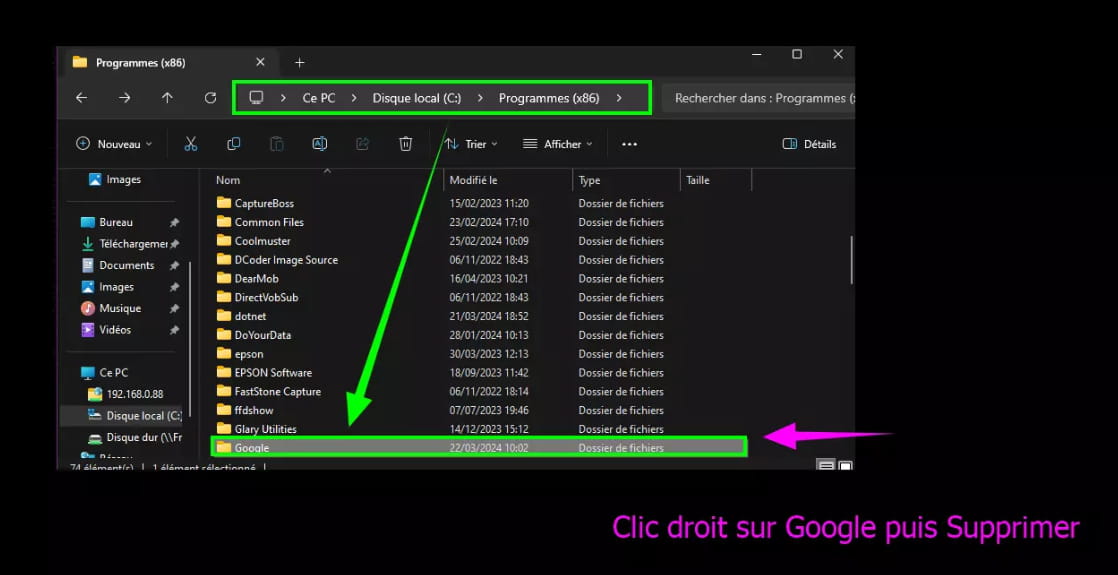

And I started the installation of the setup Google Chrome, which this time installed without any problem (note that all favorites, extensions, and settings were not deleted despite this thorough cleanup during the uninstallation of Chrome).

Same on this CCM post =► Unable to open Google Chrome
-
pistouri Posted messages 19010 Registration date Status Contributor Last intervention Ambassador 8 732
Hello,
I don't know what's going on with the latest W11 update or the latest Google Chrome update, but it's unfixable for some; Chrome no longer opens!!!
For a few days now, I have been unable to update Google Chrome (from the browser's settings). I decided to uninstall Google Chrome (through the control panel) to reinstall it. I uninstalled it, then downloaded the .exe from the Google Chrome website. When I try to launch the installer, it starts, asks for installation permission, then begins the process for a few moments (about 1/2 second) before closing for no reason. I've already tried re-downloading the installation file, disabling Windows Defender, or downloading the "offline" file on my PC and trying to install with that file, but none of these solutions worked. I'm looking for a solution if anyone has one.It seems that uninstalling and reinstalling Google Chrome doesn't help.
Even with the advanced options removal (registry keys for example) of certain uninstallers that used to solve this kind of problem.
It works if only the ''Google'' folder is deleted from its directory, which I successfully did (took about 1 minute).
Keep this in mind if it might help.
I would be very curious to know what Microsoft proposes to fix this. (To be continued).
3 posts on CCM, 1 on the Microsoft Forum at this time.
And undoubtedly on other forums...
That's a lot in such a short time!
I'm looking for a solution if anyone has one.:-)

