
Bios GPU inconnu
Hello, I'm trying to fix my mistake but I'm not getting anywhere.
I wanted to connect an old graphics card (GeForce GT 630) in addition to my main one (RX6700 XT), but since then, I can't get any display from my main card. It doesn't show anything at all.
I disabled the GT 630 card, drivers are up to date, and the AMD installation software tells me that the hardware is not compatible, even though it was working reasonably well before.
If anyone has an idea, I'm all ears.

21 answers
-
Contributor
Hello
You need to uninstall the driver for the GT630 and physically remove the card from the PC.
Signature
Wait for other responses; I attract trolls.... -
I obviously did it, but no, it's not working.
-
Contributor
If you can't even access the BIOS, it's either because the card is poorly seated, not connected, or damaged....
Since you have two PCI Express slots, try the second one.
Signature
Waiting for other responses; I attract trolls.... -
How could you get the information displayed by GPU-Z? Is the screen connected to the GeForce GT 630 or the RX 6700 XT?
-
It's the 630 that provides the image
When I unplug it, nothing shows up with just the 6700
The 6700 also turns the fans and heats up if I leave it on
tried changing the slot
-
slot change no more
-
Contributor
Okay, at this stage we need to try the 6700 in another PC to see if it hasn't flashed.
Signature
Waiting for more responses; I'm attracting trolls.... -
What's surprising is that the card is recognized by GPU-Z. One could conclude that it is properly installed. What power supply (brand and model) do you have? You can go to Device Manager, expand Display adapters, and post a screenshot.
-
I was also surprised to see these values equal to 0, but I'm not used to using GPU-Z. I wondered if it was normal.
-
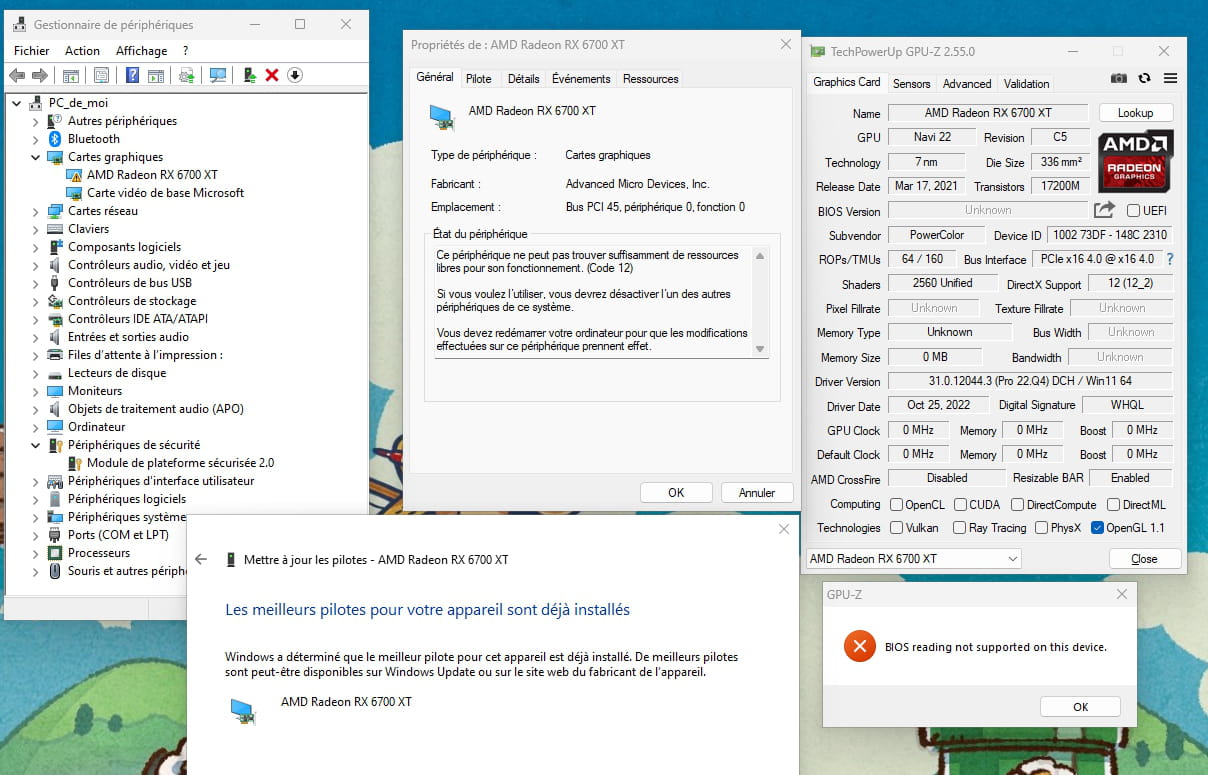
-
I don't understand how to fit a second card when I already managed to fit the main one.
It hasn't even been a year.
-
I uninstalled the drivers and everything for the 630, so it disappeared from the manager to make way for the basic card, but it is indeed the 630 that is displaying the screen.
-
Contributor
It is not broken; it's an IRQ problem, related to interrupt requests.
You really need to remove the gt630, and if it still doesn't work, you can perform a system restore to a date prior to the installation of the 630, or you can reinstall Windows; that will work just as well.
Signature
Awaiting other responses; I'm attracting trolls.... -
We clearly see your RX 6700 XT in the Device Manager with a reported driver issue (yellow triangle with an !). However, if it doesn't display, it will be impossible to reinstall its drivers. Your GT630 is still present, but it no longer has a driver, which is why it is recognized as Microsoft Basic Video Adapter.
PS: You didn't answer the question about your power supply that I asked you.
-
puissance système 9 cm 700w
-
Contributor
Alright, let's try to start over:
What is the brand and model of your motherboard?
Put the 6700XT back as it was before, in the same PCIexpress slot if you moved it, properly connected to the power supply, etc. Without the 630 of course.
The goal is to access the BIOS only, result?:
Signature
Waiting for other responses; I'm attracting trolls.... -
nothing at all the image is not coming
it's a msi b550 gaming gen 3
-
yeah with the power supply properly connected and everything
-
Hello,
You need to flash the vbios of your 6700XT, I think it's this one
it matches the info displayed on your screen
Download AMDVBFlash (there are tutorials on how to flash using the GUI or command line)
If it works, great
If not, it's either that you did it wrong or unfortunately your 6700XT is dead.
Good luck -
I am in the same situation with almost the same configuration but I can't flash my graphics card because it says "cannot find discrete ATI video card" or "adapter not found"


- 1
- 2