My PC can't find the Wi-Fi connection.
Solved
brupala Posted messages 111189 Registration date Status Member Last intervention -
Hello,
I just changed my service provider, and now my PC isn't showing the new wifi access point (freebox) even though I can detect it on my phone, my tablet...
Everything worked perfectly before they changed the box, and at Free (the new provider), I can't find anyone to guide me on the issue... :-(
Is there anyone among you who could shed some light on this for me, please??
I'm not skilled enough to handle this on my own.
Thank you very much
- No Wi-Fi on my PC, it doesn't detect Wi-Fi.
- My computer can't find my Wi-Fi. What should I do?
- I can't connect to the 5GHz Wi-Fi on my laptop.
- My PC doesn't detect the hotspot on my iPhone 12 Mini.
- Enki Connect box cannot find my Wi-Fi network.
- My computer isn't detecting the Wi-Fi from the new SFR fiber box.
20 answers
-
jeannets Posted messages 28451 Registration date Status Contributor Last intervention Ambassador 6 616
Hello,
The age or model of the PC could play a role..?? and here, we know nothing.
The frequency used for Wi-Fi (2.4 or 5 GHz) may not be supported by the PC...
So you need to be sure of the frequency emitted by the BOX...
What is the model of this "FreeBox"..? Normally, it should be "Dual Band", so it handles both frequencies simultaneously...
This kind of problem is common when changing ISPs..
Does it work if you connect your PC to your BOX with an Ethernet cable..?
-
Good evening...
Oops... I'm already a bit lost... lol
The PC isn't brand new, it's an HP running Windows 10, but it seemed to work very well with the SFR Powerbox fiber.
Now I've switched to the Freebox Pop.
There was a time when we had access to the Freebox settings on the interface, but now, apparently, it suggests we download an app on the phone to control the box... :-/
As I recall, someone helped me with certain settings, but now...!?? Mystery
I'm not very tech-savvy with the internet :-/
Thank you
-
-
-
Hello,
if you can't move your PC to connect it via ethernet to the box, try installing the Freebox app on your smartphone or tablet,
the idea would be to configure different SSID network names on the two wifi networks, 2.4 and 5 GHz of the box, if your PC has a too old network card, it may get mixed up with both if they have the same name.
And there you go, there it is ....
But good grief, the line spacing is such a hassle!!-
Thanks for the reply...
Hospital appointment this morning, but I'll try to look at this this afternoon...
But I'm not sure I'll manage on my own... :-(
The last time I was at Free, we did change the network name, but a technician from there helped me... :-/
It's still unusual to have equipment installed and for everything not to be functional :-/
Have a good day
-
-
Good evening,
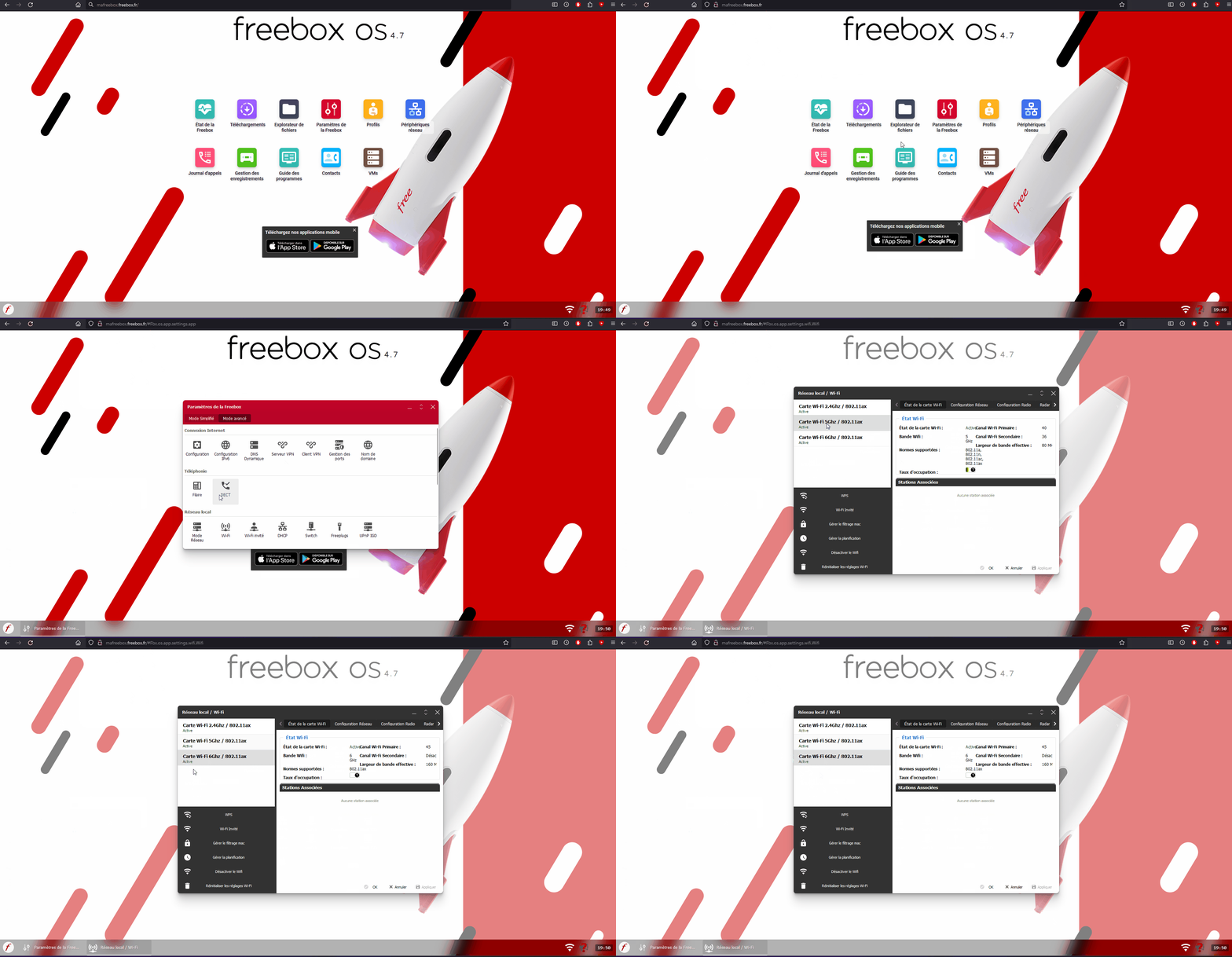
For my part, I access via the browser "http://mafreebox.freebox.fr"
and login.
When the password is not set, there should be a button to create one. (if I remember correctly)
Once logged in: there is the advanced mode => Wifi and this way we can see if the 2 frequencies are active.
Note: connect with the smartphone via Wifi and not in data network mode
-
Hello,
Thanks for this response... from my PC, which is sharing a connection with my phone, it doesn't want to work... I'll see if I can access it from the app this afternoon...
They really annoy us by abandoning us like that... :-/ Not everyone is good with computers, right... Oh damn
Have a nice day, I'm keeping my fingers crossed for this afternoon
-
Well not really... I asked someone who knows a bit about it, but no answer for now...
Now I've managed to download the app that controls the box, and finally succeeded in entering a password...
In the advanced settings, I have
- wake-on-lan Disabled
- DHCP
- Port forwarding
More to come...
-
It is in wifi, to assign two different SSID names to the 2.4 and 5 GHz networks.
But a browser on the tablet must also have access to http://mafreebox.freebox.fr
In image freebox.toosurtoo.com :)
-
Hello,
Several points to clarify:
1) You wrote in message <6>:
It's still not ordinary to have equipment installed for us and for everything not to be functional :-/The expression "installed for us" implies that a Free technician set up the box. That's a bit surprising!
Even if that’s the case, they could only confirm that the box is working, which is confirmed by the fact that you are indeed receiving WiFi on your smartphone and tablet.
The technician's role ends there. They will not make adjustments on your computer or any of your devices. It’s a matter of responsibility in case of any potential future malfunctions.
2) The box can be configured from the computer by typing the address
http://mafreebox.freebox.fr/
in a browser. You then access Freebox OS which allows all the settings.
You may have done this already, but currently, it’s pointless since the computer does not see the box.
3) You can also access the settings from a smartphone. You need to download the Freebox Connect app available in the Google Play Store
https://play.google.com/store/search?q=freebox+connect&c=apps&c=apps
The WiFi settings can be adjusted from Network (in the bottom icons).
You can change the names of the 2.4 GHz and 5 GHz networks to clearly differentiate them (see message <4> from brupala).
4) Immediate actions:
Your computer is an HP and the network cards in HPs are quite poor (I have an HP). This is the core of the problem.
When a computer does not see the WiFi, there are 2 things to do systematically:
Restart the computer and restart the box if that’s not enough.Finally, you can reset the network settings on the computer:
Go to Settings.
Settings > Network and internet > WiFi.
Click on Properties and check that WiFi is enabled.
If not, go back to the previous screen and click on Network reset at the bottom of the window.
What is well conceived is clearly stated,
And the words to say it come easily.
(Boileau) -
Hello...
Indeed, it was a technician who installed the equipment... but a subcontractor.
http://ma freebox. fr, the page doesn’t display... ????♀️ (sharing connection with my phone.
I downloaded the app, but now we start entering a directory that I have a hard time understanding. ????
If it were explained to me from start to finish, I think I would be able to achieve it.
As for the rest, being in the hospital right now, I will check this afternoon or tomorrow.
I don’t know about you, but when I can’t do something, it "frustrates" me until I’ve managed it.
Have a nice day.
-
The exact address is http://mafreebox.freebox.fr/
But it doesn't work with a hotspot connection. You need a direct connection to the box. (Which is currently not in place).
As a priority, try restarting the computer and/or the box, as well as resetting the network.
-
-
-
Yes,
it's logical, the Freebox must broadcast an mdns mafreebox.... with its local address instead of a normal dns resolution, or else, it intercepts the public address 212.27.38.253 which belongs to mafreebox.freebox.fr or mafreebox.free.fr or freeplayer.freebox.fr to transform it into its local address (nat on destination address):
brupala@Textorm:~$ host mafreebox.free.fr mafreebox.free.fr is an alias for mafreebox.freebox.fr. mafreebox.freebox.fr is an alias for freeplayer.freebox.fr. freeplayer.freebox.fr has address 212.27.38.253 brupala@Textorm:~$So it only works through a Freebox connection, through another connection it falls into the void or is filtered.
-
-
-
As a reminder :
Just do this freebox.toosurtoo.com.
-
-
I can only repeat what I've already written:
Try restarting the computer (and possibly the router). On my HP, it happened to me to do 3 restarts before it would finally find the network.
Also, perform a network reset in the Windows settings (see message <10>).
The problem lies with the computer. It should at least see the 2.4 GHz wifi.
What is well conceived is clearly stated,
And the words to say it come easily.
(Boileau) -
Good evening...
I have already restarted the PC and the box, not far from 10 times... ????
and nothing.
I don’t understand how there could be a problem with the PC, since I was connected well before the box change. I can see the neighbors' network, and I detect my phone for connection sharing!? Everything was working perfectly before the box change ???? before it detected the Orange network very well, the SFR network...!? There's something I don’t get here...??
The settings on my PC didn’t change by themselves during the box change?
And if I do a network reset, am I at risk of losing programs or software that I'll need to reinstall?
Thank you for your feedback
Have a good evening
-
-
And if I reset the network, am I at risk of losing programs or software that will need to be reinstalled?You're not at risk.
When you do that, you need to provide the Wi-Fi key again. But since you can't see the network, you've never had to provide it.
There will be no loss. -
I will look at it tomorrow.
Right now I'm on the tablet and I finally managed to access the attached settings table.
So, we are on a different language for me, but is there any way to do something?
THANK YOU
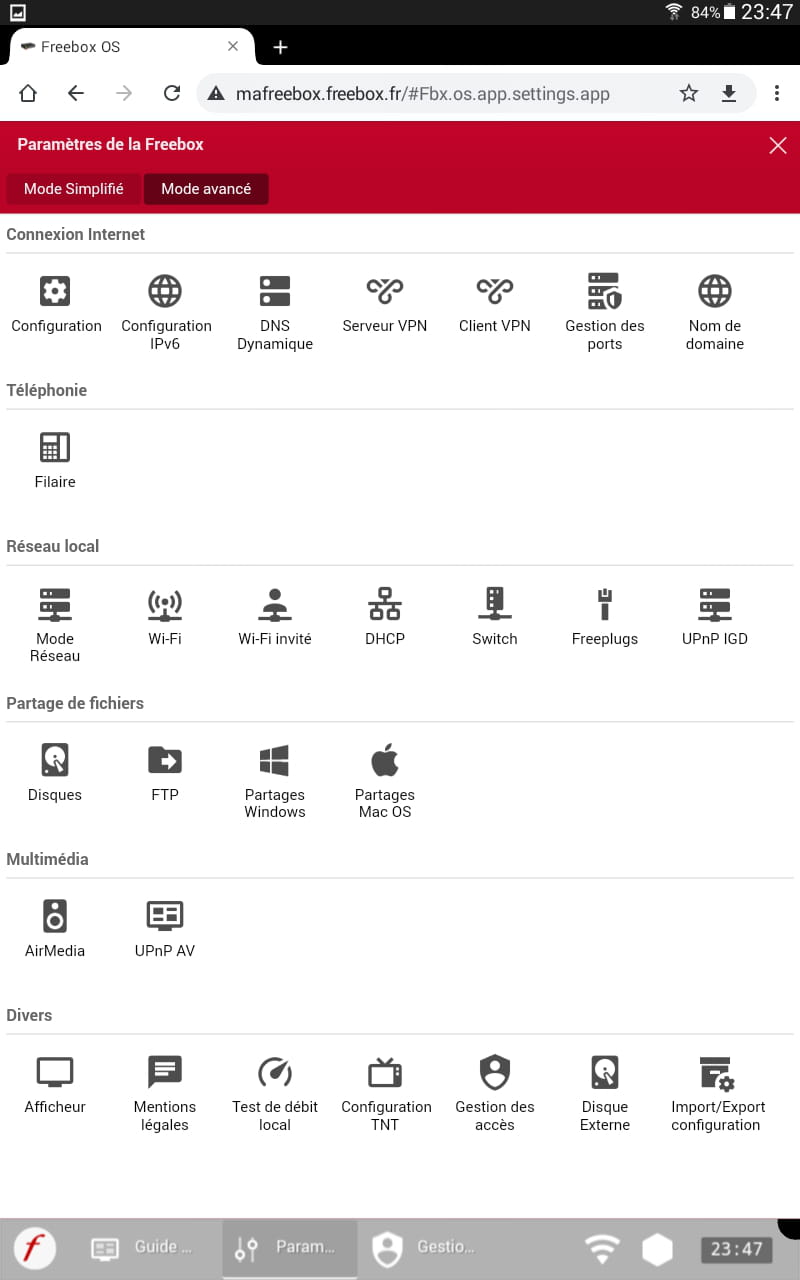
When you double-click on wifi and the network configuration tab
you will see the name of your box.
Go back to Windows and do the menu:
Windows + R
then enter Powershell
Then a window will open and copy what is below:
netsh wlan show networkit should look like this:

check if it detects it.
Hello,
The display of Freebox OS on tablet is dreadful. It is not at all designed for this support. On computer, there are double clicks that are impossible to make.
The best thing to do is to click on the wifi icon when you are on the screen where celineléa76 arrived.
You will then enter the management window, but you cannot see or do anything: the display is incomplete.
At that moment (and not before!), click on the 3 dots in the top right corner and request the display for computer.
You will get the normal display back. To make it fully usable, you need to turn the tablet to landscape mode.
You can then access all the settings.
To look at as a priority, the SSIDs and the channel settings.
Here are the main settings I have at home for wifi 2.4 GHz:

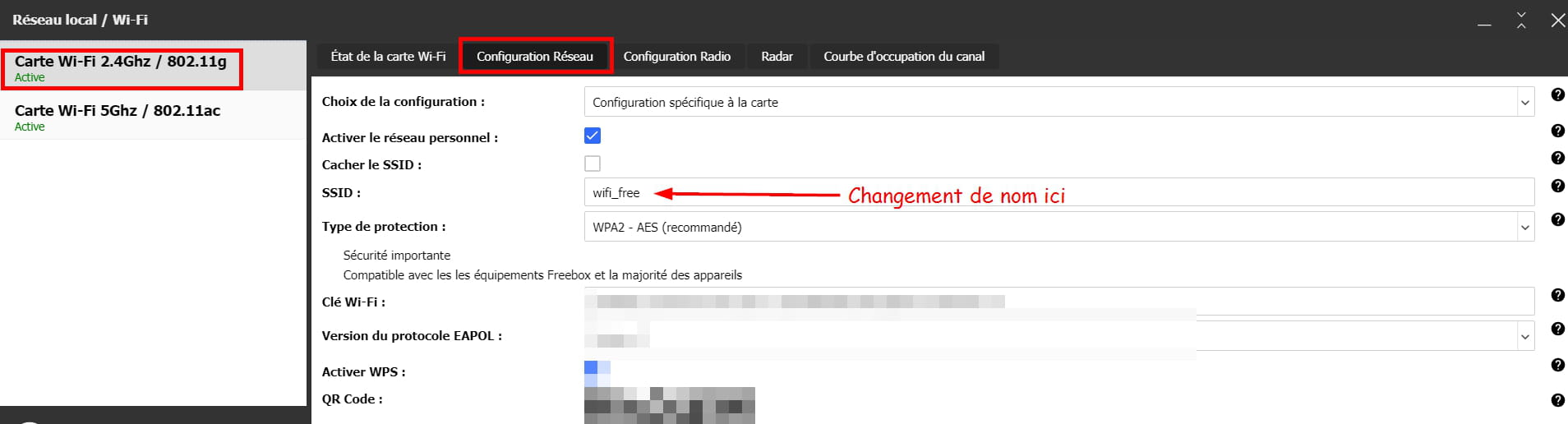

I'll stop here, due to lack of time.
What is well understood is expressed clearly,
And the words to say it come easily.
(Boileau)-
I would add that when you change the SSID name of the network, logically you risk losing the connection with the box, and you will need to reconnect with the new name.
And if I manage to connect with a little neighbor's laptop but at my place, I'll see if I can find the network with her PC already... (she's already with Free, that might help) and it might be easier if I can access the box's interface!?
Anyway, it's really not usual for Free to just leave us like this... :-/
I'm disappointed, it's not what it used to be...
Yes, I quickly saw yesterday while I was looking at the settings that I might get disconnected.
And do you think that's what's causing the problem?
You have to be an IT specialist now when you come to Free :-/
I'm disheartened...
If I can't manage it, I'll back out of this offer... :-/
Hello,
It's a great idea to see what's going on with the neighbor's computer!
If her computer can't see your router's network, there's definitely a big problem.
As for the installation of the Freebox, normally there's nothing to do. The default settings are correct: you plug it in and it works.
Just because Freebox OS allows you to change the settings doesn't mean you should. There may be adjustments, but that's as far as it goes.
There's absolutely no need to be a computer expert when receiving a Freebox.The only setting you might need to change is the wifi channel. But normally, it's an automatic choice (see the screenshot).
What one understands well is clearly expressed,
And the words to say it come easily.
(Boileau)-
-
-
Well, I don't get why I was connecting without any problem before ????
Now I'm stuck with 2 access points for the rest.
On "the channel" that I renamed
and the other still with its original name. But it hasn't changed anything ????
What if I buy a new Wi-Fi USB key? ????
I'm debating... between that and throwing the computer out the window ????
-
-
Hello...
I'm getting to it this afternoon, the second grandson wanted to stay with me...
It's impossible to be quiet :-)
Indeed, Orange, SFR, I still see my network appearing and I connect... Normal
Free, I remember a technician had helped me rename the network... Since it was my cat's name that we could see.
But he guided me from start to finish... I'm not confident enough to do that by myself...
I used to change the channels as well... they explained it to me back then...
But I don't want to mess things up, I could see my networks just fine before :-/
I'll use my neighbor's PC this afternoon. To be continued
Thank you
Have a nice Sunday
A suggestion is to move the box closer to the PC. Because the Free Wi-Fi signal is not very strong. Distance is an important factor, especially with an old PC (with an antenna on the back?). The channel should be changed in case of possible interference from neighbors' boxes. And that's all for most people, plus if your smartphone and tablet are receiving, I doubt there is a problem coming from the box.
Indeed, there shouldn't be any problem on that side. And for the card in the device manager, network card "wireless" with no "?", properties: Device status: 'This device is working properly'?
Hello, it shows me that the manager is working properly :-(

Hello,
I really think I'm going to try to go buy a new USB wifi dongle... even though my equipment is working correctly ???? but it's not exactly new. I don't understand...
On the other hand, I remember that with Free, I always had problems with the wifi dongle... before, the technicians would help me, and it was resolved, now, no one can help you ???? figure it out yourself.
I can't use Ethernet cable, the two sockets are on opposite sides of the room, I would end up with a cable in the middle of the living room ????
And it annoys me when I can't solve the problem... ????
I restored the network yesterday, and nothing.
However, last night, even my other devices had trouble connecting ????
I'm overwhelmed here
Hello,
My knowledge of networking is limited. I tend to prefer replacement for testing or a complete format as a last resort. So replacing the Wi-Fi key seems like a good option (the price being low). Another solution would be to connect the PC via Ethernet (5m ~10€) since the distance is not great.
-