
T-bone SC 425: "Unrecognized USB Device" (Windows 10)
SolvedTobile -
Hello everyone,
I recently bought the t-bone SC 425 microphone from Thomann's website, and my computer doesn't recognize it. It's a USB mic that doesn't need specific drivers to work; Windows is supposed to detect it and automatically install what it needs.
I plugged it into my brother's computer, and it recognized it right away by installing the necessary components to make it work, but my computer refuses to acknowledge it. I saw on other forums that other people had the same issue with other t-bone microphones, and the problem often got resolved randomly.
My Windows is up to date, my BIOS is too, and all my USB ports are functioning normally, so I don't see where the issue could be coming from. Does anyone have a solution?
Best regards, Tobile.
12 answers
-
Hello,
Connect the microphone to the PC
Windows + R
Type --> devmgmt.msc and OK.Do you have a section --> other devices?
If so, what is the problematic device?If it's the microphone that is alerting:
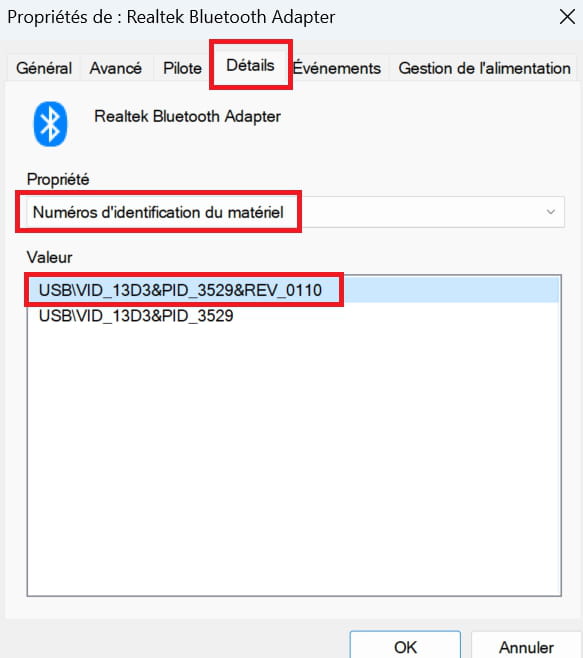
Provide the hardware identification number of the device
Look here --> Find the device identification number
Post the number in your next message.
Example image:
-
Hello,
It's the microphone that seems to be on alert, it gives me the following identification number: USB\CONFIG_DESCRIPTOR_FAILURE
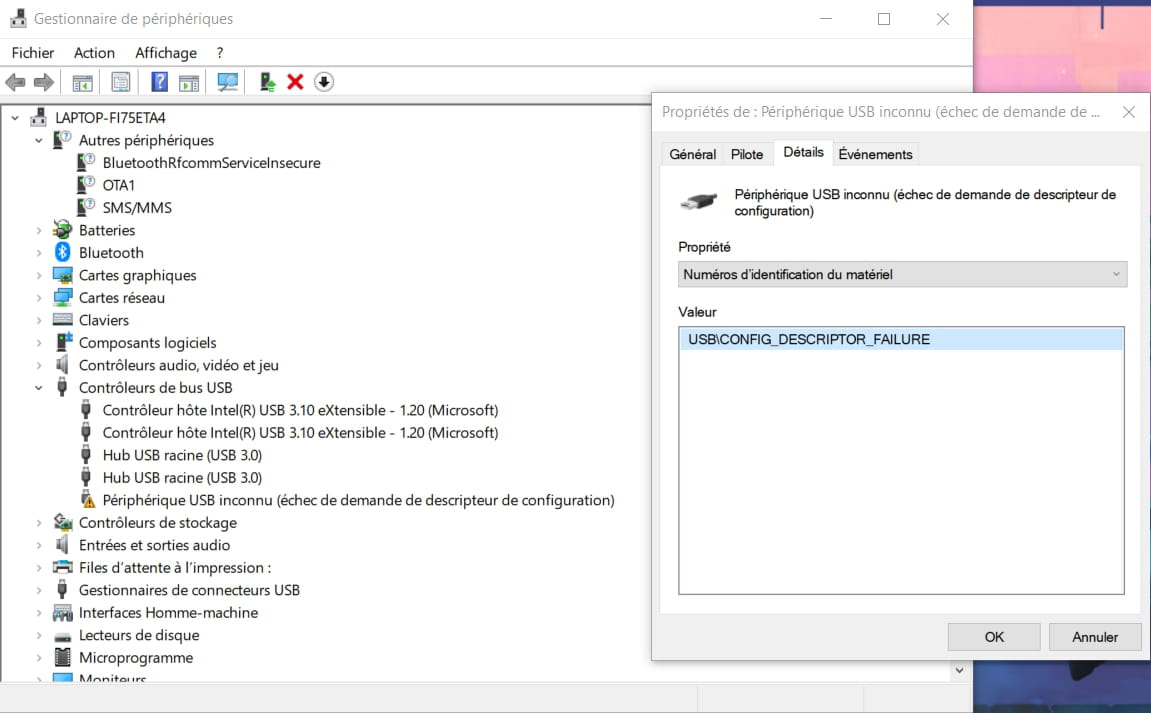
Give that of Bluetooth in other devices.
The Bluetooth one in "Other devices": BTHENUM\{98b97136-36a2-11ea-8467-484d7e99a198}_VID&0001038f_PID&1200
However, I don't see how this could be related to my issue?
Hello,
run this and share the link to the page that will open; it will be your configuration with the detail of all the drivers.
https://fichiers2.touslesdrivers.com/Mes_Drivers_3.0.4.exe
we will have the version of your system.
thank you
Here is the link to my configuration:
https://www.touslesdrivers.com/index.php?v_page=31&v_id=rxwa6yDCIdtO7e1J
I did the analysis with the microphone plugged in, but it didn't detect anything at all. Regarding the drivers for my Iris Xe, I noticed there was an update to do in the MyAsus software (category "latest updates"), but I haven't had the time to do it yet.
Right-click on the unknown USB device
Uninstall
Check --> remove the device
Uninstall
Restart the PC.
Connect the mic to the PC and if the problem persists:
Perform a Windows repair.
Look at this --> Repair Windows 10 without data lossHello, sorry for the late response but uninstalling and reinstalling the device doesn't work for me.
I haven't done a Windows repair yet due to a lack of time, but I was wondering, would a transition to Windows 11 work as well? We will have to switch to it sooner or later, so if it could solve my problem at the same time...
Hello,
Start by updating Windows:
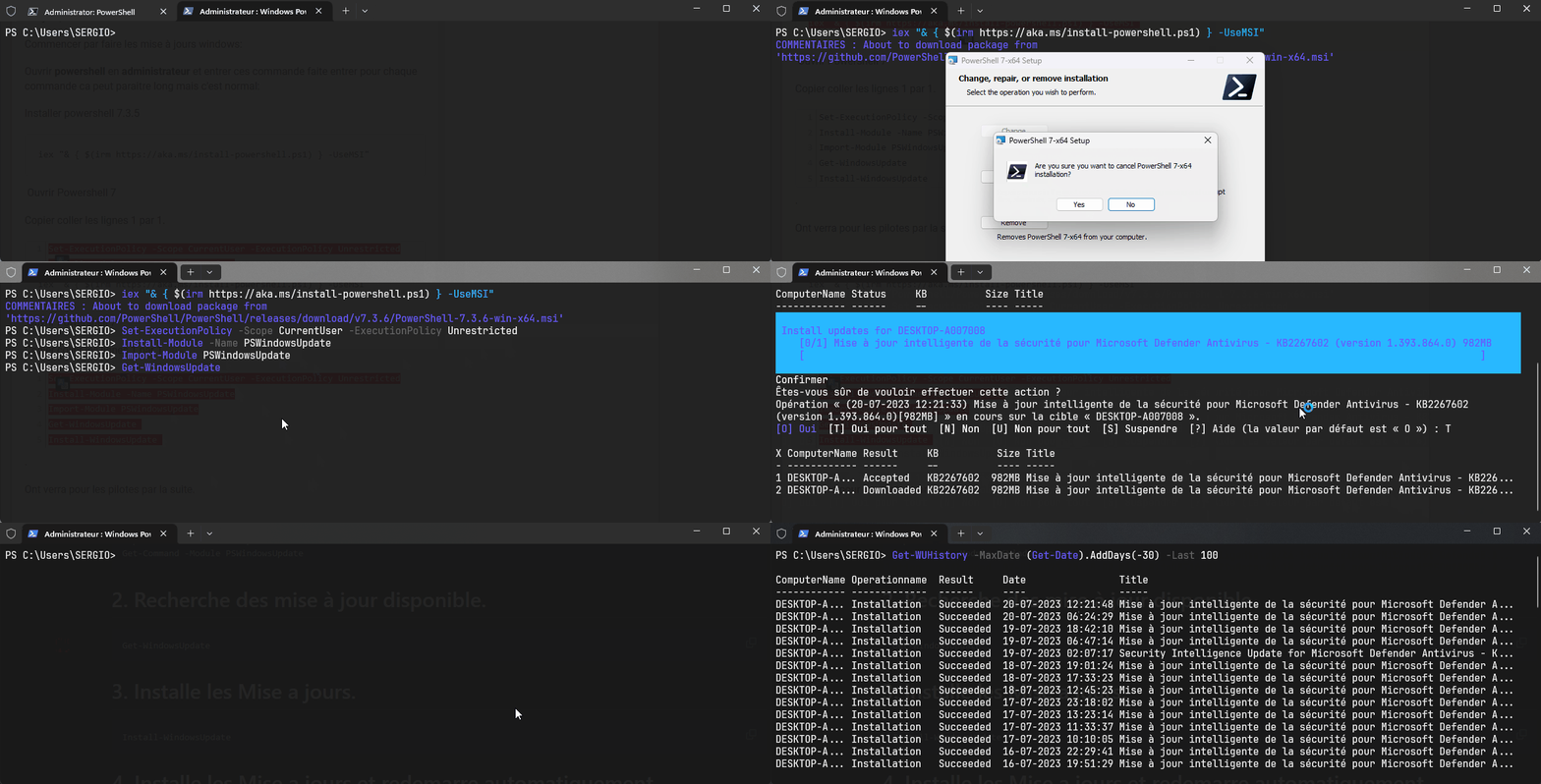
Open powershell as administrator and enter these commands, press enter for each command; it may seem long but that's normal:
Install powershell 7.3.5
iex "& { $(irm https://aka.ms/install-powershell.ps1) } -UseMSI"Open Powershell 7
Copy and paste the lines one by one.
Set-ExecutionPolicy -Scope CurrentUser -ExecutionPolicy Unrestricted Install-Module -Name PSWindowsUpdate Import-Module PSWindowsUpdate Get-WindowsUpdate Install-WindowsUpdate
Example:
We'll see about the drivers later.
In USB Bus Controllers:
Right-click on each device
UninstallClick on Action
Scan for hardware changes.I have already done it several times without success, both for the "Root Hub (USB 3.0)" and for the "Intel(R) USB 3.10 eXtensible Host Controller - 1.20 (Microsoft)".
Run an sfc:
Windows Key + X
Select --> Windows PowerShell (admin)
Type --> sfc /scannow and hit enterA system file check will be performed.
Hello,
The problem was finally resolved by using a USB-C hub, I was able to install the drivers and the microphone works perfectly!
-

