
Unable to complete Windows 11 installation
hugher65 -
Hello,
I need help installing Windows 11 on an SSD on new hardware.
Indeed, I can't manage to install it:
Several cases have occurred: I manage to start the installation but at the moment of rebooting, I get the following error: "Windows couldn't prepare the PC to boot into the next phase of installation..." Then upon rebooting, I get a loop saying "The PC has restarted unexpectedly or encountered an unexpected error."
When I try again from the beginning, the disk manager during the Windows installation tells me it can't format or delete the partitions... When I refresh, the SSD completely disappears...
To try again, I put my SSD in an external enclosure on my laptop and used clean in diskpart to reset it, I can go and try the installation on the new PC... But it fails again at the same point...
I don't know what to do anymore... I have tried with a USB stick, a stick with an SD card, I even downloaded the Windows image again... I tried disabling UEFI, CSM,... and re-enabling them but...
Nothing works...
I don't understand anything anymore, is there a problem with the SSD, or the motherboard...?
Thank you in advance for your help
My configuration is as follows:
MSI B550 Gaming Plus - BIOS updated on 04/28/2023 - E7C56AMS.1D0
Ryzen 7 5700G
2x16 GB RAM
Samsung 970 Evo Plus 2TB SSD
3 answers
-
Hello.
Try to see if it's the same by installing Windows 10.
Create a Windows 10 installation media, connect a USB key of at least 8 GB to your PC, download this Microsoft tool, open the tool, and then create your USB key containing Windows 10:
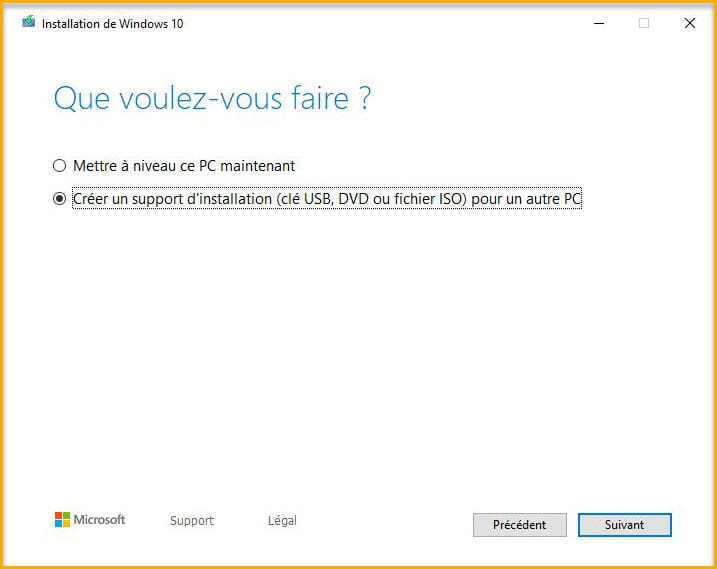
bazfile
Moderator/Security Contributor.
A hello, a response, a thank you are always appreciated. -
Thank you,
I will try that, and also try to put the SSD in another PC and attempt to install on it.
Otherwise, how can we diagnose an SSD?
Is there a kind of tool like CrystalDiskInfo for HDDs?
Thank you.
-
Good evening,
After other tests and other incomprehensible failures (installation crashing (blue screen and reboot) after the choice of languages, the search for updates, and during the choice of the PC name), I succeeded in a strange way...
I put the new SSD in my old PC, and to my great surprise, it continued the installation all the way through without any problems. So, no issues with the SSD...
Then, just to be sure, I put the SSD with the completed installation back in the new PC, and it started almost immediately without any issues... I should mention that in the meantime, I plugged in a new graphics card (instead of using the HDMI from the motherboard).
So this is apparently completely incomprehensible.
Right now, I am running various OCCT tests, no errors so far, I really don’t understand what happened with this new PC...
Do you think there could be problems with the components (CPU, RAM, motherboard)?
Thanks
