
Self-installing great software explorer
Solvedbazfile Posted messages 58551 Registration date Status Moderator Last intervention -
Hello everyone
I'm sending you this message a bit in a panic because
I was sitting in front of the computer watching a video and painting a figure when a software called "grand explorer" installed itself automatically
I immediately uninstalled it and ran Malwarebytes + Windows Security to see if they found anything serious, but in the meantime, I tried to look for other possibilities of where it could have come from
I still don't have the antivirus results for the moment, but I feel helpless, I don't know what this thing is and I think I might have something, but I would like to know if you have ever encountered this or if you have any advice
Thanks in advance!
7 answers
-
Okay, thin little oversight
here it is
https://pjjoint.malekal.com/files.php?id=20230426_15z9k11k15p10 -
Hello,
Windows has been infected by a potentially unwanted program (unknown at the moment...), a "PUP"
Securing your PC: a long list of tips
https://www.malekal.com/adwares-pup-protection/
If this happens again, a security contributor will be necessary to analyze your PC.
To go directly to the conclusion:
On certain antivirus, you can enable PUP and LPI detection.
But generally speaking, the best way to avoid them is: Antivirus: enable protection against PUPs and adware- to be careful about download sources, especially websites.
- Be vigilant when installing an application
- Avoid downloading cracks
- Enable PUA/PUP detection on Windows Defender
Best regards
-
Hello.
Download FRST, once downloaded save it to the desktop then right-click on FRST and choose Run as administrator you will see this :

Click on Scan

Warning, wait until the messages say that the scan is complete.

At the end of the scan you will have two text files on the desktop FRST and Addition.


Then send the FRST and ADDITION reports to PJJOINT and then provide the two links generated by PJJOINT in your response.
bazfile
Moderator/Security Contributor.
a hello, a response, a thank you are always appreciated. -
Hello
I just did what you told me and I suppose that the two links in question are these two?
https://pjjoint.malekal.com/files.php?id=FRST_20230426_8y6j7g11u6
https://pjjoint.malekal.com/files.php?read=FRST_20230426_8y6j7g11u6
hoping I haven't made a mistake -
Just an adware and some orphan or obsolete processes, to fix this, please follow the steps below.
Procedure to follow in the indicated order:
1- Open FRST as administrator, for this right-click on FRST and choose run as administrator
2 - Copy the entire script in the box below:Start:: CreateRestorePoint: CloseProcesses: R2 LegsNeonR; C:\Program Files (x86)\Common Files\LegsNeonR\LegsNeonR.exe [4185200 2022-05-20] (wisdomwebinc -> wisdomweb inc) [Unsigned File] [File in use] HKLM\...\Run: [RTHDVCPL] => "C:\Program Files\Realtek\Audio\HDA\RtkNGUI64.exe" -s (No file) HKU\S-1-5-21-3439424652-2730318877-655356717-1001\...\Run: [GalaxyClient] => [X] S3 wtbt; \??\d:\steam\steamapps\common\super people playtest\engine\binaries\thirdparty\wondertrust\wtdrv64.sys [X] FF ProfilePath: C:\Users\33679\AppData\Roaming\Mozilla\Firefox\Profiles\lpyytlif.default-release [2023-04-26] Edge Extension: (No name) -> AutoFormFill_5ED10D46BD7E47DEB1F3685D2C0FCE08 => C:\Windows\SystemApps\Microsoft.MicrosoftEdge_8wekyb3d8bbwe\Assets\HostExtensions\AutoFormFill [not found] Edge Extension: (No name) -> BookReader_B171F20233094AC88D05A8EF7B9763E8 => C:\Windows\SystemApps\Microsoft.MicrosoftEdge_8wekyb3d8bbwe\Assets\BookViewer [not found] Edge Extension: (No name) -> LearningTools_7706F933-971C-41D1-9899-8A026EB5D824 => C:\Windows\SystemApps\Microsoft.MicrosoftEdge_8wekyb3d8bbwe\Assets\HostExtensions\LearningTools [not found] Edge Extension: (No name) -> PinJSAPI_EC01B57063BE468FAB6DB7EBFC3BF368 => C:\Windows\SystemApps\Microsoft.MicrosoftEdge_8wekyb3d8bbwe\Assets\HostExtensions\PinJSAPI [not found] C:\Program Files (x86)\Common Files\LegsNeonR cmd: netsh advfirewall reset EmptyTem: End::3- Once the script is copied, click on Fix, FRST will automatically take the script from the clipboard.

Let the fix be done, once completed you will be prompted to restart your PC, do so as soon as requested, see below.
Then once your computer is restarted:
4- You will have a Fixlog file on your desktop, then send this fixlog report to PJJOINT then provide the link generated by PJJOINT in your reply.5- CHECK AND TELL ME IF YOUR ISSUE IS STILL PRESENT.
For your information.
Your version of Windows 10 is not up to date, to check this go to Windows Update, the update to version 22H2 should be offered to you, if not go to this page click on Update now, this will start the download of the Microsoft tool, simply opening it will allow you to update Windows 10 to the latest version and will tell you if it is compatible with your PC, note that this update takes some time.
bazfile
Moderator/Security Contributor.
A hello, a response, a thank you are always appreciated. -
hi, I'm giving you the link
https://pjjoint.malekal.com/files.php?id=20230426_y9z14v7y9i9I've also noticed that I no longer have ad block; could it be causing my problem?
just wanted to know before reinstalling it-
This has nothing to do with Adblock which is still present in Firefox extensions.
The fixlog is OK, the adware has been removed.
Don't forget to update Windows 10 (see the end of my previous message).
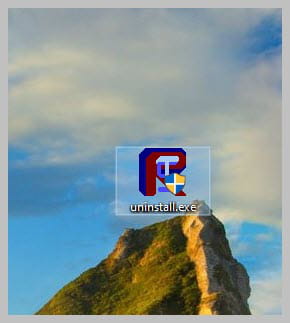
If everything is also OK on your side, you can uninstall FRST, rename the FRST file you downloaded to uninstall, then once the file is renamed, open it; the uninstallation will happen automatically via a PC restart.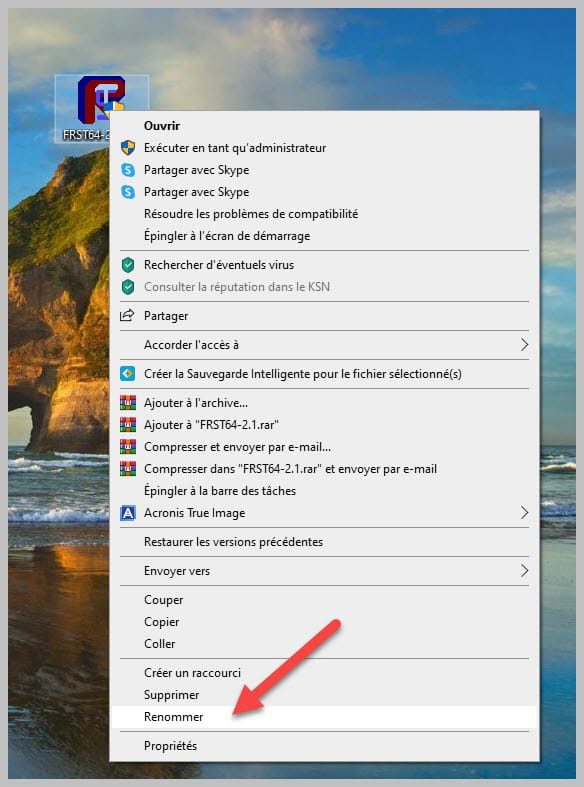
-
-
I updated and uninstalled the software, and for now everything seems fine.
Even if the problem only occurred once, I imagine it has been resolved now.
Thank you for your help, everyone!
If it happens to me again, I will keep you informed.

