Unable to change wallpaper windows 11

stef -  
Kori-Kori Posted messages 2323 Registration date   Status Membre Last intervention   -

Hello,

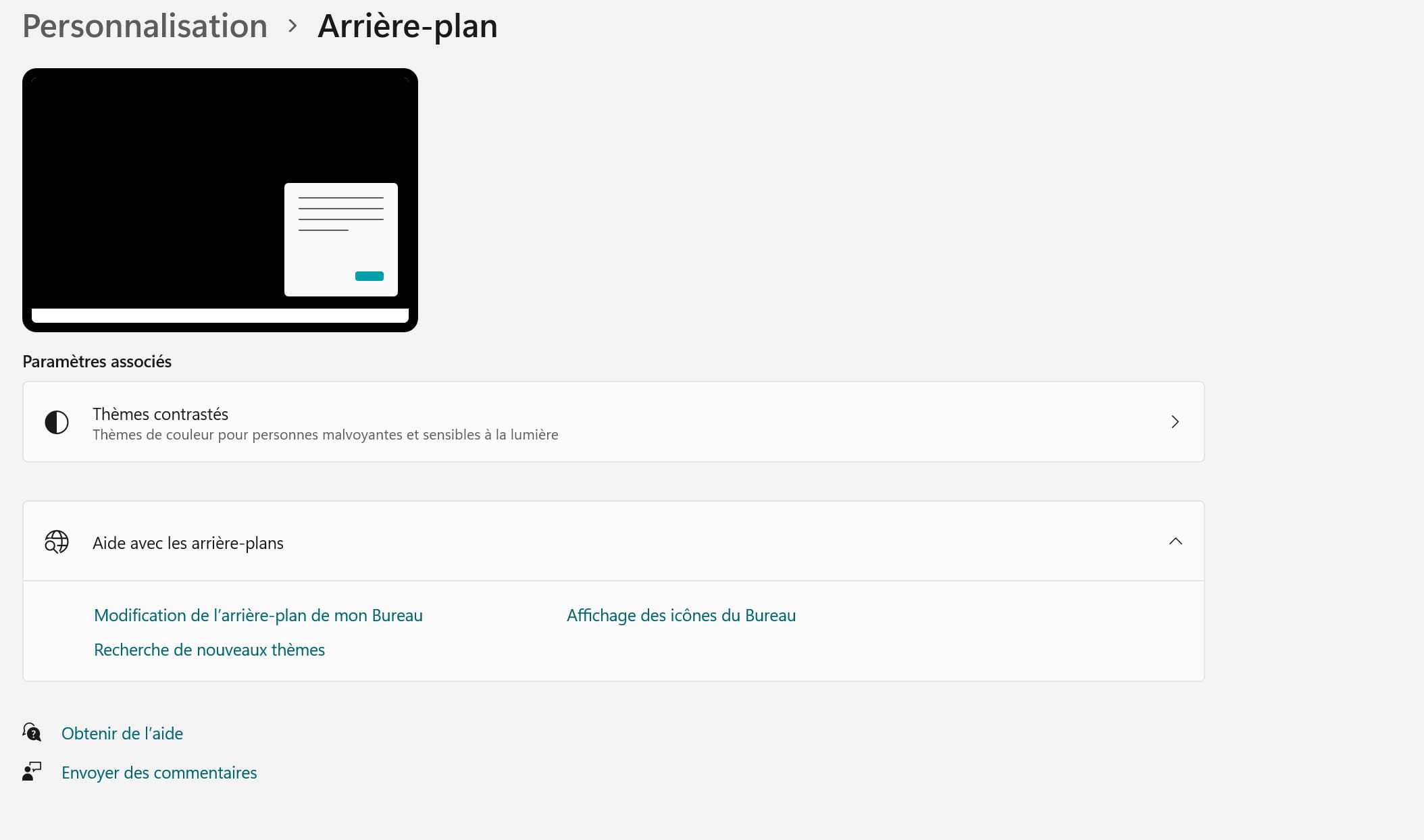
I don't have the option to change my wallpaper (completely black).

When I go to display customization, I find that the section for that is missing (in customization - background, I see nothing. Just a link to the themes).

I tried changing the theme, I see that the taskbar changes color but the wallpaper remains black despite the presence of a background in the chosen themes.

I also tried to change it by going directly to an image and selecting set as desktop background, but nothing works.

I see no solution to my "problem" (it's not really serious, but the black background gets pretty gloomy after a while)

Thank you!

11 réponses

jmarion3 Posted messages 49468 Registration date   Status Contributeur Last intervention   5 505
 

Hello .....

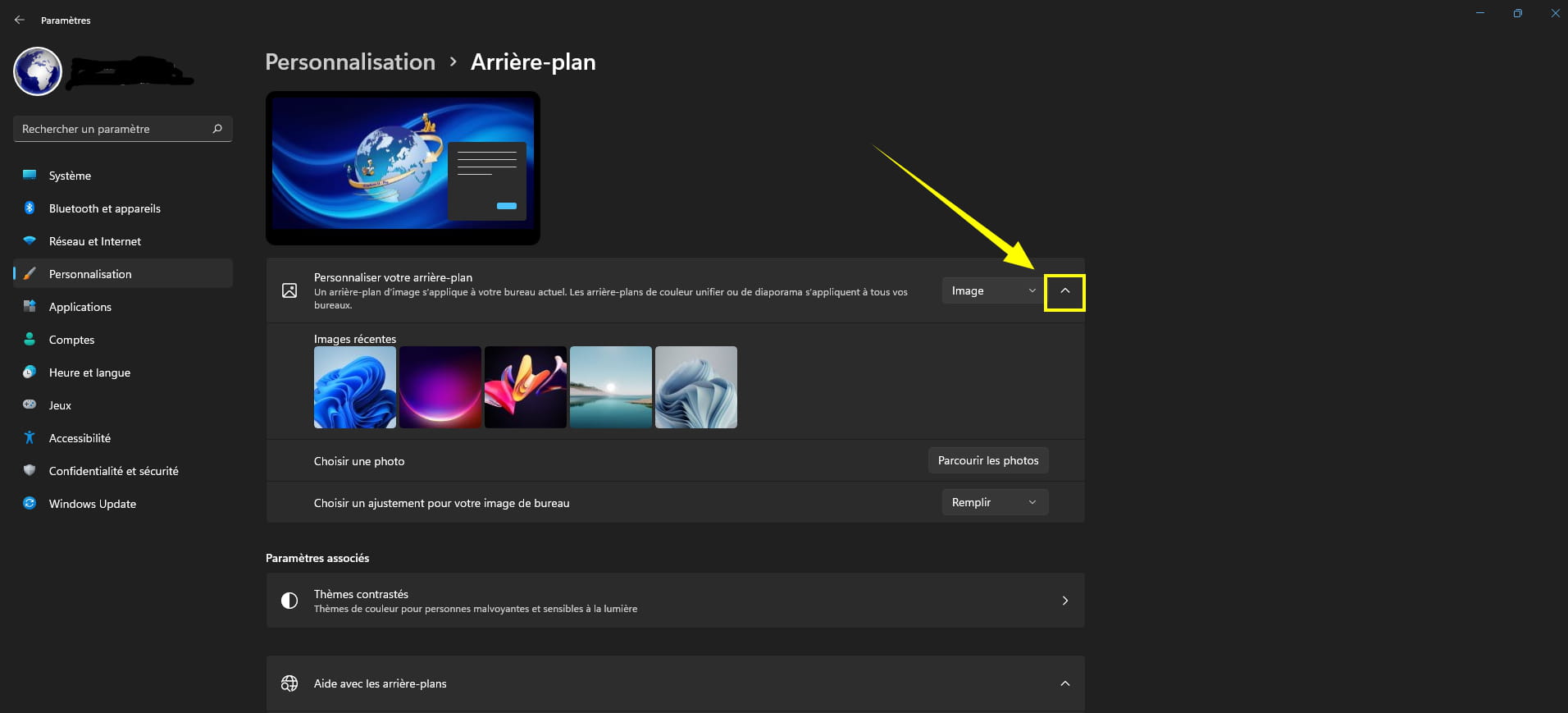
Below is a screenshot of the W11 background customization

Regarding this image, what do you think is missing?

See you+

1
stef
 

Hello jmarion3,

I'm missing the whole box 3, I don't have "customize your background."

0
jmarion3 Posted messages 49468 Registration date   Status Contributeur Last intervention   5 505 > stef
 

Stupid question... but?

Did you click on the little arrow or even on the line allowing access to the options?
0
stef > jmarion3 Posted messages 49468 Registration date   Status Contributeur Last intervention  
 

There is no such thing as a stupid question!

I don't have that possibility at all. There is no arrow, it is related to the title of the section that I don't have.

0
jmarion3 Posted messages 49468 Registration date   Status Contributeur Last intervention   5 505 > stef
 

Since when did this happen ► It's very recent or ??

A+

0
stef > jmarion3 Posted messages 49468 Registration date   Status Contributeur Last intervention  
 

since the installation of Windows 11

0
Kori-Kori Posted messages 2323 Registration date   Status Membre Last intervention   403
 
1
Kori-Kori Posted messages 2323 Registration date   Status Membre Last intervention   403
 

Hello,

Please see your version? (Family, Pro...)

Is it activated and up to date?

0
stef
 

Hello Kori-Kori,

Family version, activated and up to date

0
Kori-Kori Posted messages 2323 Registration date   Status Membre Last intervention   403
 

Is the session open in a local account or a Microsoft account?

0
stef
 

On Microsoft account

0
Kori-Kori Posted messages 2323 Registration date   Status Membre Last intervention   403
 

Try a local account, but I doubt...

Otherwise, check by creating another administrator account; this would allow you to see if your profile is damaged.

It can be deleted afterwards.

0
stef
 

I'll give it a try. What's surprising is that it's a new computer on which Windows 10 was installed. Everything was working fine before the upgrade to Windows 11 in this regard.

I'm wondering if it might not be a mistake in the installation of Windows 11, which should have been corrected with updates, it seems to me...

0
stef
 

Tested locally, no difference.

0
Kori-Kori Posted messages 2323 Registration date   Status Membre Last intervention   403 > stef
 

Not surprising; and with another administrator account?

0
stef
 

same...

0
Kori-Kori Posted messages 2323 Registration date   Status Membre Last intervention   403
 

No anomalies in device management?

0
stef
 

none and everything seems up to date

0
stef
 

I am on Surface Pro 7, I don't know if this information might be important.

0
Kori-Kori Posted messages 2323 Registration date   Status Membre Last intervention   403 > stef
 

Sorry, me neither...

Screen size and resolution maybe

0
stef
 

I think I'm going to try a repair of Windows 11 while keeping the data.

0
Kori-Kori Posted messages 2323 Registration date   Status Membre Last intervention   403
 

There is indeed this command as an administrator:

right-click Windows logo

Run

cmd

ok

 Dism /Online /Cleanup-Image /RestoreHealth
0
stef
 

Message when I try this command:

Error: 740

Elevated privileges are required to run DISM.
Use a command prompt with elevated privileges to perform these tasks.

I think it is related to Windows S mode...

0
Kori-Kori Posted messages 2323 Registration date   Status Membre Last intervention   403 > stef
 

Are you in S mode?

0