
Reminder, notes ??
Solved
Hello,
Wanting to put a to-do list on my desktop, I discovered the Windows application "Sticky Notes".
Creating a note and placing it anywhere on the desktop is not a problem.
However, with this app, you have to keep it open all the time for the note to display on the desktop.
I wanted only the note to be permanently displayed on the desktop but to close the application's icon in the taskbar, but apparently that's not possible? Because when I click "close the window", it removes the icon from the taskbar but it also makes the note disappear from the desktop!
What other means (Open Office, Paint, Photos??) could I use to display a permanent note on my desktop without the app/software that created it staying open all the time in the taskbar?
Thank you
4 answers
-
Hello,
There are a bunch of utilities in this mode, but none work to my knowledge unless they are running in the background (you can always create a shortcut and hide the icon in the taskbar, but that's just the tree hiding the forest).
The simplest (and not very decorative) way is probably to place small text files on the desktop, but they won’t stay open.
A twisted trick (the art of killing a fly with a hammer) is to use Notepad++ instead of Notepad.
As soon as I create more than one text file in the same folder (desktop or a subfolder called Notes if I don’t want to be overwhelmed), I have the option (via "Open Folder as a Workspace") to always open Notepad++ on this folder, which presents me with the structure of all the files and allows me to switch from one to another with a click, thus avoiding having to open them separately because, of course, I won’t remember what's in them.
However, there is also no way to keep this view without at least one click (opening Notepad++) if it is not already open or launched on startup, back to square one.
-
Hello Brucine,
There are a bunch of utilities in this mode, but none work to my knowledge unless they are open in the background
Arrff ... That's really my problem ..
So I'll go back to the method of using a paper post-it next to the computer ;-))
In fact, in the attached photo, I would like to have something that resembles my post-it on the right (2) and that would be displayed permanently on the desktop even after turning the computer off/on ... without having an app open in the taskbar (1)
No chance?

-
Hello ....
How many post-its do you have to "stick"?
It's a reminder that helps you with repetitive tasks, birthdays, things to do, etc......
Talk to you later
-
Hello,
Just one post-it, it's just to have an idea of the upcoming events.
I will update/delete the items gradually on this same post-it.
Since I'm often on the computer, I wanted something that would be displayed all the time to be able to anticipate preparations, easily remember things, etc.
On my mobile phone, I have the calendar for birthdays and such and a Notes Keep app that allows me to keep several notes and remind me of them with an alarm at a specific time.
But my goal was mainly to have something "permanently visual."
I thought it would be cool to have it on the desktop screen of the computer, but I have the feeling that I need to stick with the old method > paper post-it on the desk next to the computer ..
I'm not a fan of apps whether on the phone or the computer > it drains the battery quickly, uses up a lot of data, heats up the processor and the fan ..
Already the Windows updates really mess up the computer ...
I would therefore like to limit "background tasks" because I live in an apartment under the roof, with an indoor temperature of 32 to 37° during heatwaves ..
I have a laptop cooling pad with 2 fans, but the computer is so hot that it warms the air from the fans, which don't cool the computer at all ..
Overall, the sensitive components of the computer are between 40-45°, but I sometimes have spikes at 65-68° despite the fans.
I'm not doing anything extraordinary on the computer > very little storage, few apps, no gaming-type games, I listen to music and watch movies or videos, that's all.
-
@SDWilliams
Thanks for the feedback ....
What I had to offer doesn't match what you really want .... my "thing" was a small agenda called "Pense-bête" as well, which looks like this, but in my opinion, it doesn't meet your wishes.
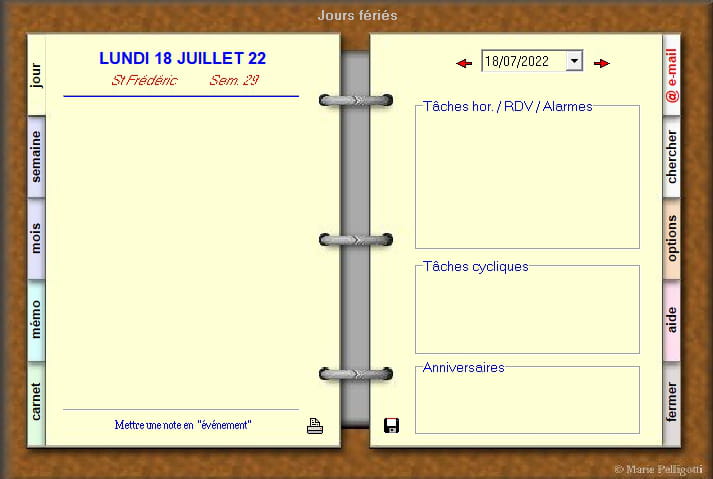
Sorry, but I don't have anything better.
Best regards
-
Moderator@SDWilliams
Hi!
Don't worry, I'm still using sticky notes, haven't found an easier method yet...
Personally, they're stuck on the printer if it's urgent or on the corkboard for later... (office)
Or right on the "mouse keyboard" * of the laptop, since I can't do anything with that touch screen and I always bring a mouse. At least there's a use for that space that makes me stretch my arms...
* that's my personal term
Welcome to the club!
-
@jmarion3
Whoa ... way too elaborate for me ;-)))
-
@xplom
Yes, in the age of everything digital, paper remains unbeatable in some respects!
I also still use a mouse; the trackpad is a real nightmare ;-))
-
-
I had a first response from Jmarion3, which is why I took the photo to check if we were talking about the same software, but I couldn't see the message here??
I also received an email response from MPMP10 that doesn't appear either?? suggesting to use Notepad, which I must admit I hadn't thought of.
I could have created a "to come" document, but that thing is really very rudimentary for formatting and fonts ..
You can't set just the dates to bold and the rest normal, the font/case change applies to the entire document .. Arfff.
On paper, I write the dates in black and what I have to do in blue ;-))
Sometimes, technology isn't really progress ...



