
Avira: web protection disabled
Solvedbazfile Posted messages 58430 Registration date Status Modérateur Last intervention -
For some time now, my computer has been slow. I've noticed since last night that the Avira Antivir icon displays "closed umbrella" and indicates "Real-time protection disabled."
Windows also indicates "Avira Security disabled."
If I open the Avira Security software and go to Security > Protection options, none of the buttons work: neither the blue "Activate" button nor the 3 toggle buttons at the bottom. I click, and nothing happens.
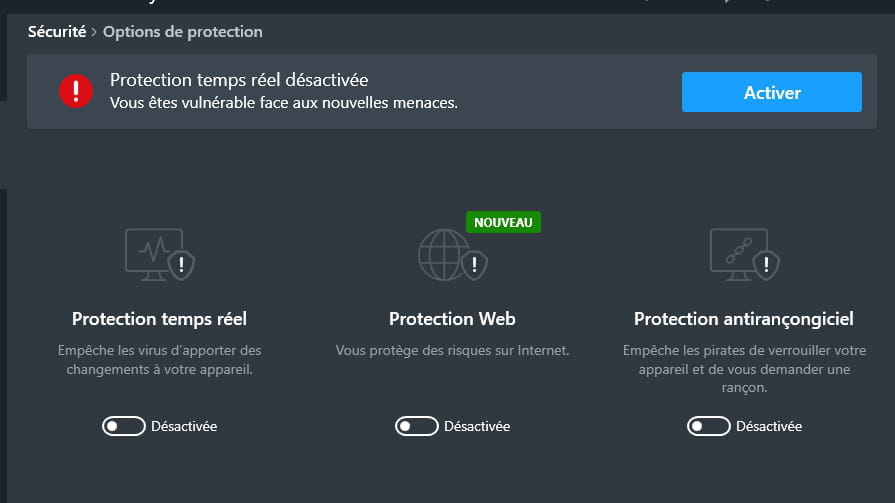
In Settings > Security > Protection options > Web protection, the page is greyed out and disabled.

What is happening? Could there be a Windows service blocking Avira Security?
Operating System: Windows 10.
Browser: Firefox
Thank you in advance for your help.
7 réponses

For 6 years I had Avira Pro (thus paid) installed on my PC but back when I was using Windows 7. After upgrading to Windows 10, some time later Avira started to mess up more and more with the following Microsoft updates. Uninstalling/reinstalling Avira and then Windows 10 brought no improvement in reliability. I ended up uninstalling Avira permanently (I lost 4 months of subscription) and let Windows Defender take over. While I was a bit skeptical about this antivirus in 2016, today I know that it has significantly improved and has become quite effective compared to other free and paid antivirus software.
When uninstalling Avira, using Revo Uninstaller for example, Windows Defender will automatically take over.
See you later. . .

In my experience, Avira has only caused problems since it has existed...
The only place it should be located in Windows is in the recycle bin.

Do you have the free or paid version of Avira?
Download FRST, once downloaded save it to your desktop, then right-click on FRST and select Run as administrator, you will see this:
Click on Analyze

Attention, wait for the messages indicating that the analysis is complete

At the end of the analysis, you will have two text files on the desktop FRST and Addition

Then send the FRST and ADDITION reports to CJOINT, see THIS TUTORIAL, then provide the two links generated by Cjoint in your response.
--
bazfile
Moderator/Security Contributor.
A hello, a response, a thank you are always appreciated.

This closed umbrella phenomenon on free Avira has existed for 1 week (update), but for the past 2 days the umbrella is open again .... even with the closed umbrella, the Windows security shield was green.
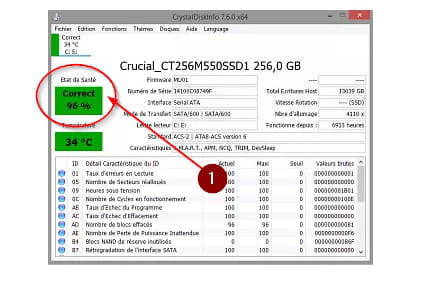
https://www.commentcamarche.net/telecharger/utilitaires/6735-crystaldiskinfo/
See what's indicated in the rectangle...
Hello Bazfile,
I apologize for my hesitations and my procrastinations. The FRST scan took a very long time (6 hours).
Here is the link to the FRST.txt file: https://www.cjoint.com/c/LGqpaoG4uZD
and the link to the Addition.txt file: https://www.cjoint.com/c/LGqpdEDrM5D
The Windows Security shield has been red since this morning. Thank you for your help.
Best regards,
You say that it's a free version of Avira, but I think it's more likely the paid version in evaluation mode. Since you haven't purchased a license, it has been deactivated at the end of the trial period, because in the installed programs, it indicates Avira Security, whereas when it's the free version, it shows Avira free or gratuit.
The best thing to do is to uninstall Avira; don't worry, Windows 10 has its own antivirus which is sufficient and effective, and it will automatically take over as soon as Avira is uninstalled.
Moreover, you have a very low-powered PC; here is your processor compared to a simple Ryzen 5 COMPARISON. Avira slows down your PC significantly, uninstalling it will make your PC run faster, as Windows Defender is less resource-intensive.
To uninstall Avira, use Revo Uninstaller in advanced scan mode; see the tutorial below. Be careful, at the same time as Avira, you installed Avira Phantom VPN; if you don't use it, uninstall it. You also installed Avira System Speedup; this software is not really useful.
There are also quite a few orphaned or obsolete processes; if you want to delete them, I've made you a FRST correction script which you will find at the end of this message.
Now it's up to you to choose and do what you want among these solutions, which are not mandatory.
Tutorial Revo Uninstaller to read carefully.


Accept the uninstallation of the program you wish to uninstall, and if there is an error message saying that uninstallation is impossible, close the error message and continue the procedure.

Check "Advanced scan" then click on "Scan".

Click on "Select all" then on "Delete"; if a second list appears, do the same, then once everything is deleted, click on "Finish"; a restart may be requested.
FRST Correction.
Procedure to be done in the indicated order:
1- Open FRST as an administrator, for this right-click on FRST and choose run as administrator
2 - Copy the entire script that is in the box that follows:
Start:: CreateRestorePoint: CloseProcesses: HKLM\...\Run: [] => [X] HKLM-x32\...\Run: [] => [X] HKU\S-1-5-21-1499397212-1887481046-3172651696-1001\...\Run: [] => [X] Task: {090A75B1-F79B-4EDE-96AC-70F46E52544F} - System32\Tasks\Hewlett-Packard\HP Support Assistant\HP Support Solutions Framework Updater - Resources => C:\Program Files (x86)\Hewlett-Packard\HP Support Solutions\Modules\HPSSFUpdater.exe /r /m (No file) Task: {16ECC710-C3E6-4450-9C51-1F774FC09617} - System32\Tasks\Hewlett-Packard\HP Support Assistant\WarrantyChecker_DeviceScan => C:\Program Files (x86)\Hewlett-Packard\HP Support Framework\Resources\HPWarrantyCheck\HPWarrantyChecker.exe /DeviceScanR6 (No file) Task: {24EA1B7E-DA18-4F21-AEF7-D10A4BB5F981} - System32\Tasks\Hewlett-Packard\HP Support Assistant\Product Configurator => C:\Program Files (x86)\Hewlett-Packard\HP Support Framework\Resources\ProductConfig.exe /noreport (No file) Task: {300B735D-584E-4A98-8E22-EF9F1A4A9468} - System32\Tasks\Hewlett-Packard\HP Active Health\HP Active Health Scan (HPSA) => C:\Program Files (x86)\Hewlett-Packard\HP Support Framework\Resources\HPActiveHealth\ActiveHealth.exe -task -source HPSA (No file) Task: {31A87168-D057-45C1-82E2-F00CF912FF29} - System32\Tasks\Chess Titans => C:\Users\Marc\AppData\Local\Temp\is-HFH4K.tmp\prsetup.exe "/logon" (No file) Task: {38761E27-3468-45D3-90DD-0875F0611858} - System32\Tasks\Hewlett-Packard\HP Support Assistant\HP Support Assistant Quick Start => C:\Program Files (x86)\Hewlett-Packard\HP Support Framework\HPSF.exe /taskrestart (No file) Task: {59218722-0C17-4DED-B585-9A0B14273FD7} - System32\Tasks\Hewlett-Packard\HP Support Assistant\HP Support Solutions Framework Updater => C:\Program Files (x86)\Hewlett-Packard\HP Support Solutions\Modules\HPSSFUpdater.exe /u (No file) Task: {6FF8E032-1AC0-4C95-84B1-50710AF6AD65} - System32\Tasks\Hewlett-Packard\HP Support Assistant\HP Support Solutions Framework Updater - resources updates => C:\Program Files (x86)\Hewlett-Packard\HP Support Solutions\Modules\HPSSFUpdater.exe /r (No file) Task: {A7E050B4-2995-47C7-8727-8F0AB43CF79C} - System32\Tasks\Hewlett-Packard\HP Support Assistant\HP Support Assistant Update Notice => C:\Program Files (x86)\Hewlett-Packard\HP Support Framework\Resources\BingPopup\BingPopup.exe /show (No file) Task: {BDF3D94E-DEE0-48FD-AA4F-C99D58581850} - System32\Tasks\Hewlett-Packard\HP Support Assistant\HP Support Assistant printer driver installation => C:\WINDOWS\TEMP\sp81110.exe (No file) Task: {CE470408-2489-4BC7-947F-1EA598695444} - System32\Tasks\Hewlett-Packard\HP Support Assistant\PC Health Analysis => C:\Program Files (x86)\Hewlett-Packard\HP Support Framework\HPSF.exe /L Analysis (No file) Task: {D69DBD2E-474B-4163-BE10-A85D2FE95DC5} - System32\Tasks\Hewlett-Packard\HP Support Assistant\PC Health Analysis Restart => C:\Program Files (x86)\Hewlett-Packard\HP Support Framework\HPSF.exe /Reboot (No file) Task: {E6E16566-E19A-4A16-A078-4660322F0AE6} - \Microsoft\Windows\UNP\RunCampaignManager -> No file S2 HPSupportSolutionsFrameworkService; "C:\Program Files (x86)\Hewlett-Packard\HP Support Solutions\HPSupportSolutionsFrameworkService.exe" [X] S3 netprotection_network_filter2; System32\drivers\netprotection_network_filter2.sys [X] HKLM\SOFTWARE\Policies\Microsoft\Windows\WindowsUpdate: Restriction GroupPolicy-Firefox-x32: Restriction HKLM\SOFTWARE\Policies\Microsoft\Internet Explorer: Restriction Edge Extension: (No name) -> AutoFormFill_5ED10D46BD7E47DEB1F3685D2C0FCE08 => C:\Windows\SystemApps\Microsoft.MicrosoftEdge_8wekyb3d8bbwe\Assets\HostExtensions\AutoFormFill [not found] Edge Extension: (No name) -> BookReader_B171F20233094AC88D05A8EF7B9763E8 => C:\Windows\SystemApps\Microsoft.MicrosoftEdge_8wekyb3d8bbwe\Assets\BookViewer [not found] Edge Extension: (No name) -> LearningTools_7706F933-971C-41D1-9899-8A026EB5D824 => C:\Windows\SystemApps\Microsoft.MicrosoftEdge_8wekyb3d8bbwe\Assets\HostExtensions\LearningTools [not found] Edge Extension: (No name) -> PinJSAPI_EC01B57063BE468FAB6DB7EBFC3BF368 => C:\Windows\SystemApps\Microsoft.MicrosoftEdge_8wekyb3d8bbwe\Assets\HostExtensions\PinJSAPI [not found] CHR HKLM\...\Chrome\Extension: [ipmkfpcnmccejididiaagpgchgjfajgp] CHR HKLM-x32\...\Chrome\Extension: [ipmkfpcnmccejididiaagpgchgjfajgp] EmptyTemp: End:: 3- Once the script is copied, click on Fix; FRST will automatically take the script that is in the clipboard.

Let the correction process take place; once it is complete, you will be asked to restart your PC, do so as soon as it asks you, see below.

Then once your computer has restarted:
4- You will have a Fixlog file on your desktop; then send these reports to https://www.cjoint.com/; see this tutorial; then give the link generated by Cjoint in your next message.
5- CHECK AND TELL ME IF YOUR PROBLEM IS STILL PRESENT
Hello Bazfile,
Indeed, I didn't see your message. You tell me that I have an expired trial version. I'm surprised, I've had this antivirus for 5 years, that is to say since I got this computer. It's a free antivirus. They regularly offer an upgrade because it only resolves part of the issues, but I don't believe it's a trial version; it's known for being free.
We'll see in the long run if I have any problems. I'm keeping your advice in mind. For now, everything seems to be working well. It's true that this computer isn't very fast, but you can't expect much with Windows. Especially this kind of computer, with a hard drive instead of an SSD (I wanted to buy something not too expensive).
Thank you, in any case, for your valuable advice.
Sincerely,
Hello everyone!
I should have started with this: my Avira Free Antivirus was faulty. I went to the Avira website and downloaded the antivirus installation again. When I launched the installation, the software detected the presence of Avira Antivirus. It asked me if I wanted to activate my license or repair the existing antivirus. I clicked on "repair," and the update was completed.
Now, the Windows Security shield is green, and everything seems (for now) to be working correctly.
Thank you all for your valuable help; I was really struggling.
Best regards,
Hello.
Don't be too optimistic. I myself have gone through the process of uninstalling and reinstalling this antivirus several times. This process temporarily resolves the issues, but after a while, they come back.
The main problem, at least in the earlier versions of Windows 10 (1507 - 1511 - 1607), was that they did not go smoothly, and it was necessary to remove Avira beforehand for them to work properly. However, even when an update went through, Avira would get corrupted afterward. I believe those same problems persist today.
I am not blaming this antivirus at all, as I was satisfied with it back when I was using Windows 7, but with Windows 10, it became impossible to manage.
Have a good Sunday...
Thank you all for your valuable help, I was really struggling.
And you might be stuck there.
See my message 12 from yesterday that you apparently haven't read https://forums.commentcamarche.net/forum/affich-37631843-avira-protection-web-desactivee#12
-
Saracroche: the effective french app against phone spam
at 09:51 -
How to get the character µ on the android keyboard.
on 22 May -
Texture issues in enshrouded
on 22 May -
Access issue to my "contact me" profile
on 22 May -
Windows spotlight is not working.
on 20 May -
Black screen digital camera
on 19 May -
Connecting rj45 cable with fiber
on 19 May -
Sony bravia tv red led blinks 4 times
on 19 May -
Free: associating with the freebox server in progress
on 19 May -
Inuyasha in french
on 19 May