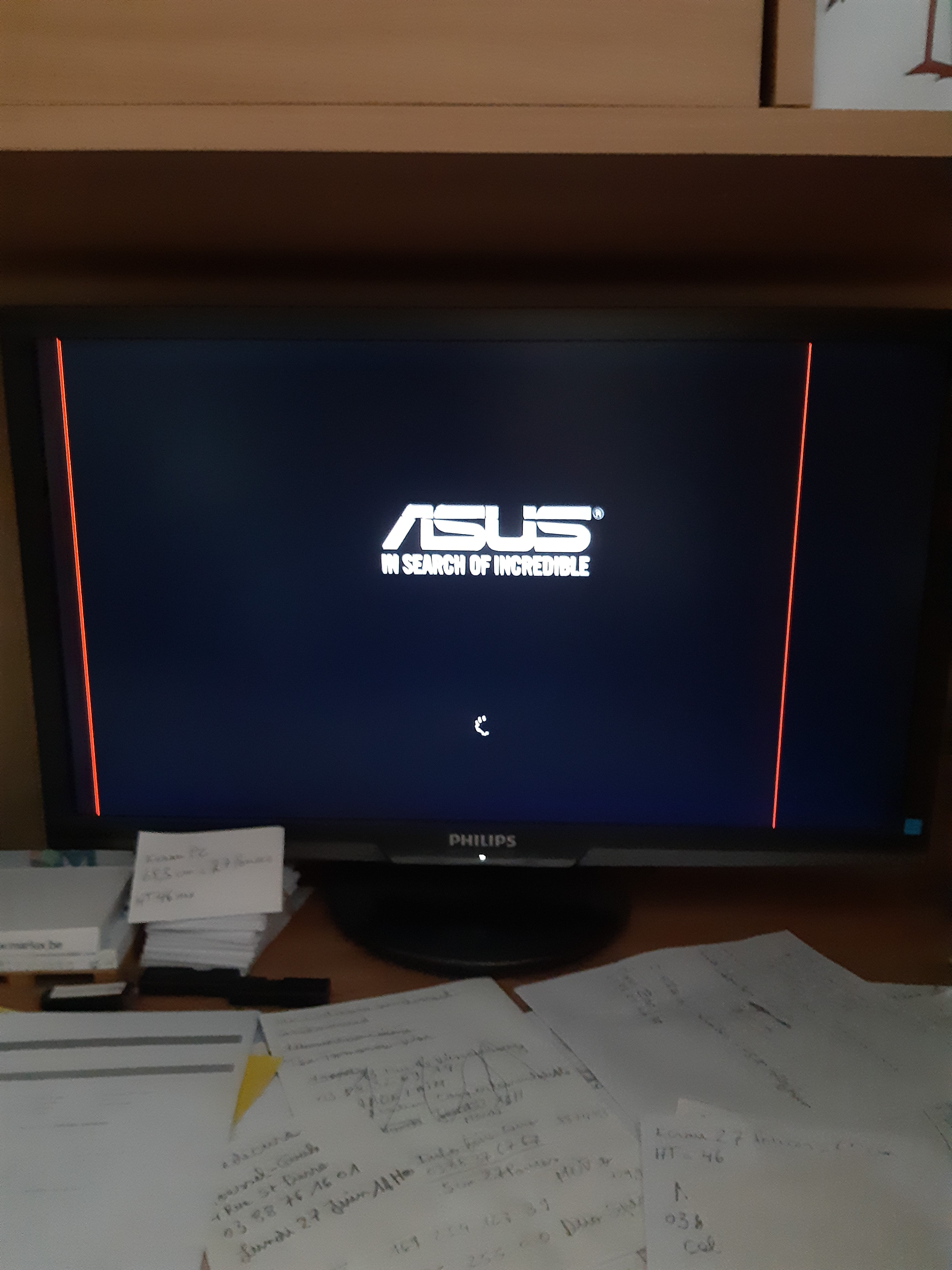
Red line on PC screen
Solved
alwendal
Posted messages
12
Status
Member
-
alwendal Posted messages 12 Status Member -
alwendal Posted messages 12 Status Member -
Hello
I have two vertical red lines on each side of my computer screen, is it due to aging or something else? I should mention that my screen is between 8 and 10 years old, brand Philips
Thank you for your replies
I have two vertical red lines on each side of my computer screen, is it due to aging or something else? I should mention that my screen is between 8 and 10 years old, brand Philips
Thank you for your replies
6 answers
-
Hello,
the lines are probably due to the fact that your screen may have one or two dead LEDs or pixels.
If you could attach a photo of your screen with the two red lines, that would be better.
--
Knowledge is gained through experience; everything else is just information. A. Einstein -
-
You take a photo, then you place it in a folder or subfolder, for example images> myphoto > thephoto.jpg
then, when you ask your question on this forum, you have buttons to bold, italicize, underline, the <> is to insert your programming code and then you have a button to insert an image/photo
it is in the shape of a "mountain"
you go to the folder that contains the photo here in this example it is images>myphoto>thephoto.jpg
you may need to change the dimensions of the photo so that it is not too large
for the photo, you can take it with your smartphone or a digital camera (APN - Appareil Photo Numérique).
--
Knowledge is acquired through experience; everything else is just information. A. Einstein -
-
According to what I’ve seen online, some people press on each end of the lines and by miracle the lines disappear, also with a little tapping on the back of the screen. Personally, I don't really believe it. Has your screen fallen or received a shock recently? Also, check the condition of your cables; they might be damaged. But for me, the problem is more likely on the panel side. It might be due to wear and tear that you have two vertical red lines. There are also problems coming from the graphics card. If you have two graphics cards (one integrated into the motherboard and another added one), and you’re using the latter, I suggest you open your case, remove the graphics card—be careful to disconnect any cables that are attached—and plug your screen into the graphics port on the motherboard (the blue port). This will allow you to run a test.
--
Knowledge is acquired through experience; all the rest is just information. A. Einstein -
no, not fallen, no shocks, I’m also thinking about the screen, and I will start slowly to gather information for a new display, brand, price etc.
in the meantime, thank you for taking the time to respond to me. Thank you.