Ethernet port not working
Raphael68
-
brupala Posted messages 111195 Registration date Status Member Last intervention -
brupala Posted messages 111195 Registration date Status Member Last intervention -
Hello,
I have been in the same apartment for almost 8 years and I have never managed to get the Ethernet sockets to work throughout the apartment, and I don’t know why none of them work. I have a cable connected from the box to one Ethernet socket and a cable at the other end of the apartment which goes Ethernet socket -> console, but it has never worked. Does anyone have a solution?
Configuration: iPhone / Safari 15.4
I have been in the same apartment for almost 8 years and I have never managed to get the Ethernet sockets to work throughout the apartment, and I don’t know why none of them work. I have a cable connected from the box to one Ethernet socket and a cable at the other end of the apartment which goes Ethernet socket -> console, but it has never worked. Does anyone have a solution?
Configuration: iPhone / Safari 15.4
3 answers
-
Hello,
The wall sockets must have their end in a central box, usually located with the electrical meter. Please provide us with photos of this box so that we can get an idea of the installation.
In particular, to check whether the installation has been designed only for telephony or for an Ethernet network.
Is it an ADSL or fiber box? If ADSL, the phone line arrives at the wall socket, so it is not a configuration to distribute the network to other sockets.
--
a foreigner is a friend we haven't met yet. -
This installation is only for telephony/ADSL. The cover of the DTI should be removed, all the cables from the wall sockets must converge there.
For an Ethernet network, a female RJ45 socket should be installed at the end of each cable, which would be fixed onto the rail next to the DTI. This also requires rewiring the wall sockets. And before starting, it's necessary to check the type of cables and ensure they have 8 wires.
-
So I'm calling an electrician? Two SFR technicians came last week and assured me that the Ethernet sockets should work after tinkering for 5 minutes behind the box...
- Behind the box, you can only connect an Ethernet cable between the box and the wall outlet. If the installation at the other end of the cable is not set up for Ethernet, nothing will happen.
The internal installation is not the responsibility of the ISP (SFR). It is indeed a job for the electrician. However, we often encounter this type of installation on the forum, and it happens that those who ask us, who are somewhat handy, take the plunge to do the installation themselves. Because it has nothing to do with the electrical network. - You need to open the DTI to check the cables, and the same goes for dismantling a wall socket.
For the equipment and wiring: https://forums.commentcamarche.net/forum/affich-37339661-fibre-optique-free#3
-
-
Hi,
if I understood correctly, this is what you should do: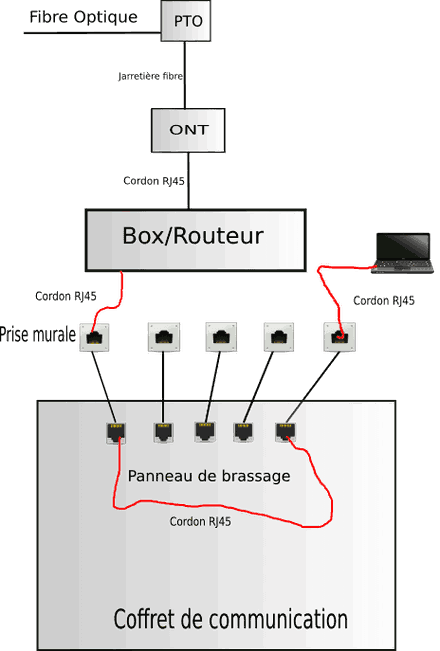
So, disconnect your cables from the DTI and connect them to patch panels instead, following the diagram provided
by Jeepee (on each end).
-
-
@brupala, you need to propose the diagram with the switch ;-)
- He talked about connecting a single device (console) to the box,
but here is the diagram to connect several at the same time via a switch: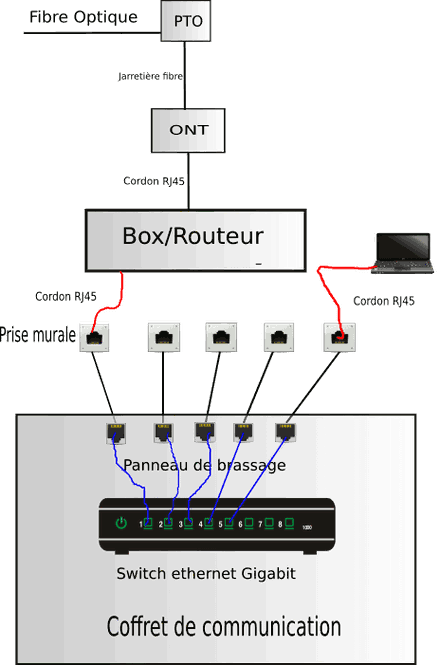
- RJ45 sockets aligned to the communication cabinet, they terminate the cables coming from the wall sockets in modern installations (look for VDI)
Check out the discussions in this forum, it's mentioned practically every time.
They don't exist in your place, to modernize your installation, you'll need to add them, it looks roughly like what is behind the blue words I put earlier, but it can take other forms.
-