USB refuses to be repaired.

Hello,
my dear friends
I have a faulty USB key, but when I try to repair it using the AOMEI PARTITION software, this message appears on my screen,
(Sorry, the ongoing operation has been canceled!
Error code: 6
Description: The partition table update failed because the table is locked by other programs. Please close other programs before trying again.
What does the code information mean? Please refer to: https://www.diskpart.com/fr/help/errorcode.html )
I don't understand what this message means, please explain it to me and thank you in advance.
Best regards,
my dear friends
I have a faulty USB key, but when I try to repair it using the AOMEI PARTITION software, this message appears on my screen,
(Sorry, the ongoing operation has been canceled!
Error code: 6
Description: The partition table update failed because the table is locked by other programs. Please close other programs before trying again.
What does the code information mean? Please refer to: https://www.diskpart.com/fr/help/errorcode.html )
I don't understand what this message means, please explain it to me and thank you in advance.
Best regards,
5 answers
-
ModeratorHi,
Try running a chkdsk on the drive (Respond Y to close the instances) -
thank you fabul,
but how can I run chkdsk on the USB drive, I'm a beginner in this area -
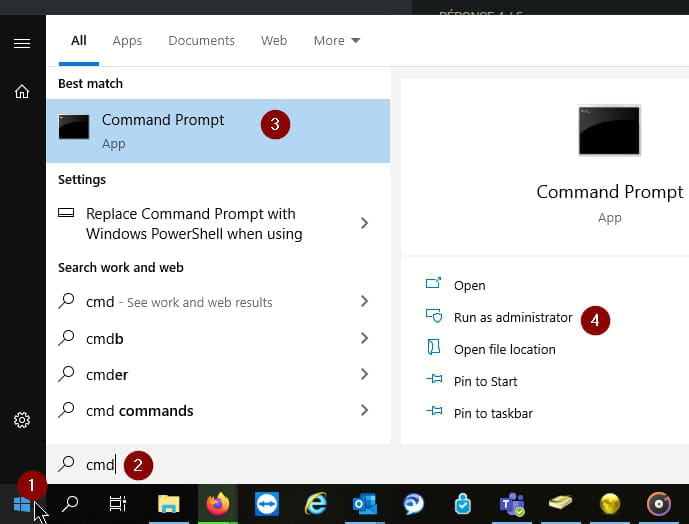
ModeratorWith the command prompt as administrator (CMD.exe), do a search
Change x to the drive letter
chkdsk /f x:
Answer Y
This should stop the processes that have access to the drive -
Thank you dear Fabul for your effort, but unfortunately I can't understand what you explained to me. I need a tutorial or a video.
Sincerely, -
ModeratorYou need to close a program that is accessing the key.