
Word: how to create an automatic page break
helene1009
Posted messages
55
Status
Member
-
m@rina Posted messages 27782 Registration date Status Moderator Last intervention -
m@rina Posted messages 27782 Registration date Status Moderator Last intervention -
Hello
is it possible and if so how to make an automatic page break in Word?
I need to make a presentation with no more than 30 lines per page
How do I insert a page break every 30 lines?
Thank you for your help
is it possible and if so how to make an automatic page break in Word?
I need to make a presentation with no more than 30 lines per page
How do I insert a page break every 30 lines?
Thank you for your help
3 answers
-
Hello.
No, that doesn't exist.
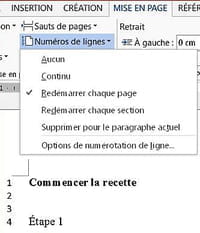
However, you can do PAGE LAYOUT / Line Numbers;
so when you get to line 30, you insert your page break.
Retirement is great! Especially in the Caribbean...
Raymond (INSA, AFPA) -
Good evening!
I'm not sure if you can set one up according to your criteria, but you can always count the number of lines per page and insert one manually (Insert>Page break)...
Good luck! -
Good evening,
You just need to change the margins.
You create a text with the desired font, as well as the left and right margins.
Then, you manually adjust the top and/or bottom margin to get to 30 lines.
This way you know at what level you need to set your margins, and the page break will occur automatically.
For your information, to generate dummy text, you do as explained here:
https://faqword.com/index.php/word/8-environnement/351-comment-generer-du-faux-texte
m@rina
--
Can we read my responses in full????

