
DOCP issue RAM 3600 MHz
ElBombero_1533
Posted messages
4
Status
Member
-
jumulka Posted messages 12090 Registration date Status Member Last intervention -
jumulka Posted messages 12090 Registration date Status Member Last intervention -
Hello everyone.
First of all I am new to computing and I know very little, but I recently bought the following setup:
AMD Ryzen 7 5700G
Asus TUF B550-Plus Gaming
Vengeance Corsaire 3600 MHz
My problem is that I tried to use the ram’s full potential and therefore enable DOCP in the Asus BIOS.
The problem is that firstly the change doesn’t apply and I remain at 2666 MHz and the second is that when I restart the PC, it reboots 3 times and shows me a page saying there is an error, making Windows boot impossible.
I still can’t find a solution; I tried updating the BIOS but with no result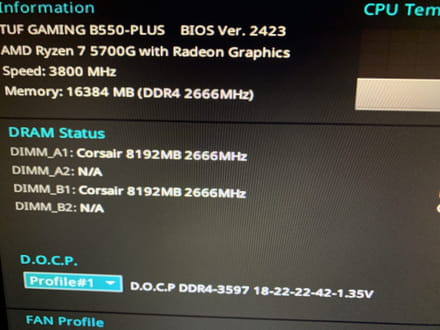 .
.
Hoping to find a solution.
Thank you for your help and have a good day
First of all I am new to computing and I know very little, but I recently bought the following setup:
AMD Ryzen 7 5700G
Asus TUF B550-Plus Gaming
Vengeance Corsaire 3600 MHz
My problem is that I tried to use the ram’s full potential and therefore enable DOCP in the Asus BIOS.
The problem is that firstly the change doesn’t apply and I remain at 2666 MHz and the second is that when I restart the PC, it reboots 3 times and shows me a page saying there is an error, making Windows boot impossible.
I still can’t find a solution; I tried updating the BIOS but with no result
 .
. Hoping to find a solution.
Thank you for your help and have a good day
8 answers
-
It’s better to leave your RAM in auto, at 2666MHz there’s no perceptible performance difference anyway, your processor uses an integrated chip that takes its memory from the PC’s main memory. The room for maneuver with this type of CPU isn’t the same as with a graphics-chip-free one.
--
Signature
Euskadi Ta Askatasuna -
Use CPU-Z and post screenshots of the Memory and SPD sections.
--
Misnaming things adds to the misfortune of the world (Albert Camus) -
Hi
Is it normal that your RAM kit runs at this frequency of 2666MHz because this is its JEDEC configuration (table from the 3rd photo; these are the real frequencies, so 1333x2=2666; this one being the commercial frequency)
If you want to bring the frequency to 3600MHz, you need to choose in the BIOS the RAM profile "XMP" (right column of the table).
It's found in the RAM settings pages in the BIOS.
Do not change anything else, and if it causes problems, revert. In any case you won't notice any performance difference (and your CPU won't handle RAM beyond 3200MHz anyway)
--
Signature
Euskadi Ta Askatasuna -
You have the latest BIOS version. Normally your motherboard can handle up to 4600MHz, so 3600MHz should work. There might be several XMP profiles and you’re not choosing the right one. Otherwise, you can try a manual adjustment.
--
Naming things poorly only adds to the world's misfortune (Albert Camus)-
Hello
Thank you for your responses. After trying to set the RAM in "XMP" profiles, when I restart my PC it reboots 3 times and an error message "American Megatrends" appears on the screen. I think the tweak doesn't work and I have to reset the BIOS to default to return to my desktop.
Do you have a solution?
Thank you for your help.
-
-
Do you save the changes before exiting the BIOS? What is the model of the Corsair Vengeance kit?
--
Misnaming things adds to the world's misfortune (Albert Camus) -
I wanted to see if there were people who had problems with these memory sticks. Indeed, there are, even though for the majority it works without issues:
https://www.amazon.fr/Corsair-VENGEANCELPX16GB-Pc4-28800-C181-35V-M%C3%A9moire/dp/B07RM39V5F#customerReviews
If you bought them on Amazon.fr, they refund or exchange easily.
--
Misnaming things adds to the world's misfortune (Albert Camus) -
Hello,
any idea, we need to see if there is an option in the BIOS that allows choosing whether the memory is managed by the motherboard or the CPU
otherwise sometimes the RAM or the motherboard cannot overclock without knowing why. -
I don’t recall there ever being a time when there could be a memory controller in the motherboard (MB) and, at the same time, a memory controller integrated into the CPU. In my memory, we moved from memory controllers on the MB to memory controllers built into the CPUs.
--
Misnaming things only adds to the world’s misfortune (Albert Camus)

