Realtek High Definition Audio Missing from Device Manager
Hello
Since a repair (updates and disinfection as well as hardware interventions with soldering to be redone), I have no sound anymore (sound icon has a red cross). I own an ASUS Windows 10 R558UQ laptop.
I noticed that Realtek was no longer installed. I have just reinstalled it on C: but it still does not work as it does not appear in the device manager.
1) Sound icon > Troubleshoot problems > No problems found, then when I look in detail, it identifies a device problem but without further information
2) Right-click on sound icon: Speaker configuration (Unknown)
3) Device manager > Audio, video and game controllers: Realtek is not recognized.
4) Settings>SOUND: No output or input device detected
If you have any ideas...Thanks in advance.
Since a repair (updates and disinfection as well as hardware interventions with soldering to be redone), I have no sound anymore (sound icon has a red cross). I own an ASUS Windows 10 R558UQ laptop.
I noticed that Realtek was no longer installed. I have just reinstalled it on C: but it still does not work as it does not appear in the device manager.
1) Sound icon > Troubleshoot problems > No problems found, then when I look in detail, it identifies a device problem but without further information
2) Right-click on sound icon: Speaker configuration (Unknown)
3) Device manager > Audio, video and game controllers: Realtek is not recognized.
4) Settings>SOUND: No output or input device detected
If you have any ideas...Thanks in advance.
Related links:
- High Definition Bus Audio Device
- High Definition Bus Audio Peripheral Prob
- Audio device driver download for high definition audio bus
- Potentially Unwanted Software - Realtek High Definition Audio Driver
- Realtek High Definition Audio not working
- installation issue with IDT high definition audio codec
12 answers
-
ModeratorHello,
Press Windows + R
Type --> winver and OK
What's the version?
Example image: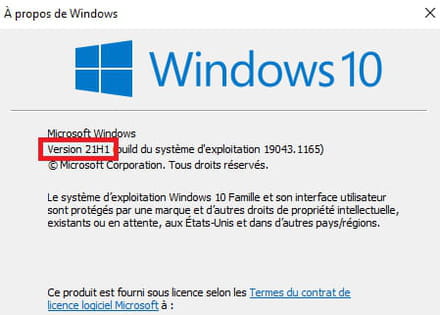
--
Human beings are at their best when things are at their worst. -
I just switched to 21h1
I tested the sound on a Ubuntu USB stick. Impossible to get the sound/speaker to work. The lspci and lsusb do not detect a Realtek sound card.
The graphics card sound works via HDMI.
The controller card I handled (without ever disconnecting the ribbon cable) seems intact and the USB port works. Adding a headset to the USB port doesn't change anything (no sound). -
ModeratorWindows key + X
Device Manager
Do you have a section --> other devices?
What do you have under audio, video, and game controllers?
--------------------------------------------------------------------------
Try this driver --> Realtek
--
Human beings are at their best when things are at their worst. -
It's been 2 weeks since I tried to install Realtek. It is indeed installed but it is not recognized by the device manager, which only contains "Intel sound for screen."
-
ModeratorDo you have a section --> other devices?
Do you have a device alert in --> System devices, namely audio controller?
Example image: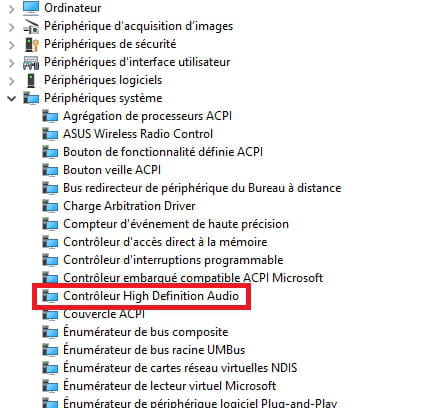
-
No alerts at this level.
-
ModeratorDownload and install --> Revo Uninstaller
Launch it as an administrator
Uninstall --> Realtek High Definition Audio Driver
Carefully follow the tutorial to completely uninstall including residual folders and keys.
For the residual scan, check advanced mode.
Restart the PC.
Try these 2 drivers from the manufacturer's website:
--> Chipset
--> Realtek
--
Human beings are at their best when things are at their worst. -
I'm already using Revo Uninstaller...
I went through the procedure again for the 10th time, this time with the chipset, but nothing changes. -
for me the problem is hardware
-
ModeratorReinstall Windows cleanly.
--> How to install Windows 10
--
Human beings are at their best when things are at their worst. -
I followed the procedure described below with the media creation tool to reinstall Windows 10. But the problem persists. I install Realtek audio but it is never detected in my device manager.
https://lecrabeinfo.net/reparer-windows-10-sans-perdre-ses-donnees.html -
Moderator
interventions on the hardware with soldering to be redone
Check the connections and solder joints?
If everything is correct, the board may be defective.
--
Human beings are at their best when things are at their worst.