
McAfee display glitch
SolvedGood evening forum,
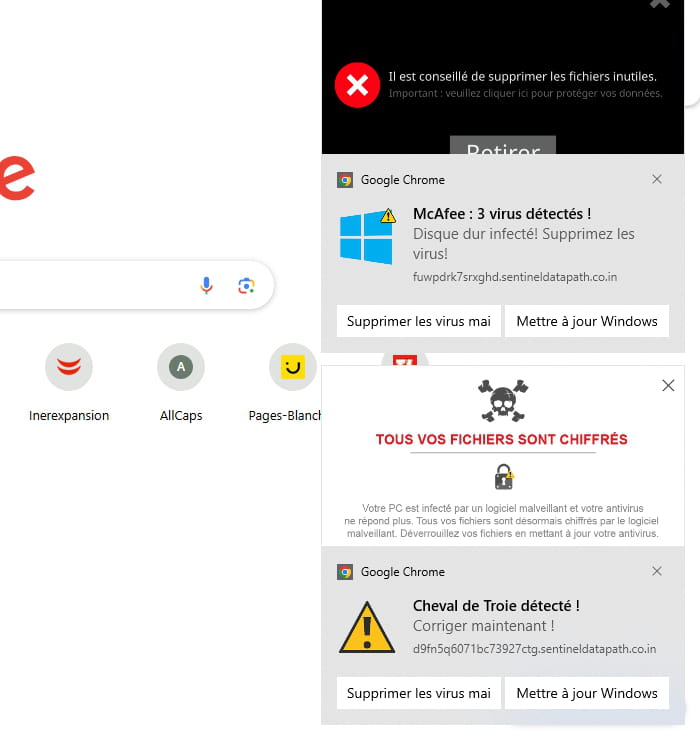
Since this morning, I’ve been battling with this window that appears on the right side of my screen (see attached screenshot) and I can’t get rid of it.
Is it a virus?
Could someone give me the solution to remove this window?
Thanks in advance.
JF
4 answers
-
I forgot the attached file...
-
ModeratorHello, or good evening,
These are the parasite Browser Notifications that you have registered in your browser.
You can delete them via your browser's Security & Privacy settings.
Or run a full scan; the notifications can be found in the #5 tab of RegRun Reanimator (Search Settings)
https://forums.commentcamarche.net/forum/affich-38206831-alors-vous-voulez-supprimer-les-virus-vous-meme-comment -
Moderator
Hello.
According to the screenshots these are nuisance notifications that you have recorded in Google Chrome.
Two solutions are available to you.
- Either delete the nuisance notifications yourself, read this page.
- Or reset the concerned browser manually or with Reset Browser.
bazfile
Moderator/Security Contributor.
a hello, a response, a thank you always pleases. -
Hello,
Thank you for your responses.
I just mended things for myself before reading your messages.I went into my browser settings and reset the settings. That was enough to make that annoying window disappear. Until next time...
JF
-
Hello,
This will surely happen again except
by blocking all notifications in Chrome
https://thierryvanoffe.com/google-chrome-activer-desactiver-les-notifications/?srsltid=AfmBOophaNAIDy5EGtdxK_dbAmIcT_GnFu73Fs7IH0KwvcpNduqWBiJB
or by installing a script-manager extension that blocks by default and allows temporary or permanent (reversible) permission for what we want
https://noscript.net/getit/ -
-

