Text files no longer open with Notepad.
Solved
jld272
-
kaneagle Posted messages 86295 Registration date Status Moderator Last intervention -
kaneagle Posted messages 86295 Registration date Status Moderator Last intervention -
Bonjour, voici comment changer l'application par défaut pour ouvrir les fichiers .txt avec le Bloc-notes sous Windows 7 :
1. Cliquez avec le bouton droit sur un fichier .txt.
2. Sélectionnez "Ouvrir avec" dans le menu contextuel.
3. Choisissez "Choisir le programme par défaut...".
4. Dans la fenêtre qui s'ouvre, sélectionnez "Bloc-notes" dans la liste des programmes. Si ce n'est pas visible, cliquez sur "Parcourir..." pour trouver le fichier "notepad.exe", généralement situé dans `C:\Windows\System32`.
5. Assurez-vous de cocher la case "Toujours utiliser ce programme pour ouvrir ce type de fichier".
6. Cliquez sur "OK" pour appliquer le changement.
Cela devrait vous permettre d'ouvrir les fichiers .txt avec le Bloc-notes par défaut.
1. Cliquez avec le bouton droit sur un fichier .txt.
2. Sélectionnez "Ouvrir avec" dans le menu contextuel.
3. Choisissez "Choisir le programme par défaut...".
4. Dans la fenêtre qui s'ouvre, sélectionnez "Bloc-notes" dans la liste des programmes. Si ce n'est pas visible, cliquez sur "Parcourir..." pour trouver le fichier "notepad.exe", généralement situé dans `C:\Windows\System32`.
5. Assurez-vous de cocher la case "Toujours utiliser ce programme pour ouvrir ce type de fichier".
6. Cliquez sur "OK" pour appliquer le changement.
Cela devrait vous permettre d'ouvrir les fichiers .txt avec le Bloc-notes par défaut.
Related links:
- Windows window does not open in full screen
- My session won’t open, my password is correct.
- Windows 7 won't boot / Safe Mode hangs on Classpnp.sys
- File opening in "Notepad" instead of "PDF"
- The HP Probook 4530S WiFi is not turning on despite having all drivers installed.
- PC won't turn on, LED always on
6 answers
-
Hello,
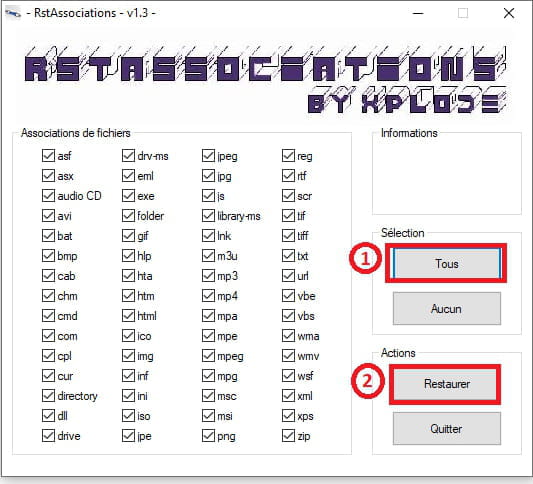
Download this --> RstAssociations Version .scr
and place it on the desktop.
Launch it
In Selection, click on --> All
In Actions, click on --> Restore
Restart the PC

-------------------------------------------------------------------------------------
If it doesn’t work, try this:
Windows key + R
Type --> regedit.exe and OK.
Follow this path:
HKEY_CURRENT_USER\Software\Microsoft\Windows\CurrentVersion\
Explorer\FileExts
Locate the extension --> .txt
In subfolders, delete --> UserChoice
Close the registry
Restart the PC.
--
Humans are at their best when things are at their worst. -
Thank you for your responses. In any case, this additional software is the only way I found to fix my problem, as after trying all your suggestions, it was ultimately rstassociation that allowed me to reopen my txt files with Notepad. The other solutions proved ineffective.
However, what is the difference between Notepad and Notepad?
When I click on a txt file, it opens with Notepad, but if I click on Notepad in "Start", "Notepad" launches Notepad++. -
Hello,
On the path as follows: https://support.microsoft.com/fr-fr/windows/changer-les-programmes-que-windows-7-utilise-par-d%C3%A9faut-62fd162f-8c82-0436-806f-c60d69dcf495
associate the .txt extension with Notepad.
If you then want to use Notepad++, you will need to right-click on the text file, open with. -
Hello,
this is like using a bazooka to kill a fly: why add another software, and if we want to continue, for example, having jpg files open in the browser or mp3 files in VLC? -
Notepad is in English.
Right-click on your broken shortcut, properties, and check the target which should be: %windir%\system32\notepad.exe -
If you don't use Notepad++, uninstall it.
--
Human beings are at their best when things are at their worst.