ARCHOS archos133 flip
lemon162
Posted messages
8
Status
Member
-
kaneagle Posted messages 86298 Registration date Status Moderator Last intervention -
kaneagle Posted messages 86298 Registration date Status Moderator Last intervention -
Hello,
I made the mistake of formatting my "ARCHOS 133 flip" tablet without backing up the driver store folder.
It's been weeks now that I've been struggling; I can't find the drivers for the tablet either on their website or anywhere else. I tried those for the ARCHOS 140 Cesium published here on CCM, but I still have other devices that aren't installed, like the touchscreen, Wi-Fi, and others. Using Microsoft Update installs everything, but nothing works, neither the Wi-Fi nor the touchscreen, so I had to reinstall Windows 10 again.
I also tried DRIVER BOOSTER and DRIVER PACK, but without success.
Please help me; I would be grateful.

I made the mistake of formatting my "ARCHOS 133 flip" tablet without backing up the driver store folder.
It's been weeks now that I've been struggling; I can't find the drivers for the tablet either on their website or anywhere else. I tried those for the ARCHOS 140 Cesium published here on CCM, but I still have other devices that aren't installed, like the touchscreen, Wi-Fi, and others. Using Microsoft Update installs everything, but nothing works, neither the Wi-Fi nor the touchscreen, so I had to reinstall Windows 10 again.
I also tried DRIVER BOOSTER and DRIVER PACK, but without success.
Please help me; I would be grateful.

8 answers
-
Hello,
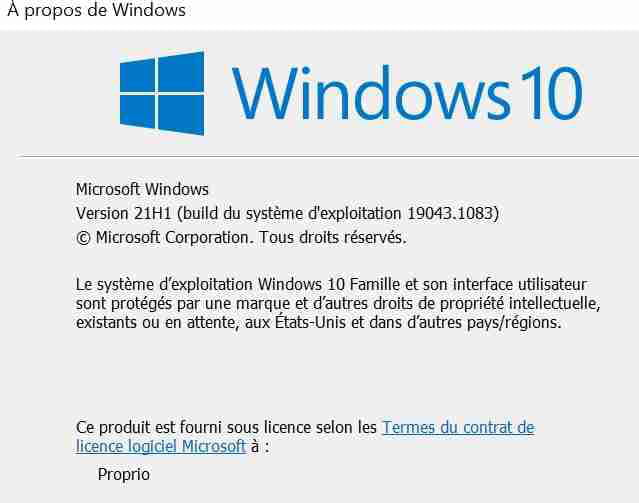
Is Windows up to date?
Press Windows + R
Type --> winver and OK
What version is it?
Example image:
--
Human beings are at their best when things are at their worst. -
Hello kaneagle, thank you for responding.
By the way, I tried the 32-bit versions of Windows 10 Pro and Home, then I read on the CCM forum that it's better to install Windows 10 LTSC for tablets.

-
Windows 10 is not up to date.
To upgrade to version 21H1:
Download this -->> MediaCreationTool21H1 <<--
Run it
Check --> Upgrade this PC now
--
Humans are at their best when things are at their worst. -
Thank you again for your response, okay I'll give that a try.
-
Hello,
Update completed, but nothing has changed; I still have the issue of missing drivers displayed on the first station :(
I don't think it's a Windows version problem.

-
Give the device identification numbers of the peripherals
Look at this --> Find the identification number of a device on PC
Post the number in your next message.
Is Windows 10 indeed 32-bit?
--
Human beings are at their best when things are at their worst. -
Hello,
SD\VID_02d0&PID_a9a6&FN_1
SD\VID_02d0&PID_a9a6
SD\VID_02d0&PID_a9a6&FN_2
SD\VID_02d0&PID_a9a6
ACPI\VEN_MSSL&DEV_1680
ACPI\MSSL1680- MSSL1680
ACPI\VEN_BMA&DEV_250E
ACPI\BMA250E- BMA250E
ACPI\VEN_BCM&DEV_2E74
ACPI\BCM2E74- BCM2E74
32-bit operating system
The drivers are for the wifi and touchscreen, which I am most interested in; the wifi driver always shows a yellow exclamation mark, I have tried several drivers without success.
Thank you very much. -
Try these drivers and install them manually:
SD\VID_02d0&PID_a9a6&FN_1--> Broadcom
SD\VID_02d0&PID_a9a6&FN_2 --> Broadcom
ACPI\VEN_MSSL&DEV_1680 --> SileadTouch
ACPI\VEN_BMA&DEV_250E --> BMA2
ACPI\VEN_BCM&DEV_2E74 --> Broadcom BT
For SD\VID_02d0&PID_a9a6&FN_1
Right click on the driver --> 3fa61174....cab
Select --> 7Zip
Choose --> extract to "3fa61174....\"
Go to device manager
Right click on the corresponding device SD\VID_02d0&PID_a9a6&FN_1
Update driver
Browse my computer for drivers
Browse
Select the unzipped driver folder --> 3fa61174....
OK, next
Do the same with the devices corresponding to the drivers.
Restart the PC.
--
Human beings are at their best when things are at their worst.