PC 2 long beeps followed by 2 short beeps at startup
Solved
amiseck
Posted messages
11
Status
Member
-
billmaxime Posted messages 50532 Registration date Status Contributor Last intervention -
billmaxime Posted messages 50532 Registration date Status Contributor Last intervention -
Hello,
My HP Probook 450 G3 won't start and stays on a black screen with 2 long beeps followed by 2 short beeps. I changed the RAM with no effect. The fan is running, the DVD drive can open, and the Wi-Fi and sound indicators are on (white). When the sound signal stops, the warning light takes over on the Caps Lock key, still with 2 longs followed by 2 shorts.
I've been searching in vain for two days.
Thank you in advance for your help.
Configuration: Android / Firefox 89.0
My HP Probook 450 G3 won't start and stays on a black screen with 2 long beeps followed by 2 short beeps. I changed the RAM with no effect. The fan is running, the DVD drive can open, and the Wi-Fi and sound indicators are on (white). When the sound signal stops, the warning light takes over on the Caps Lock key, still with 2 longs followed by 2 shorts.
I've been searching in vain for two days.
Thank you in advance for your help.
Configuration: Android / Firefox 89.0
14 answers
-
hi
Beep codes for AMI BIOS --> 2 long beeps, 2 short beeps Video memory error
the link to the page --> click here
@+
--
the radiation level is higher at the unemployment office than at Chernobyl -
Hello,
Meaning of the sound codes... https://support.hp.com/fr-fr/document/c02461514
--
ASUS ROG G752 VSK | QuadCore Intel i7 7700HQ | 32 GB-DDR4 | 2 SSD M.2 500 GB | 2 Seagate 2TB HDDs | GeForce GTX 1070M 8 GB | 17.3" screen (120 Hz) | DirectX 12 | Windows 10 (x64) -
re
it's the dedicated RAM for the graphics card
I don't have time to do a search right now (I have to leave)
check the specifications of your PC --> graphics card --> click here
@+
--
the radiation level is higher at the employment agency than at Chernobyl -
re
in addition to my previous message --> click here
I found this in the specs page:
Graphics card (integrated)
Intel HD Graphics 510 or Intel HD Graphics 520
then, depending on your CPU (processor)
Processors
Intel Core i7-6500U with Intel HD Graphics 520 (2.5 GHz, up to 3.1 GHz with Intel Turbo Boost technology, 4 MB cache, 2 cores)
Intel Core i5-6200U with Intel HD Graphics 520 (2.3 GHz, up to 2.8 GHz with Intel Turbo Boost technology, 3 MB cache, 2 cores)
Intel Core i3-6100U with Intel HD Graphics 520 (2.3 GHz, 3 MB cache, 2 cores)
Intel Core 3855U with Intel HD Graphics 510 (1.6 GHz, 2 MB cache, 2 cores)
Intel Core 4405U with Intel HD Graphics 510 (2.1 GHz, 2 MB cache, 2 cores)
See you
--
the radiation level is higher at job center than at Chernobyl -
re
the problem is that the graphics card is usually soldered onto laptops...
if it’s the card that took "1 hit", you can't do much
check with the local technician for a diagnosis, and if he can desolder and resolder a new graphics card
see ya
--
the radiation level is higher at the job center than at Chernobyl -
re
no problem for the help :)
will you be able to give news after the diagnosis of your computer?
@+
--
the radiation level is higher at the unemployment office than at Chernobyl-
Hello
a small clarification is necessary
there is no soldered graphics card
the graphics part "INTEL HD 520" is integrated into the CPU- Yes billmaxime, I read the message jfmimi and thank you for it.
This capricious machine eventually displayed and started. It then resumed its biiiiiiiip biiiiiiiiip; beep beep. I handed it back to the local technician for a thorough clean-up. It needed it because it hasn't been blown out since 2016.
I will get back to you for the next steps.
Thank you.
-
-
No problem for the help, we’re happy to hear that :)
I will get back to you for the next steps.
It’s nice, and it could be useful for other internet users
Thank you
See you later
--
The radiation level is higher at the employment office than in Chernobyl. -
re
I would say that not everyone has the same perspective...
Many people stop responding once their issue is resolved!
As jfmimi pointed out, you can already tell the technician that it’s the CPU (processor) that needs to be changed
thank you
@+
--
the radiation level is higher at the employment office than at Chernobyl -
re
in this case, the repair will go through like a letter in the mail :)
the repairman is aware of the discussion/topic and opts for the same issue
it's going to work out :)
@+
--
the radiation rate is higher at the employment office than in Chernobyl-
Hi billmaxime, jfmimi, the forum,
As agreed, here is the promised feedback.
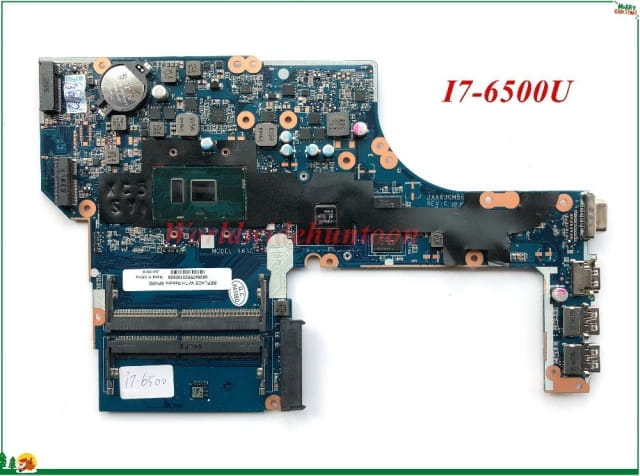
My technician informs me that the CPU is integrated into the motherboard. So, it’s impossible to replace it. We will need to find another motherboard. Which, in our tropics, is going to be quite complicated for me.
Since the machine sometimes starts when it feels like it, I'm planning to jump at the first opportunity to increase the memory allocated to the video card and decrease the resolution to see what that will yield. What do you think?
I’m attaching a model of the motherboard in question.
Thank you

-
-
hi
after a good clean-up, the pc restarts from time to time without making any beeps?
for increasing the memory dedicated to the video card, I don’t know if it will help, as it's the graphics chip itself that is damaged
without being indiscreet, how much did the pc cost when you bought it?
check the motherboard reference to buy a new one, if the pc is worth it

later
-
Good evening billmaxime, this PC that I bought second-hand has been with me for nearly 5 years without ever failing. It deserves a beautiful death and grand funerals Snif Snif. Ordering a new motherboard from Africa (Senegal) will be, as I said, complicated and quite expensive. I believe I have no choice but to find another PC.
Thank you billmaxime -
re
no problem for the help :)
if everything is okay for you, remember to mark your topic as resolved --> click here
thank you
@+
--
the radiation rate is higher at the job center than at Chernobyl -
-
hi
thank you too
good luck
see you
--
the radiation level is higher at the employment center than in Chernobyl