Poor PDF export quality
Lauralee
-
Lauralee -
Lauralee -
Hello,
I created a document in InDesign. And when I import it as a print PDF, my images are pixelated around the edges.
I'm desperate because I've tried a lot of things:
- Modifying the export settings
- Checking in Adobe Reader that the options for Line Drawings and Images are checked
- Trying to change the resolution of my images in Photoshop and then re-import them into InDesign
- Trying various tools for anti-aliasing and image smoothing in Photoshop
- Vectorizing my images in Illustrator
My images are originally 512 px pngs. I know they're not ideal for printing, but the original quality is not catastrophic, plus they are small in my document. So if you have solutions that I haven't tried yet, I would appreciate it.
Thank you in advance :)
I created a document in InDesign. And when I import it as a print PDF, my images are pixelated around the edges.
I'm desperate because I've tried a lot of things:
- Modifying the export settings
- Checking in Adobe Reader that the options for Line Drawings and Images are checked
- Trying to change the resolution of my images in Photoshop and then re-import them into InDesign
- Trying various tools for anti-aliasing and image smoothing in Photoshop
- Vectorizing my images in Illustrator
My images are originally 512 px pngs. I know they're not ideal for printing, but the original quality is not catastrophic, plus they are small in my document. So if you have solutions that I haven't tried yet, I would appreciate it.
Thank you in advance :)
4 answers
-
For printing, don't talk about pixels.. define your images by their dimensions in cm or mm and their resolution.
What are their values?
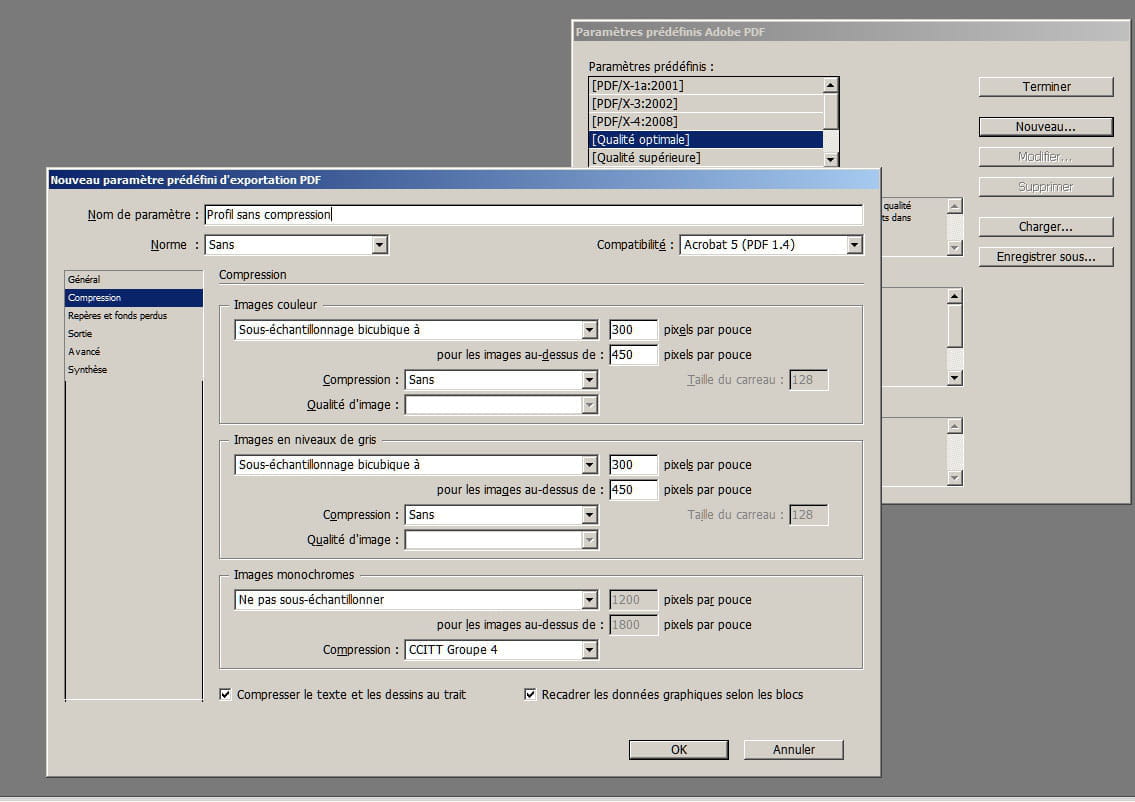
If your images are of low definition, the best is to create your PDF without any compression... -
Hello
Thank you very much for your response
My png images are 14.45/14.45 cm.
But I also have illustrator vectors that come out poorly and measure 80/70 cm.
My logo also comes out poorly even though it was made in illustrator by a graphic designer.
How to avoid any compression?-
You create a new PDF export profile
Menu "File/Adobe PDF preset/define"..
You can create a new profile or modify an existing one
You can also not downsample, which will be even better.. however, if there is no compression or downsampling, the data will be fully incorporated and you will end up with a large PDF file...
-
-
Even with this setting, it's not the best, but slightly better. Indeed, the PDF is heavier though.
I imported my images as SVG instead of PNG, and that works with a reasonable PDF size.
Thank you for your help. -
For my needs, I think that will be fine. I need a print PDF but that doesn't print, lol
Thank you for your advice.