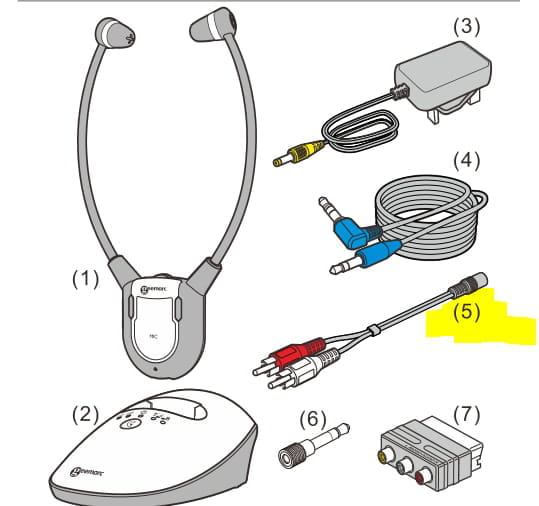
Geemarc device
Solved
nbvcxwm
Posted messages
110
Status
Member
-
nbvcxwm Posted messages 110 Status Member -
nbvcxwm Posted messages 110 Status Member -
Hello. I have a Geemarc CL7350 headset. It works very well, but when I plug it into the TV, it cuts off the sound in the room, which is inconvenient for my wife. I have the Freebox Revolution. Is there a device that can fix this problem? I contacted the Geemarc customer service, but since I didn't buy it from them, they sent me away. Thank you.
6 answers
-
Hello,
Using the headphone output on a television generally disables the speakers of the TV.
Some, however, offer, via the "sound" or "audio" menu, the option to choose whether the speakers should be turned off or not.
What are the references (brand and model) of your television?
At Geemarc, there are 2 CL 7350 models: the CL7350 and the CL 7350 opti. Which one do you have?
I suppose you have the CL7350 plain.
There are digital audio/RCA or headphone converters that can be connected either at the back of the TV box or the television itself.
Example https://www.amazon.fr/AMANKA-Convertisseur-Num%C3%A9rique-Analogique-Adaptateur/dp/B073TQYXVQ
which connects to the optical or coaxial output of the television... or to the optical output (SPDIF) at the back of the TV box.
In general, a setting in the "Sound" or "Audio" menu of the television or the TV box needs to be done to activate the optical output.
--
It’s very difficult to catch a black cat in a dark room.
Especially when it isn't there... -
Thank you Baladur 13, the TV is a Samsung, the headset and the brochure don't mention 'opti'. I don't have time for now, this afternoon I will give you more details about the TV.
-
The difference between the Cl7350 and the opti model lies in the fact that the opti model has a digital optical input and not just analog inputs Jack3.5 and RCA as is the case with the CL7350 plain.
The OPTi model could connect directly to the optical output of the boxtv or television (Samsung models generally have an optical output).
-
-
My TV does have an optical output, but my headset does not. The issue with this headset is that whether it's for the TV, the computer, or the Hi-Fi system, plugging it in cuts off the sound in the room. If I buy the converter you mentioned on Amazon, will it fix my problem?
-
If you connect the converter to the optical output of the box or the TV and the output from the converter to the headphones either with a 3.5mm jack cable or RCA cable, the sound will not be cut off on the TV.
As for the PC or the hi-fi system, new participants at the "concert", I need to know how these two new elements are connected and to whom?
For the hi-fi system, what is the brand and model?
-
-
Thank you, Baladur, I will order this converter. As for the computer, it is a Toshiba Satellite with a headphone jack output and the stereo system is a Yamaha with a jack output, and of course, for both, when I plug in the headphones, it mutes the sound in the room. Will I be able to use the converter for these two devices?
-
OK but it's actually the RX-V377 Yamaha amp
Is the AV out, RCA jacks, white (L) and red (R) red arrow in the image below
used or not?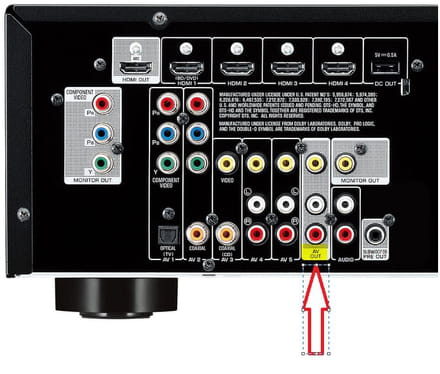
You should be able to connect your headphones with the RCA/3.5mm female jack cable
marker 5 below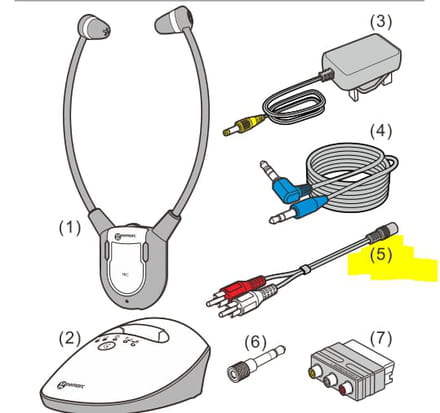
--
Very difficult to catch a black cat in a dark room.
Especially when it's not there... -
yes, the ports are free and I connected it, it works.
The computer is not essential, but why not.-
No... for the computer... I have no solution,,, unless the computer is connected via HDMI to another device..
An HDMI to RCA extractor could do the trick
Example https://www.amazon.fr/Ozvavzk-Extracteur-Convertisseur-Analogique-Adaptateur/dp/B07KYGVNPW
-