
GPU 3D at 100%
Hello,
When I play, after a certain amount of time, the 3D usage of my GPU goes to 100%.
It can happen after 2 hours, 30 minutes, or it's even possible that there are no issues during gameplay for an entire day.
Specifically, when my 3D usage hits 100%, my game drops to 15fps and then after about 10 seconds it goes back up to 75fps for 10 seconds, and so on.
All my drivers are up to date, I did it using the Nvidia software.
I have an i7, 8GB of RAM, and a 1060 (I've been using it for 3 years)
My problem is the same as this one except the final solution doesn’t resolve my issue (the "Restore" button is greyed out)
https://forums.commentcamarche.net/forum/affich-35578861-cpu-100-en-jeu
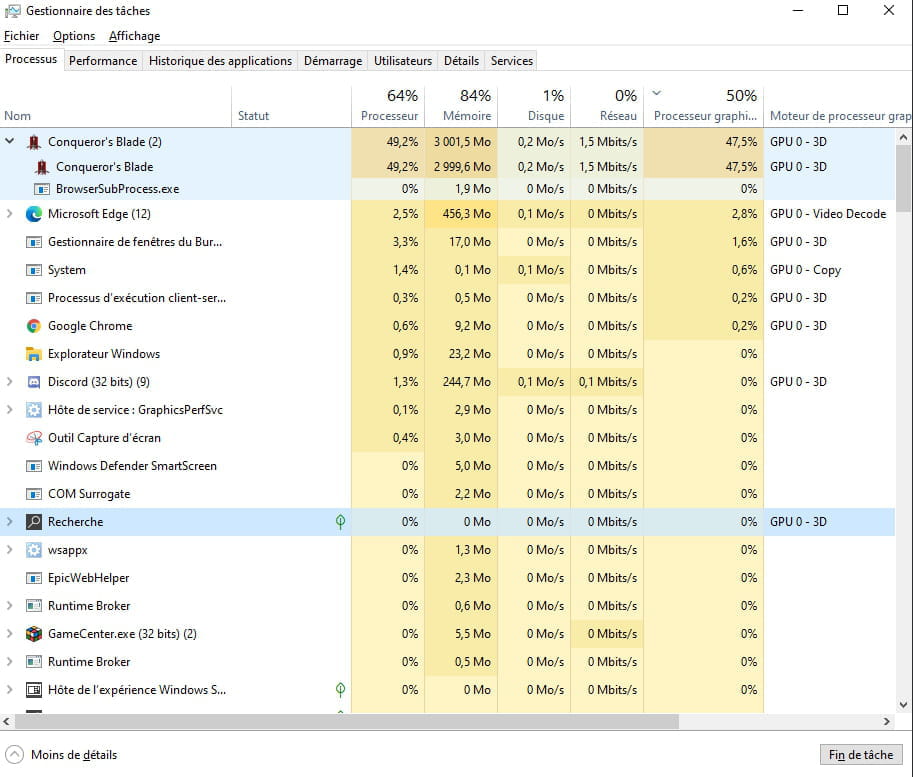
Here are some screenshots from my task manager:
3D usage graph

When the 3D usage is at 100%

When everything is working well:

When I play, after a certain amount of time, the 3D usage of my GPU goes to 100%.
It can happen after 2 hours, 30 minutes, or it's even possible that there are no issues during gameplay for an entire day.
Specifically, when my 3D usage hits 100%, my game drops to 15fps and then after about 10 seconds it goes back up to 75fps for 10 seconds, and so on.
All my drivers are up to date, I did it using the Nvidia software.
I have an i7, 8GB of RAM, and a 1060 (I've been using it for 3 years)
My problem is the same as this one except the final solution doesn’t resolve my issue (the "Restore" button is greyed out)
https://forums.commentcamarche.net/forum/affich-35578861-cpu-100-en-jeu
Here are some screenshots from my task manager:
3D usage graph

When the 3D usage is at 100%

When everything is working well:
3 answers
-
Hello,
Did you follow to the letter what is written on the Malekal Forum, which I greet by the way... https://www.malekal.com/regler-chutes-de-fps-jeux-pc/
--
ASUS ROG G752 VSK | QuadCore Intel i7 7700HQ | 32 GB-DDR4 | 2 SSD M.2 500 GB | 2 Seagate 2TB HDD | GeForce GTX 1070M 8 GB | 17.3" screen (120 Hz) | DirectX 12 | Windows 10 (x64)

