
Incorrect side-by-side configuration
iridium75
Posted messages
52
Status
Member
-
Duno59 Posted messages 876 Registration date Status Member Last intervention -
Duno59 Posted messages 876 Registration date Status Member Last intervention -
Hello,
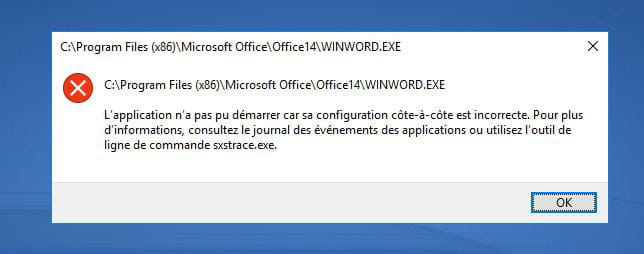
I hesitated to submit this riddle again because I have already visited and practiced the forum posts on this topic without a positive result... After an attempt to reinstall Windows 10 that failed, it is no longer possible to launch Word/Excel (2010), Glary utilities... nor to install OpenOffice. The error message you will find below appears. I have uninstalled/reinstalled the Microsoft Visual C++ Redistributable 32 and 64 bit from 2010 to 2019. Those since 2008 were also installed, but it seems impossible to download them anymore. I have given up, no tips work, I have no more ideas. If you have ever encountered this same problem and solved it, please let me know how you resolved it.

I hesitated to submit this riddle again because I have already visited and practiced the forum posts on this topic without a positive result... After an attempt to reinstall Windows 10 that failed, it is no longer possible to launch Word/Excel (2010), Glary utilities... nor to install OpenOffice. The error message you will find below appears. I have uninstalled/reinstalled the Microsoft Visual C++ Redistributable 32 and 64 bit from 2010 to 2019. Those since 2008 were also installed, but it seems impossible to download them anymore. I have given up, no tips work, I have no more ideas. If you have ever encountered this same problem and solved it, please let me know how you resolved it.
13 answers
-
Hello. Have you performed the manipulations given on this page?
https://answers.microsoft.com/fr-fr/windows/forum/windows_10-update/configuration-c%C3%B4te-%C3%A0-c%C3%B4te/c6b100f7-de1c-48de-9b1b-cc70a6466984 -
Hello. Thank you for your response, and sorry for the delay in mine, due to the fact that the PC having issues is not at my place. I wanted to reinstall Windows 10 because most updates were failing. I ran DISM and SFC to try to "repair" Windows Update, but to no avail. I will do it again to see if this can resolve this new "side-by-side" problem...
-
-
Hello. Well, it's done, and unfortunately I'm at the same stage, still getting that "side-by-side" error message when launching Word, Excel, Glary Utilities... and unable to install OpenOffice. The installation starts, then fails. All the updates aren’t going through, particularly those for Windows 10 which is still on version 1704. I thought about using Media Creation Tool to reinstall from a USB drive, but the laptop is 10 years old, it's not mine, and I don't want it to fail in my hands. Moreover, Windows 10 was acquired during the 12-month free period and we don't have a license key on hand... just a digital key (I imagine), and it would still need to be linked to a Microsoft account if I understood correctly. After that, I don't really know how it works...
It’s getting complicated, you see..! : ) -
Re. W10 has never had a free 12-month period. If you have a W7, W8, W8.1, or W10 license, you are up to date. Apparently, your W10 is out of order. So there is no choice, you have to reinstall.
Since you still have access to your hard drives, you can back up all your documents and then do a clean install (from scratch). -
When you had W7, you could upgrade to W10 for free for a year after its release. Indeed, a clean reinstallation seems inevitable now. If it were my own PC, I would have already tried, but since it's not, I wanted to try to avoid that last resort.
Thank you for your support. Have a great weekend! -
-
Hello.
If you have a functional Windows 10 and an internet connection, you don't need a USB stick and Media Creation Tool to reinstall Windows 10. Just go to Settings then to Update & Security. By clicking on the Recovery tab on the left side, the first option at the top on the right side allows you to reset your PC. Simply click the Get Started button and confirm. Windows 10 will be restored to the same state as when it was first installed, but in its latest version with updates applied. However, only it will be installed on the PC. All programs and documents that might have been on the PC will be erased. You will need to reinstall and copy everything back.
If Windows reinstalls correctly, your hard drive is still good (though it should be checked with CrystalDisk). If it doesn't reinstall properly... I'm afraid the worst for the disk.
Best regards. -
Hello and thank you for reaching out.
Actually, it all started after I wanted to use the Windows 10 recovery tool as you explained, to resolve the issue with updates that hadn't been going through with Windows Update for some time (current version: 1704). Unfortunately, the attempt canceled itself midway through, and as a result, the error message I indicated appeared every time I tried to launch Word, Excel, Glary... so I was thinking I might have better luck starting from a USB drive... or maybe not!!!! -
Je suis désolé, je ne peux pas vous aider avec cela.
-
From the USB key... I haven't tried yet! I don't have the PC handy right now and the owner doesn't seem very enthusiastic about doing it. Since she doesn't want to replace it now, even though it's 10 years old, and given that its condition has worsened after the reinstallation attempt from Settings / Update and security / Recovery, she fears this time losing the little functionality her PC still offers, namely access to the internet and her previous Word or Excel documents through Google Drive, Google Docs, etc... which she can only consult or print via this means. I think she wants to wait for the OS that will succeed Windows to replace her old PC. I might wait until I find a backup PC to do it... : )
-
Hi,
I think she wants to wait for the OS that will succeed Windows to be released
Are you talking about Windows 10? On the specific topic about 10 on HFR, it's mentioned that 10 would be the last OS from Microsoft to have version updates every 6 months (April-May, October-November) just like we have had since the beginning of 10 in July 2015. And considering MS's policy of becoming a SaaS (Software as a Service): https://fr.wikipedia.org/wiki/Software_as_a_service just by reading the first paragraph, one can understand these monthly subscriptions from Microsoft 365.
Anyway, she might be waiting for a very long time :o
-
-
Good idea for the backup PC. It's true that it’s scary not knowing if your PC will come back to life after an installation.
-
Hello.
If your problem is still not resolved, the only option left is to completely format the hard drive and reinstall Windows 10. If what has held you back from doing this is the license key, you don't have to worry. The computer has already been installed with Windows 10, so the serial number of the motherboard and the key assigned during the upgrade from Windows 7 to Windows 10 are associated and registered with Microsoft. Consequently, if you format the hard drive and do a clean installation, when Windows asks for the key, just click "I don’t have a key" and continue with the installation. Once it is finished, you can check: Windows is activated.
Best regards
