
Very slow scanning with HP Smart
yannld-110
Posted messages
8
Status
Member
-
yannld-110 Posted messages 8 Status Member -
yannld-110 Posted messages 8 Status Member -
Hello,
I have an HP ENVY 4525 (all-in-one) printer that is connected via my home network, using WIFI, and it seems to work fine.
When I want to scan a document, I open HP Smart and select the "Scan" option. The initial window opens, and when my document is ready, I click the "Scan" button.
And there I wait about 3 minutes to get a preview of my document, which I can normally save as a PDF or JPEG.
Since the waiting time is the same for each request, I wouldn't want to have twenty pages to scan, as happens to me sometimes.
My setup: Windows 10, 8GB of RAM, hundreds of GB free on the disk, and all necessary antivirus, cleaning, defragmentation tools.
Is this scanning speed normal? Is there nothing I can do about it? And if not, is HP that bad in performance?
Thank you for your help.
I have an HP ENVY 4525 (all-in-one) printer that is connected via my home network, using WIFI, and it seems to work fine.
When I want to scan a document, I open HP Smart and select the "Scan" option. The initial window opens, and when my document is ready, I click the "Scan" button.
And there I wait about 3 minutes to get a preview of my document, which I can normally save as a PDF or JPEG.
Since the waiting time is the same for each request, I wouldn't want to have twenty pages to scan, as happens to me sometimes.
My setup: Windows 10, 8GB of RAM, hundreds of GB free on the disk, and all necessary antivirus, cleaning, defragmentation tools.
Is this scanning speed normal? Is there nothing I can do about it? And if not, is HP that bad in performance?
Thank you for your help.
3 answers
-
Good evening
see if the resolution is not too high (300 should be enough)-
Good evening "yclik" and I'm sorry for taking so long to respond. In fact, I was waiting for an email that would have notified me of a possible contact... I was wrong.
No, the definition is not an issue either, because from the start, the machine takes this time to give me control and I am set to 200 dpi by default anyway. Thank you.
-
-
Good evening
try the "scan" app from W10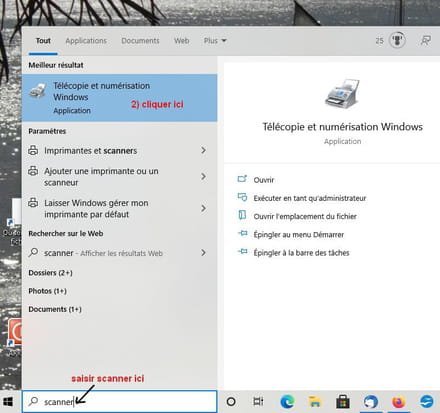
-
Good evening
and again, sorry for the delay :)
Especially since using Windows scanning is 3 or 4 times faster than with HP.
Conclusion: HP is really useless when it comes to scanning and, in the end, I don't care much. You made me aware of this solution, which is public anyway.
Thank you very much for your help.

