
Computer not detecting my Brother DCP-153C printer
Emma2003
-
billmaxime -
billmaxime -
Hello,
I bought a new HP computer yesterday. Today I'm trying to print a document, but my computer can't find my Brother DCP-153C printer.
The USB cable of the printer works, and the USB port of my computer also works.
The printer works perfectly with other devices and when making copies.
I tried to search for the printer, but nothing.
Thank you in advance for contacting me if you've ever experienced this problem or if you have a solution to share with me.
Have a nice day.
I bought a new HP computer yesterday. Today I'm trying to print a document, but my computer can't find my Brother DCP-153C printer.
The USB cable of the printer works, and the USB port of my computer also works.
The printer works perfectly with other devices and when making copies.
I tried to search for the printer, but nothing.
Thank you in advance for contacting me if you've ever experienced this problem or if you have a solution to share with me.
Have a nice day.
47 answers
- 1
- 2
- 3
Next
-
Hello, have you installed the drivers?
Attention, when installing, only connect the printer via USB when prompted.
-
Thank you very much for your response, I have installed the drivers and I can now detect my printer.
But when I try to start a print job, the computer indicates an error (in the print queue). -
In the queue, if you click on printer then cancel all documents, will it be erased?
Otherwise, once canceled, restart the PC and then try a new print.
-
Thank you again for your reply, the documents in the queue are being deleted but I tried to restart and start over but a notification still shows an error.
-
What kind of error?
--
Security contributor. -
I am sending you a photo; I don't know if you can see it.
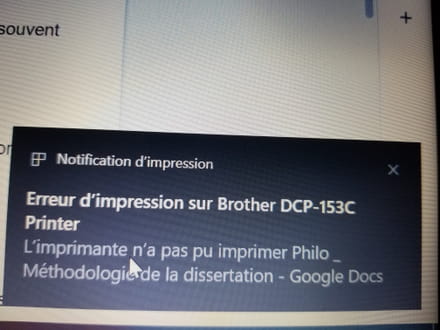
-
RE_
it doesn't say much :(
Do this:
=> In Cortana / search, type printers
=> Click on Printers and scanners
=> Click on the printer => Manage
=> In printer status, what does it say?
--
Security contributor. -
-
and next to it?
For example, for mine (it's off)
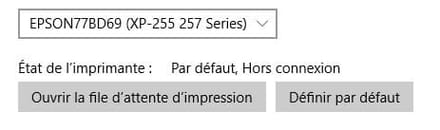
If it says offline while it is on, there is still a problem
--
Security contributor. -
Next to it, there was nothing
There was just the default. -
Try launching the troubleshooter just below
-
-
RE_
Try launching a print job, and if you get the error message like above, click on it; it should open a window with more information.
Have you checked on the printer to see if there’s a message or a warning light on?
--
Security contributor. -
When I click on the message, it opens the print queue.
No, the printer doesn't display any message, and what's even more curious is that it works with another computer. -
Try to start the status controller and see if the printer is noted as ready.
Click on start => In the programs, look for brother => Status controller
--
Security contributor. -
-
RE_
No, start is the Windows button at the bottom left, then look in the list of programs for brother => Status monitor
--
Security contributor. -
Alright, thank you very much
I don't have brother in the list of programs -
RE_
It's weird :(
Try:
=> In Cortana / search, type print
=> Click on Printers and scanners
=> Click on the printer => Manage
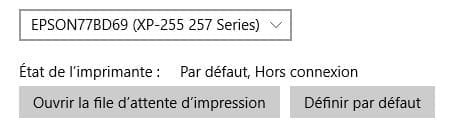
=> Click on print preferences and take a photo
--
Security contributor. -




- 1
- 2
- 3
Next