Unable to send emails over mobile data on Galaxy S10 with Free...
Solved
DoBargi
-
Pierr10 Posted messages 13860 Registration date Status Moderator Last intervention -
Pierr10 Posted messages 13860 Registration date Status Moderator Last intervention -
Hello everyone!
I already posted this issue on another forum on 11/22/2020... without any reactions or responses. I don’t know if it was posted correctly.
I am a new member of the site. I check it quite often for its relevant help!
Here's my problem that unfortunately Free and FreeMobile support have not been able to resolve.
I have a Galaxy S10 that I am extremely satisfied with.
Two days ago, I couldn't send emails through the Free mailbox using mobile data. It works fine on Wi-Fi.
I tested it with my wife's iPhone... same observation!
Here are the settings entered in the server settings:
Email Address: d-.b--------@free.fr
Username: d-.b--------
Password: provided by Free
Incoming Server
Imap.free.fr
No security
Port 143
Imap path prefix: optional
Outgoing Server
smtp.free.fr
No security
Port 587
Authentication required to send emails: not enabled
I searched a bit before calling Free...
I activated authentication on the phone and tried to send an email
----> Message: "UNABLE TO VERIFY THE ACCOUNT
The username or password is incorrect, POP3/IMAP access is not enabled for this account. Check your email account settings on the web, then try again."
I checked the password in Free's docs: Ok
I checked on the management interface of my Freebox account, section My Freebox - Advanced features, "Blocking outgoing SMTP protocol" was indeed activated.
I disabled it, ensuring that authentication required was of course disabled on the smartphone...
Nothing worked. I reactivated this feature.
I then modified the various settings... Imap/Smtp/Port on the phone's settings... Nothing worked as I wanted.
One last precision, I am on Zimbra for my mail configuration.
I called Free Mobile support who directed me to Freebox support since they couldn't help. The person from Freebox support, after consulting their supervisor, simply told me that there was currently a bug with FreeMobile emails?
I really have a hard time believing that, because unlike other interactions I've had with Free support, they didn’t ask me for specifics about the malfunction. Moreover, on the forums "Freenews" or "Univers Freebox", it doesn't seem to me that this issue is being discussed.
Here's my problem! It’s not a big deal with everything happening today, but if you could reassure me and help me, it would be greatly appreciated.
See you soon
DoBargi
I already posted this issue on another forum on 11/22/2020... without any reactions or responses. I don’t know if it was posted correctly.
I am a new member of the site. I check it quite often for its relevant help!
Here's my problem that unfortunately Free and FreeMobile support have not been able to resolve.
I have a Galaxy S10 that I am extremely satisfied with.
Two days ago, I couldn't send emails through the Free mailbox using mobile data. It works fine on Wi-Fi.
I tested it with my wife's iPhone... same observation!
Here are the settings entered in the server settings:
Email Address: d-.b--------@free.fr
Username: d-.b--------
Password: provided by Free
Incoming Server
Imap.free.fr
No security
Port 143
Imap path prefix: optional
Outgoing Server
smtp.free.fr
No security
Port 587
Authentication required to send emails: not enabled
I searched a bit before calling Free...
I activated authentication on the phone and tried to send an email
----> Message: "UNABLE TO VERIFY THE ACCOUNT
The username or password is incorrect, POP3/IMAP access is not enabled for this account. Check your email account settings on the web, then try again."
I checked the password in Free's docs: Ok
I checked on the management interface of my Freebox account, section My Freebox - Advanced features, "Blocking outgoing SMTP protocol" was indeed activated.
I disabled it, ensuring that authentication required was of course disabled on the smartphone...
Nothing worked. I reactivated this feature.
I then modified the various settings... Imap/Smtp/Port on the phone's settings... Nothing worked as I wanted.
One last precision, I am on Zimbra for my mail configuration.
I called Free Mobile support who directed me to Freebox support since they couldn't help. The person from Freebox support, after consulting their supervisor, simply told me that there was currently a bug with FreeMobile emails?
I really have a hard time believing that, because unlike other interactions I've had with Free support, they didn’t ask me for specifics about the malfunction. Moreover, on the forums "Freenews" or "Univers Freebox", it doesn't seem to me that this issue is being discussed.
Here's my problem! It’s not a big deal with everything happening today, but if you could reassure me and help me, it would be greatly appreciated.
See you soon
DoBargi
5 answers
-
Hello,
Same observations! I'm doing more tests.
--
What is well conceived is clearly expressed,
And the words to say it come easily.
(Boileau) -
Hello Pierr10
Thank you and unfortunate to see that I am not the only one.
I found this online:
http://jc.etiemble.free.fr/abc/index.php/trucs-astuces/configurer-smtp-free-fr
It seems that since 2/11, you need to "enable SMTP authentication which is optional if the connection used is a Freebox subscription.
This option is clearly intended for sending emails from a connection that belongs to a different operator.
<underline>However, it will be mandatory from the Free mobile network. (02/11/2020)
For security reasons, it is now necessary to enable the authenticated SMTP option on your @free.fr mail account if you use it from your smartphone connected to the Free mobile network."
...I went into my Freebox space... no way to find the "email management" link and the right path...
See you soon maybe for a solution...
DoBargi -
No, that's not it!
I'm using authenticated SMTP and the emails aren't going out. (To activate it, go to the Free portal and log in with your email address and account password: you'll immediately find the activation for authenticated SMTP).
The problem seems complicated.
- I asked someone who is with Free Mobile to send me an email using 4G: the email arrived successfully. So some people are not affected by this issue.
- I sent an email from my tablet, still using Free's SMTP, using my smartphone as a hotspot: Failure. It seems that the problem is more related to the 4G network than to the Samsung smartphone.
I will keep searching and ask the question in the newsgroups.
What is well conceived is clearly set forth,
And the words to say it come easily.
(Boileau) -
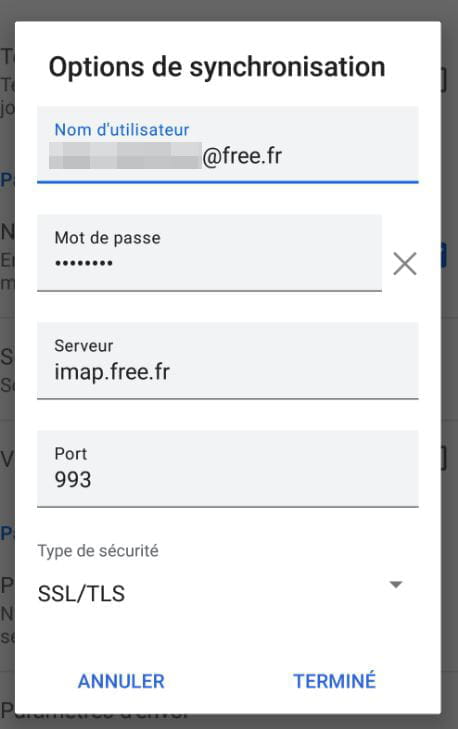
Eventually, I realized that the settings for sending my messages were not the best, even though they were going through wifi. So, I fixed everything and now the messages are sent and received.
I invite you to check the settings of your accounts as well. Here’s what I use:
For receiving:
For sending:
--
What is well conceived is clearly stated,
And the words to express it come easily.
(Boileau) -
Hello Pierr10
I proceeded as such and validated the SMTP authentication on the Free portal.
Then I configured the incoming and outgoing server settings on the Galaxy with SSL Security and Ports corresponding to what you indicated.
Finally, I have enabled "authentication required to send emails" as well as the dedicated password ...
...and it works.
Thank you very much for your help.
I consider this issue resolved!
Have a great day
DoBargi