
How to restore the warning message before "Empty Trash"
elephantInTheRoom
Posted messages
2
Status
Member
-
Pierr10 Posted messages 13860 Registration date Status Moderator Last intervention -
Pierr10 Posted messages 13860 Registration date Status Moderator Last intervention -
Hello,
I am using Thunderbird version 78.5.0 on Windows 10, and I accidentally disabled the automatic display of a warning message before executing the Empty Trash menu option. I want to restore the display of this message, but I really can't figure out how to do it.
The solution I found at https://support.mozilla.org/en-US/questions/1155312 (checking the mail.warn_on_delete_from_trash setting) doesn't work for me.
(I just saw it on the forum too:
https://forums.commentcamarche.net/forum/affich-35788119-comment-remettre-l-option-de-confirmation)
If anyone has encountered this problem and managed to solve it, thank you in advance for your help!
I am using Thunderbird version 78.5.0 on Windows 10, and I accidentally disabled the automatic display of a warning message before executing the Empty Trash menu option. I want to restore the display of this message, but I really can't figure out how to do it.
The solution I found at https://support.mozilla.org/en-US/questions/1155312 (checking the mail.warn_on_delete_from_trash setting) doesn't work for me.
(I just saw it on the forum too:
https://forums.commentcamarche.net/forum/affich-35788119-comment-remettre-l-option-de-confirmation)
If anyone has encountered this problem and managed to solve it, thank you in advance for your help!
2 answers
-
Thank you very much, bazfile, for your response:
right-click on the trash can, then choose Properties, then check the box for Show delete message.
But I do not see a box for Show delete message (neither in the General Information tab nor in the Retention Rules tab)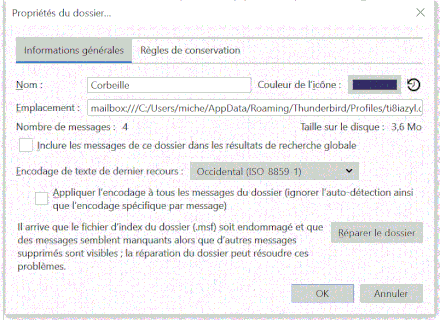
-
Hello,
Go to Tools > Options
Scroll down to the bottom of the window to Config Editor; click on it.
Click on I accept the risk
In the search box, type trash.
You will find the option mail.warn_on_delete_from_trash
In your case, the line should be in bold (indicating that there has been a change) and the value is false.
Double click on the line: The value changes to true.
Close the windows and restart Thunderbird.
What is well understood is clearly expressed,
And the words to say it come easily.
(Boileau)

