Thunderbird still not recognized as the default mail app
pia51
-
Pia51 -
Pia51 -
Hello,
I used Outlook for a long time and recently switched to Thunderbird on Windows 10. Despite all my attempts to have Thunderbird recognized as the default mail client, nothing works. Right-click "Send to... recipient" always opens Outlook. I have correctly set Thunderbird as default in "Settings / Default apps" and also for the mailto protocol. Does anyone have an idea?
I used Outlook for a long time and recently switched to Thunderbird on Windows 10. Despite all my attempts to have Thunderbird recognized as the default mail client, nothing works. Right-click "Send to... recipient" always opens Outlook. I have correctly set Thunderbird as default in "Settings / Default apps" and also for the mailto protocol. Does anyone have an idea?
19 answers
-
Hi
I was in the same situation
In Options === General === System Integration === if you click on Check now == is it checked?


-
yes. It’s checked. I’m going crazy. And it’s the same in Acrobat Reader, when I click "send," it opens Outlook...
-
It's checked fine OK but you also clicked, in the same dialog box, on Set as default?
which version of Thunderbird?
Well you still have the solution of placing a Thunderbird shortcut in the SendTo folder (send to)
Thus you will have Thunderbird in Send To
To access the SendTo folder, type in Run shell:sendto
-
-
Version 78.5.0 (64-bit)
yes, I did click (at least 100 times!)
Where do I find the SendTo folder? -
To access the SendTo folder, type in Run shell:sendto
-
ah ok. thanks.
I did... that opens Thunderbird, but without the file.
There must be something in the registry for this SendTo "Recipient" command... but I don't know where.
I looked at the registry and I have plenty of places where Outlook.exe is still indicated. This is still a dirty trick from Microsoft, this story. -
Without the file?
Are you sure?
Is it not at the top right of the email like mine?

Otherwise have you tried resetting the default values, at the bottom of Default apps? -
Oh. Sorry... I totally forgot about it. Yes, it's actually there. So it works.
Now just need to fix the Acrobat issue.
Thanks anyway for your help! -
Otherwise you tried to reset the default values, at the bottom of Default apps?
-
Yes, it doesn’t help after restoring Thunderbird to default. Right-click/send/recipient command seems permanently reserved for Outlook, it seems. Acrobat too.
-
Too vague a reply
Did you actually follow the steps described in the link I provided, namely resetting all apps to default?
Your Windows is not right in the head, because on my side I can switch Outlook to Thunderbird as default and back
A very detailed link on the topic:
https://www.malekal.com/reinitialiser-programmes-par-defaut-associations-de-fichiers-windows-10/ -
Yes, yes, I’ve reset everything. Then set Thunderbird as the default again, but nothing changes. In the registry there are clearly things that Windows doesn’t change. Even an uninstall of Outlook doesn’t solve it; there are still traces and it doesn’t get cleaned properly. It’s like the default browser you set to Chrome and IE or Edge still opens from time to time. Microsoft’s technique, you know.
-
Well then, after looking around, I finally found that what determined the right-click/Send To/Recipient was the app associated with the .MAPImail file type, which stays empty if Thunderbird is set as the default mail client. So you have to type shell:sendto, and in that folder right-click on "Recipient" "open with..." and select Thunderbird to properly associate it permanently with the .MAPImail file type.
Another solution is to create a .txt file with Notepad, rename the extension to .MAPImail and do the same, "Open with" then pick Thunderbird and check the option "Always open with this program". -
That does not explain why a click on the Acrobat Reader envelope (send) keeps opening Outlook for me...
-
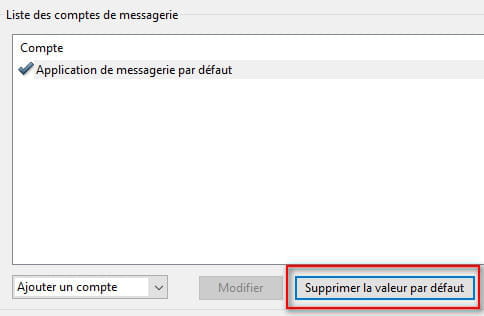
To have my default mail client taken into account, I had to go to Edit === Preferences, Mail Accounts, select Default mail application, click on Set as default (a green checkmark appears in front of Default mail application), click OK and restart Acrobat Reader

If the line is already checked, click on Remove default value and redo the procedure
- A big thank you to @Kaumune for your help. It's really kind of you. I tried, but I don't have the "Default mail app" option in Acrobat Preferences. And if I create an account, it's Gmail or another account. With a Gmail account, it opens Gmail in Chrome. I think since I removed Outlook and set Thunderbird as the default mail client, it isn't recognized... I smell that Microsoft did everything to make this complicated.
-
-
Did you really check the path (points 1 and 2) to reach this option?
Which version of Acrobat are you using?
And which version of Windows 10? Home? Pro? Up to date in 20H2? -
La 20.013.20064.
je peux pas mettre de snap d'écran, mais dans Préférences/comptes de messagerie, la liste des comptes n'indique que "Compte", rien dessous. -
The same version
The first time I clicked on the envelope, since nothing was defined, it offered me the default messaging application, I clicked Next and it opened Windows Live Mail (it's my default client on this test PC)

And that's when I set it as I explained to you
In my second screenshot at 8:01 at the bottom of the window you have set the default value or remove the default value ?
And which version of Windows 10? Home? Pro? up to date in 20H2?
Why can't you include a screenshot? -
I’m on Windows 10 64-bit Home 20H2
I do have the option “Delete default value” but it’s grayed out.
The site says you must be a member to paste an image here.
There is something new though: when I click the Acrobat envelope icon, it now offers me 2 options
“Default email application (unknown)” or “Web mail”
If I choose the first, it says “Adobe Acrobat could not connect to your email client.”
I checked all the registry keys, and they all point to Thunderbird:
- HKEY_CLASSES_ROOT\mailto
- HKEY_CLASSES_ROOT\PROTOCOLS\Handler\mailto
- HKEY_LOCAL_MACHINE\SOFTWARE\Classes\mailto
- HKEY_LOCAL_MACHINE\SOFTWARE\Classes\PROTOCOLS\Handler\mailto
I don’t understand. -
No need to be a member, but you’ll have to go through a hosting service instead of being able to paste the image directly.
How to take a screenshot
And did you click Next?
Returning to Preferences after restarting Acrobat, you still don’t have Default email application?
If I were you, I’d uninstall Acrobat and manually delete the following directories afterward:
C:\Users\your_username\AppData\Local\Adobe\Acrobat
C:\Users\your_username\AppData\LocalLow\Adobe\Acrobat
C:\Users\your_username\AppData\Roaming\Adobe\Acrobat
I would then reinstall and redo the steps at 10:32 and then at 8:01. -
Thank you again for your help;
I did a full reinstall of Acrobat, with no success.
It's not a big deal, I can live without Thunderbird integration.
Thank you a thousand times!