Fix SEC_ERROR_REVOKED_CERTIFICATE with the latest version of Firefox
Solved
Aurelien-info
Posted messages
2
Status
Member
-
pistouri Posted messages 19011 Registration date Status Contributor Last intervention -
pistouri Posted messages 19011 Registration date Status Contributor Last intervention -
Hello everyone,
I would like to post this question: because the solution "repair Firefox" didn't work in my case. I want to connect to the website https://www.IZLY.fr, a secure site, to recharge my university restaurant tickets account online in euros. There has never been a problem until now.
When I try to access the site, the message "Error code: SEC_ERROR_REVOKED_CERTIFICATE" appears.
Aside from "repairing Firefox," I have also checked the time and date on my PC.
So, if anyone thinks they have a solution, I would appreciate it, especially given the number of students using this national site. Thank you in advance.
I would like to post this question: because the solution "repair Firefox" didn't work in my case. I want to connect to the website https://www.IZLY.fr, a secure site, to recharge my university restaurant tickets account online in euros. There has never been a problem until now.
When I try to access the site, the message "Error code: SEC_ERROR_REVOKED_CERTIFICATE" appears.
Aside from "repairing Firefox," I have also checked the time and date on my PC.
So, if anyone thinks they have a solution, I would appreciate it, especially given the number of students using this national site. Thank you in advance.
3 answers
-
pistouri Posted messages 19011 Registration date Status Contributor Last intervention Ambassadeur 8 723
Hello,
Open Firefox
Go to the menu, which is the three horizontal lines at the top right.
Click on ► Options
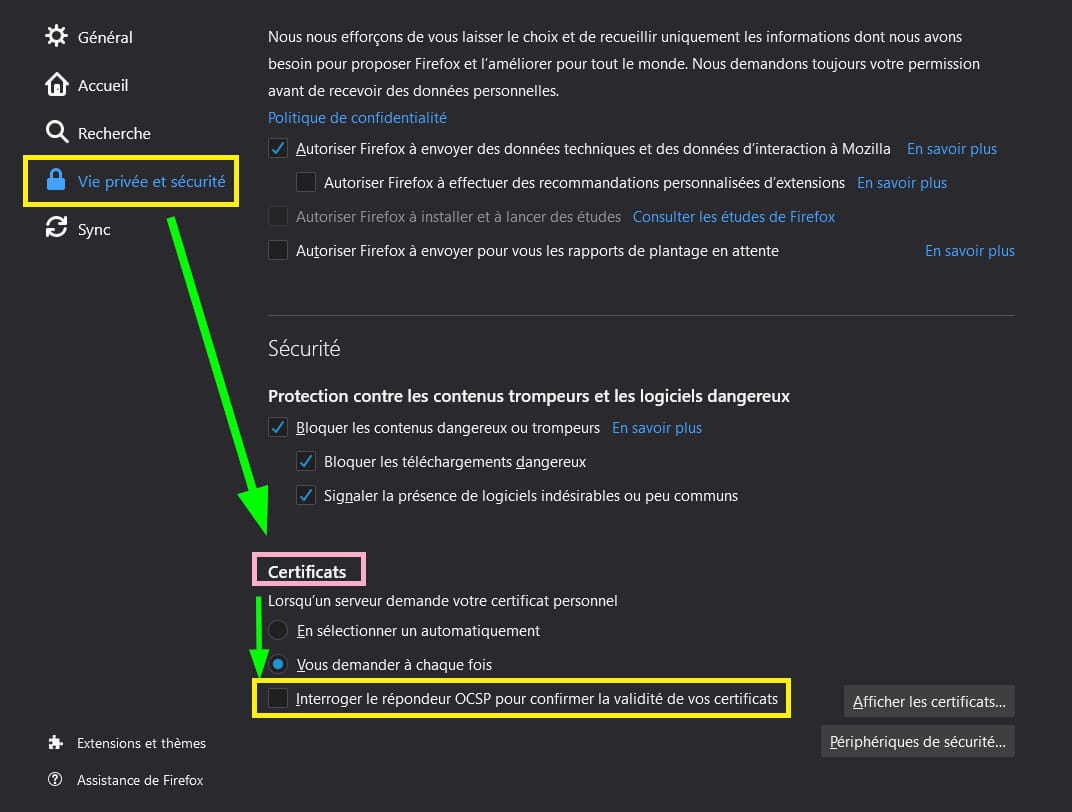
Go to the left menu on the line ► Privacy & Security
Scroll down to the bottom to the section ► Certificates
Uncheck the box ► Query the OCSP responder to confirm the validity of your certificates
Then refresh your site izly
F5 keyboard.
With Google Chrome as an alternative, it works.
See you later