Retrieve all occurrences
Solved
Mecagogo
Posted messages
10
Status
Member
-
Mecagogo Posted messages 10 Status Member -
Mecagogo Posted messages 10 Status Member -
Hello,
I created a small form to quickly generate statistics on the number of activities I organize and the number of participants who attended them, based on certain criteria.
In cell D3, there is this formula:
=COUNTIFS('PLANNED ACTIVITIES'!A2:A,'BIBLIO COMPILATION'!C4,'PLANNED ACTIVITIES'!B2:B,">="&'BIBLIO COMPILATION'!C5,'PLANNED ACTIVITIES'!B2:B,"<="&'BIBLIO COMPILATION'!C6,'PLANNED ACTIVITIES'!D2:D,'BIBLIO COMPILATION'!C7,'PLANNED ACTIVITIES'!F2:F,'BIBLIO COMPILATION'!C8,'PLANNED ACTIVITIES'!G2:G,'BIBLIO COMPILATION'!C9,'PLANNED ACTIVITIES'!H2:H,'BIBLIO COMPILATION'!C10,'PLANNED ACTIVITIES'!I2:I,'BIBLIO COMPILATION'!C11,'PLANNED ACTIVITIES'!K2:K,'BIBLIO COMPILATION'!C12,'PLANNED ACTIVITIES'!L2:L,'BIBLIO COMPILATION'!C13,'PLANNED ACTIVITIES'!M2:M,'BIBLIO COMPILATION'!C14,'PLANNED ACTIVITIES'!N2:N,'BIBLIO COMPILATION'!C15,'PLANNED ACTIVITIES'!P2:P,">=1")
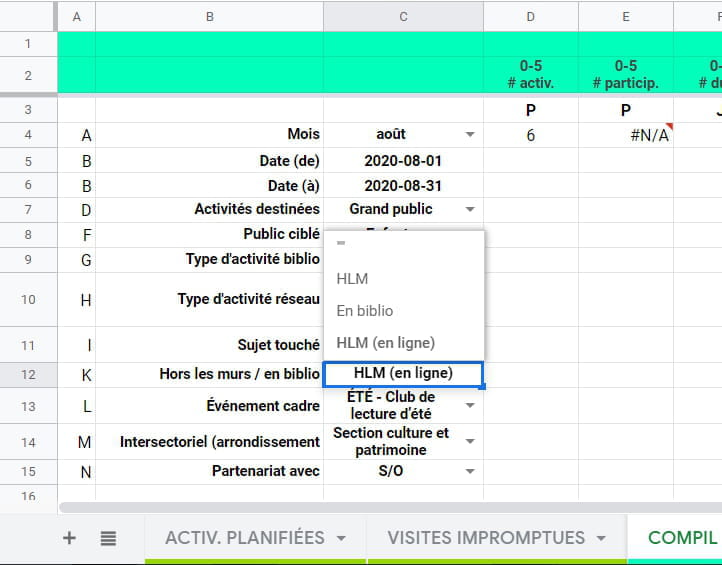
In column C, I have a list of criteria using data validation that allows each one to choose an option from the proposed list. Formula D3 refers to these cells in column C.
Everything works well, but I want to add an additional possibility: to make the formula count all occurrences related to a criterion (for example (In library, HLM (off-site), online HLM + all these activities) without having to choose just one option.
As you can see in the pop-up of cell C12, I've added some "" to the list. Unfortunately, it seems to treat the element as text and not as a precise command. I also tried with NOT BLANK, to no avail.
Do you have any ideas?
Thank you!

I created a small form to quickly generate statistics on the number of activities I organize and the number of participants who attended them, based on certain criteria.
In cell D3, there is this formula:
=COUNTIFS('PLANNED ACTIVITIES'!A2:A,'BIBLIO COMPILATION'!C4,'PLANNED ACTIVITIES'!B2:B,">="&'BIBLIO COMPILATION'!C5,'PLANNED ACTIVITIES'!B2:B,"<="&'BIBLIO COMPILATION'!C6,'PLANNED ACTIVITIES'!D2:D,'BIBLIO COMPILATION'!C7,'PLANNED ACTIVITIES'!F2:F,'BIBLIO COMPILATION'!C8,'PLANNED ACTIVITIES'!G2:G,'BIBLIO COMPILATION'!C9,'PLANNED ACTIVITIES'!H2:H,'BIBLIO COMPILATION'!C10,'PLANNED ACTIVITIES'!I2:I,'BIBLIO COMPILATION'!C11,'PLANNED ACTIVITIES'!K2:K,'BIBLIO COMPILATION'!C12,'PLANNED ACTIVITIES'!L2:L,'BIBLIO COMPILATION'!C13,'PLANNED ACTIVITIES'!M2:M,'BIBLIO COMPILATION'!C14,'PLANNED ACTIVITIES'!N2:N,'BIBLIO COMPILATION'!C15,'PLANNED ACTIVITIES'!P2:P,">=1")
In column C, I have a list of criteria using data validation that allows each one to choose an option from the proposed list. Formula D3 refers to these cells in column C.
Everything works well, but I want to add an additional possibility: to make the formula count all occurrences related to a criterion (for example (In library, HLM (off-site), online HLM + all these activities) without having to choose just one option.
As you can see in the pop-up of cell C12, I've added some "" to the list. Unfortunately, it seems to treat the element as text and not as a precise command. I also tried with NOT BLANK, to no avail.
Do you have any ideas?
Thank you!