How to set Firefox to French?
Fabien G
Posted messages
139
Registration date
Status
Member
Last intervention
-
pistouri Posted messages 19010 Registration date Status Contributor Last intervention -
pistouri Posted messages 19010 Registration date Status Contributor Last intervention -
Hello,
I'm asking this question for a friend who is on PC. She wants her information in French, but all messages are displayed in English even though she says she downloaded Firefox in French.
I did some research because I personally use a Mac and I'm not familiar with PCs.
I read that it should be done (it seems quite simple):
Menu
Options
General
Language
choose the language
But when I get there, actually I don't have a language choice. Only English is offered, there’s nothing else.
Does she need to re-download Firefox to replace it?
Should she do something else, find another option elsewhere in another menu to get the right language?
I did the test a few weeks ago and I can't find the little note where I wrote down exactly what I did. I think I found a language option somewhere else or it indicated that the computer's language was French, but when I tried to work on the computer again, it still continued to display messages in English (and when I went back to the detailed menu above, there was still only the English box and it was checked).
Any advice please?
Thank you in advance.
I'm asking this question for a friend who is on PC. She wants her information in French, but all messages are displayed in English even though she says she downloaded Firefox in French.
I did some research because I personally use a Mac and I'm not familiar with PCs.
I read that it should be done (it seems quite simple):
Menu
Options
General
Language
choose the language
But when I get there, actually I don't have a language choice. Only English is offered, there’s nothing else.
Does she need to re-download Firefox to replace it?
Should she do something else, find another option elsewhere in another menu to get the right language?
I did the test a few weeks ago and I can't find the little note where I wrote down exactly what I did. I think I found a language option somewhere else or it indicated that the computer's language was French, but when I tried to work on the computer again, it still continued to display messages in English (and when I went back to the detailed menu above, there was still only the English box and it was checked).
Any advice please?
Thank you in advance.
5 answers
-
Hello,
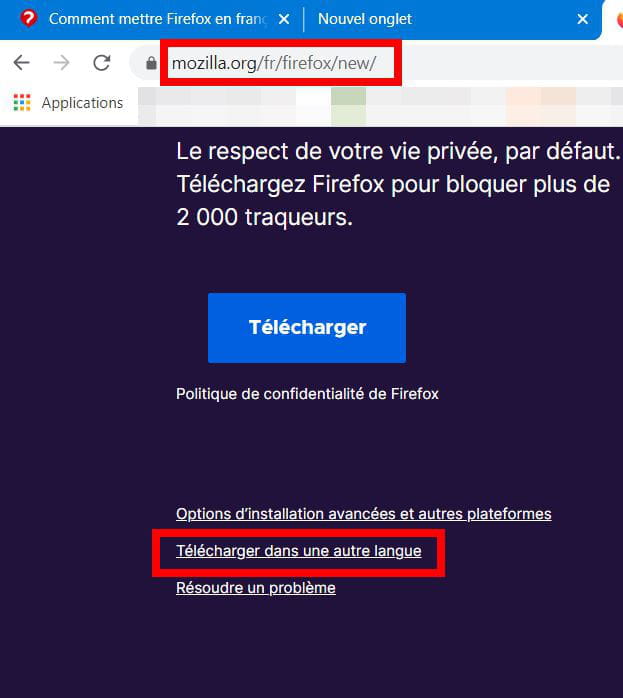
A screenshot that shows that if you download from the French Mozilla site, the software will be in French, unless you want to download it in another language.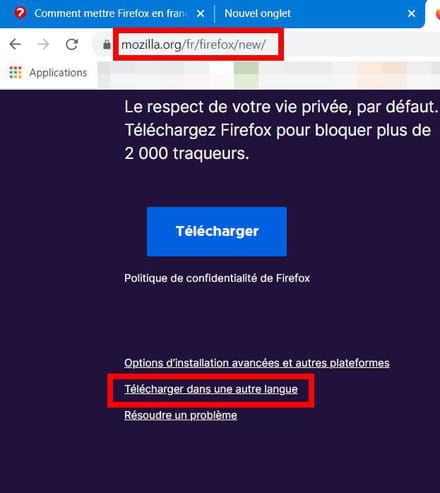
The options to change the language do not work if you downloaded it in a specified language (no other language is available).
--
What is well conceived is clearly expressed,
And the words to say it come easily.
(Boileau) -
pistouri Posted messages 19010 Registration date Status Contributor Last intervention Ambassador 8 732
Hello,
Try to install → French Language Pack
It's an extension that you will find in the Firefox options → Add-ons
Close and restart Firefox.
Info:
Go to Tools > Add-ons > Languages:
If an “English (US) or (GB) Language Pack” is installed, you need to disable it and restart Firefox.
Or Export your Bookmarks
Uninstall Firefox in Control Panel → Programs → Uninstall a program or with Revo, run the advanced scan to remove all residual keys.
Finally, reinstall Firefox 32 or 34 bits depending on your PC architecture
→ Firefox 32 or 64 bits
→ 32 bits or 64 bits?
Ps: I greet Pierrot by the way.
See you later
--
pistouri -
Hello,
thank you for your responses, I will do these operations as soon as I return to my friend's place, thank you for the advice, and if it doesn't work, I will come back to see you...
Thank you. -
Good evening,
I have access to the computer this weekend,
the computer on which I want to set the French language doesn't use a Windows system but is running Ubuntu, is that a problem for the installation of the Firefox extension?
Thank you? -
pistouri Posted messages 19010 Registration date Status Contributor Last intervention Ambassador 8 732
Hello,
4 days later, the continuation.
Following where you are at:
1- For the language pack.
→ Check that the language pack for Firefox is installed
To open a terminal, you can press CTL-Alt + T, and then when the window is open:
If it still doesn't work, you need to follow the Mozilla procedure:
With the configuration editor:
Type about:config in the address bar;
Check that the value of the field general.useragent.locale is 'fr', otherwise double-click on it and set it to fr.
Check that the value of the field intl.locale.matchOS is 'false', otherwise double-click on it.
 Check that the value of the field intl.locale.requested is 'fr', otherwise double-click on it and set it to fr.
Add dictionaries:
If you want to add dictionaries to use spell checking (especially French dictionaries), you can use the menu from Firefox (right-click ⇒ Languages ⇒ Add dictionaries …), which adds modules/extensions. But you can also use the Ubuntu/Linux method 6) by adding a package (which will also be used by LibreOffice): myspell-fr-gut
Default Firefox:
Simply go to Firefox Preferences, in the Advanced tab, then the General tab: check the last box, and possibly restart Firefox. You will confirm the action in the pop-up that appears.
You can also, in the system preferences, set Firefox as the "Preferred Application" for the Web.
I also saw this:
To open a terminal, you can press CTL-Alt + T, and then when the window is open:
sudo apt update
sudo apt install firefox-locale-fr
Between each line, confirm with the Enter key and wait for it to finish reading the list.
2- Uninstall Firefox and follow the procedure below
→ Linux - Ubuntu - Install Firefox 3.5
3- Ubuntu CCM Forum
Then you can ask your question again, as I don't know anything at all about this system.
Good luck.
--
pistouri