
Samsung TV UE55TU7125K
Solved
david
-
gugu01 Posted messages 15669 Registration date Status Contributor Last intervention -
gugu01 Posted messages 15669 Registration date Status Contributor Last intervention -
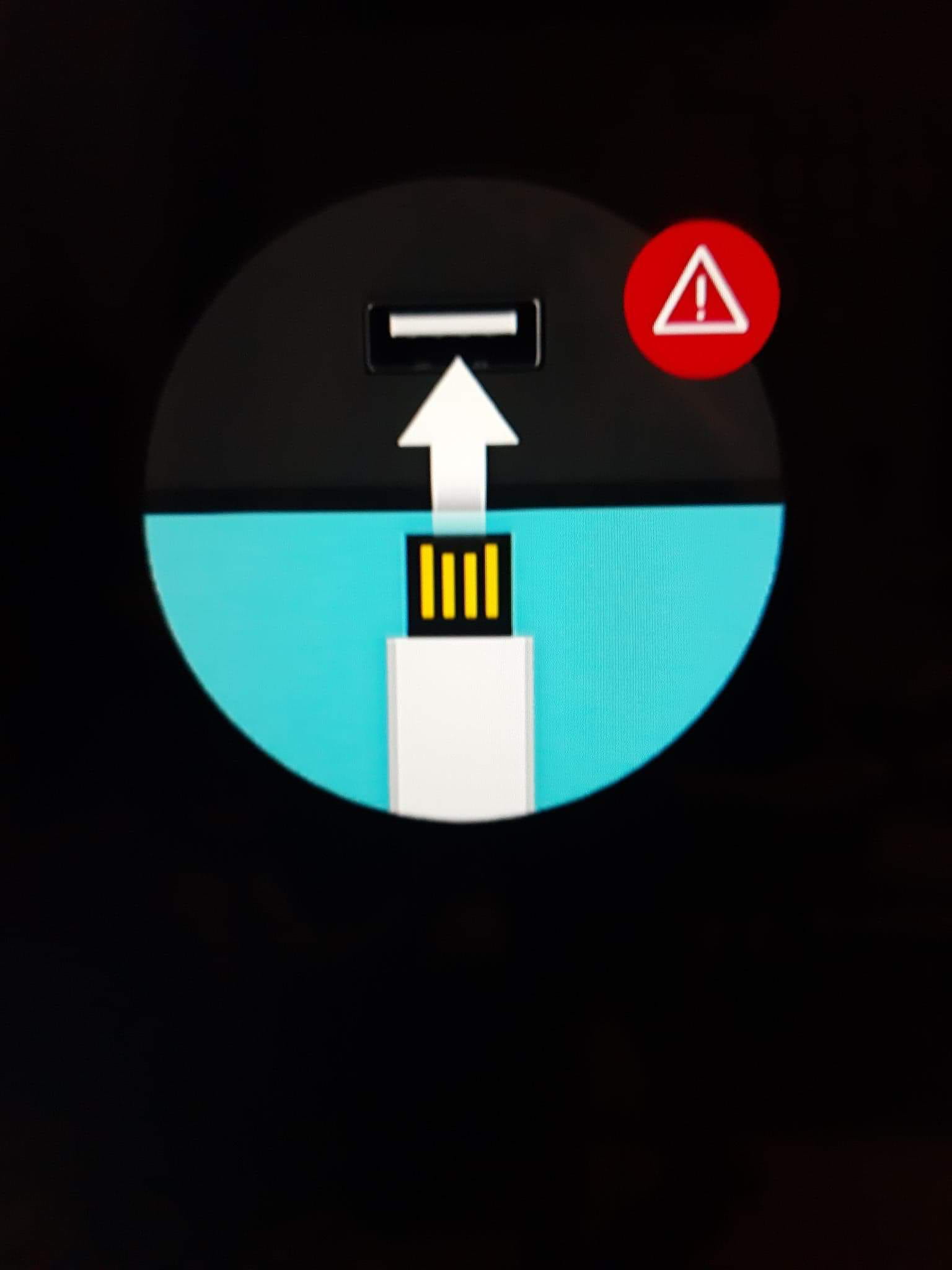
Hello, my brand new Samsung TV suddenly got stuck on a round logo with a USB port and a red triangle danger sign... does anyone know, please?
22 answers
- 1
- 2
Next
-
Good evening,
So with this TV they provide a useless paper manual and a real notice integrated into the TV.
Since you don't have access, here it is:
https://downloadcenter.samsung.com/content/UM/202003/20200316132410459/KT2DVBEUT-1.0.2_EM_KANT_EU_FRA_200224.0.pdf
Found nothing,
but the TV seems to be stuck on the USB source
or
it’s more like the TV wants to perform a manual update and is asking to insert the USB stick with the update on it.
Try
> unplugging it from the power for a while and try again.
or
> if we think it’s an update issue, try to do the update
procedure starting from page 168
update at the bottom of this page https://www.samsung.com/fr/support/model/UE55TU7125KXXC/
Auto message
Without regular feedback from you... you can always refer to Article 22 ;-)
Mini To the volunteers who are helping you: Response, Respect, Politeness,... -
1 >
download this file
https://org.downloadcenter.samsung.com/downloadfile/ContentsFile.aspx?CDSite=UNI_FR&CttFileID=7630323&CDCttType=FM&ModelType=N&ModelName=UE55TU7125K&VPath=FM%2F202007%2F20200727181659630%2FT-KTSU2DEUC_1302.5.exe&OriginYN=N
(took quite a while to download on my side and yet it’s not big)
2 >
Copy this file onto a USB stick
(empty, nothing else on it)
3 >
Access the USB stick and select the file by double-clicking on it.
4 >
click on extract
5 >
the file extracts and installs, just let it do its thing
6 >
at the end check that you have this on your USB stick
7 >
if everything is good, safely eject your USB from the PC.
8 >
You will plug it into your TV
The update should start (if not, wait a bit)
Once it starts, do not interrupt it under any circumstances (do not remove the USB, do not turn off the TV...) and wait for it to finish.
--------------
If during the creation of the USB your antivirus or defender blocks or gives a warning, authorize the action.
Example with defender:
So "more info" on the first message, then on the second you authorize the action.
Info presented from this document (if needed)
https://downloadcenter.samsung.com/content/FM/202006/20200616125127573/2020_TV_Firmware_Upgrade_Instruction_T-KTSU2DEUC.pdf
And update folder from this page (if you want to check that it’s for your correct TV model)
https://www.samsung.com/fr/support/model/UE55TU7125KXXC/
Of course, the brand indicates this:
Warning Removing the USB stick or unplugging the power cable can cause a firmware error or a failure of the main board. These issues are not covered by Samsung's warranty policy.
Given your situation, you are in this case, so let's try.
At worst, you'll be at the same point, and you’ll have to check with the warranty which may be refused according to this little warning note.
There you have everything in detail and additional info.
Auto message
Without regular feedback from you...you can always refer to article 22 ;-)
Mini Regarding the volunteers who help you: Response, Respect, Politeness,... -
-
You're welcome, it was a pleasure to help you ;-)
(A nice mystery to solve at the start)
It's not normal that she crashed her firmware all by herself.
An unfortunate bug, caught and without consequence
or if you notice any other issues, send it back under warranty.
(The most likely scenario is that the TV was updating automatically and at the same time, you cut off the box, so no more internet and it crashed in the process)
-
-
Hello,
I think the best source would still be your user manual to find the answer to your TV's reaction?
Did you plug in a USB drive?
It wouldn't turn off anymore when pressing the remote control? -
It's the TV that's right, turn it off, remove the USB, and restart. Since it's brand new, go check the house. If you haven't plugged in a USB key, then you have a short circuit in one of the ports. Check the inside of the ports. Remove one HDMI, try with just one. Start the TV alone if it's not coming from the box.
-
I unplugged the TV, removed both HDMI cables, so nothing is connected except for the power supply. I turn the TV back on and the logo comes back...
-
-
-
If you bug yourself, we won't make any progress.
If you unplug the TV from the socket (the electrical outlet) for 10 or 15 minutes and then plug it back in
have you done it? What does it give?
Auto message
Without regular feedback from you... you can always refer to Article 22 ;-)
Mini Regarding the volunteers who help you: Reply, Respect, Politeness,... -
Did you prepare a USB key for the update, download and unzip it, then copy the update onto it, and then plug your key into the TV?
How did it go?
--
Auto message
Without regular feedback from you...you can always refer to article 22 ;-)
Mini Regarding the volunteers who are helping you: Reply, Respect, Politeness,... -
We'll take a look together because, just so you know, your image corresponds to this firmware update procedure document and would indicate an issue, a cut in the TV update.
It fits your story, but why did it happen without any action on your part? That's not reassuring. https://downloadcenter.samsung.com/content/FM/202006/20200616125127573/2020_TV_Firmware_Upgrade_Instruction_T-KTSU2DEUC.pdf
You check it, I’ll check it, and we’ll evaluate to get started.
--
Auto message
Without regular feedback from you... you can always refer to Article 22 ;-)
Mini Regarding the volunteers who are helping you: Respond, Respect, Politeness,...-
Actually, I found that the TV was acting up a bit, so I unplugged my Orange decoder and restarted it. I saw the startup images from Orange, and suddenly the logo appeared...
- Did you check the link? This logo appears in case of a TV update interruption.
It might have been in automatic mode and cut off at the wrong moment or there's a bug prompting for an update or...
We need to do it or rather finish it.
I'm currently downloading the file and seeing how to create the key.
-
-
-
-
-
-
-
-
-
When you double-clicked on the program, did your PC show you a warning like this:

If so, click on "more information"
Then in the following window, click on "run anyway"
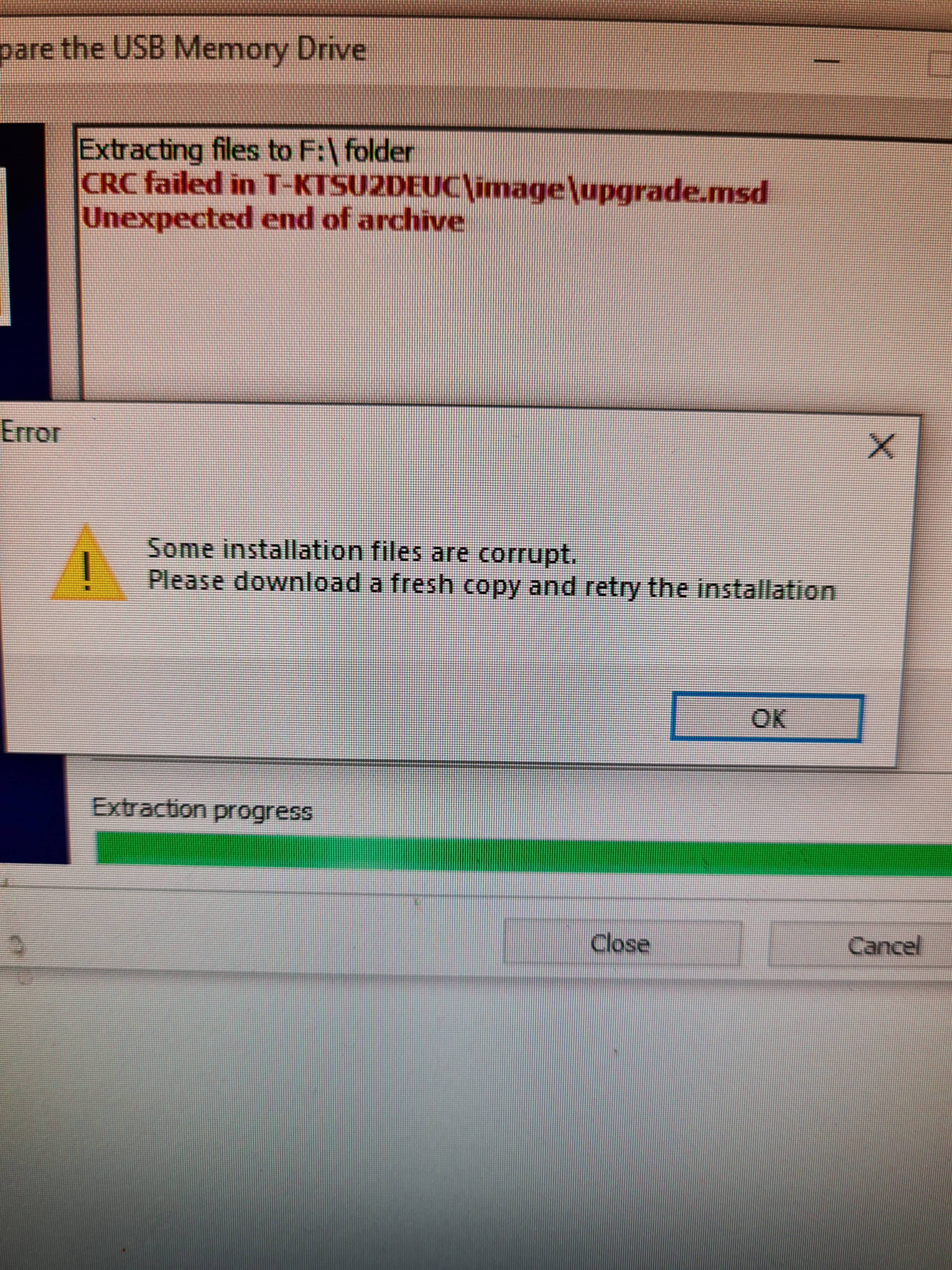
However, you may need to re-download the file if it has been corrupted (damaged by the antivirus)
Auto message
Without regular feedback from you...you can always refer to article 22 ;-)
Mini Regarding the volunteers who are helping you: Reply, Respect, Politeness,... -
re-download the file and start over
(it may not have been complete, but I think rather that your antivirus is interfering)-
Also, disable the antivirus while creating the key.
You say you found "Windows Security"
Click on "Virus & threat protection"
then go to "Virus & threat protection settings" and click on the line "Manage settings"
You will then be able to disable real-time protection.
In order:
You re-download the file
You disable the antivirus
You create your key
Remove it from the PC
And then remember to reactivate your antivirus
And update the TV.
-


- 1
- 2
Next