Avast Botnet : liste noire
Solved
Didch66
Posted messages
5
Status
Member
-
Malekal_morte- Posted messages 178136 Registration date Status Moderator, Security Contributor Last intervention -
Malekal_morte- Posted messages 178136 Registration date Status Moderator, Security Contributor Last intervention -
Hello, when I turned on my computer today, Avast notified me with the alert in the picture

However, last night there was no problem to report, and regularly (every 10 minutes precisely) this alert keeps coming back.
I have performed several in-depth virus scans with Avast, and ran a scan with Malwarebytes, but it hasn't had any effect :/
If you could explain to me what is happening, or better yet, if someone has a solution that would be really helpful because I don't know what to do
Thank you in advance :)
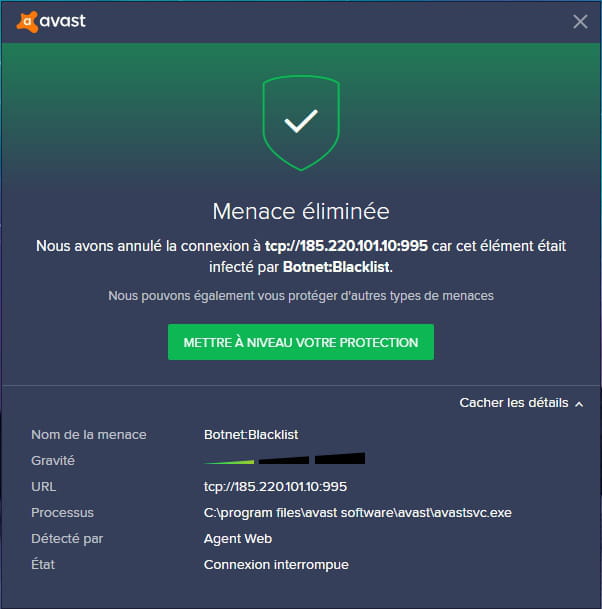
However, last night there was no problem to report, and regularly (every 10 minutes precisely) this alert keeps coming back.
I have performed several in-depth virus scans with Avast, and ran a scan with Malwarebytes, but it hasn't had any effect :/
If you could explain to me what is happening, or better yet, if someone has a solution that would be really helpful because I don't know what to do
Thank you in advance :)
17 answers
-
Can you check in Avast when the update was made?
(In Avast > menu > settings > updates)
I will keep you informed if there are any developments. -
Hello,
From the file path, Avast detects itself x)
Do you use Tor Browser? (By searching the address, we find a match with a proxy from the Tor network)
Regards. -
So, for this specific post, it can be closed:
Avast, after trying many virus definition updates, has finally proposed an update of the program itself!
The problem is resolved, there are no more annoying false positive pop-ups.-
-
- I'm just noting that the problem at the root of this post (Avast and a recurring message) seems to be resolved
- As for the Trojan Miner, I've gone through the content of the FRST fix, and I don't see where the trojan is, nor do I see it in reading the 3 reports. Sorry, but could you tell me where it is? I would like to understand (I'm afraid of making reckless changes with the fix)? Thank you! -
The scheduled tasks that launch Chrome on the .win URL that loads cryptojacking
See the correction in message #16. -
Okay, it's done. Thank you. I would like to understand where this problem came from, if it's possible to find out what it did, and of course how to avoid getting it again?
And while we're at it, how did you find the script to apply? Well, I know it's okay now, but I like (to try to) understand... ;-) Thanks again! -
It's Avast! that can answer this question.
They may have blacklisted this class of IP: 185.220.101
At your place, it's Bittorrent that connects to it; there may have been a user on this network.
However, in the first message... the connection goes towards a port used for sending emails.
That's not a good sign.
But without the reports, it's hard to say.
Moreover, there have been so many responses that we can't check.
Fortunately, you provided the FRST reports, which helped remove the Trojan Miner.
-
-
Hello,
This is an unusual connection to a mail server.
It could be for sending SPAM/Malicious emails.
To check your computer for potential infections and to get a general status of the system:
Follow the FRST tutorial by clicking on this blue link. ( take the time to read carefully - everything is well explained ).
Download and run the FRST scan,
Wait for the scan to finish, a message will indicate that the analysis is complete.
Three FRST reports will be generated:- FRST.txt
- Shortcut.
- Additional.txt
Send these 3 reports to the website https://pjjoint.malekal.com/ and return with the 3 pjjoint links leading to the reports here in a new response so we can review them.
(The blue links lead to step-by-step explanatory tutorials, click on them for more precise instructions to follow).
--
Please press a key to continue the disinfection... -
Hello,
Yes, that's what leaves me very puzzled, however the last alert I received targeted a different program

No, I do not use Tor Browser.-
Strange, it looks like false positives, and it smells like a buggy update... It's not necessarily easy to do, but we should check if it's not due to a recent update of Avast, by installing a previous version for example. (Or by waiting for a new update but well...)
-
-
Greetings!
According to the information in the image, it seems to be from your BitTorrent!
I recommend removing it from the automatic startup; that should solve your problem, but as soon as it is launched, you will get the same alert. Your BitTorrent may have been affected by some malware, so reinstall it if necessary.
Best regards, Miiisokaa at your service :)
-
-
The false positive is indeed plausible, as the Avast update took place when the PC started up, and that's when the problem appeared. Additionally, I installed ESET and MalwareByte in parallel, and neither of them detects any problems...
I will submit the false positive to Avast and see if I get a response; otherwise, I will try Malekal's solution.
In any case, thank you for your interest in my issue :) -
Hello,
I experienced that too when I opened my computer; it happened 3-4 times and then nothing.
I also did a thorough scan, but found nothing...
And yesterday, there were no issues either.
I also have Avast.
I look forward to your reply! -
Yes, update today, and Avast did another one 5 minutes ago.
-
Same for me.
Avast update (free version), and since then, it keeps notifying me "Threat eliminated. We have terminated the connection to tcp://185.etc because this item was infected by Botnet/Blacklist.
We can also etc."
This message keeps coming back nonstop when my torrent client is open (Transmission QT). No problem before this update.
Windows Defender (which is also running) detected a suspicious file in the Avast folder, unfortunately, I can no longer find the name of this file. -
All your rambling leads nowhere; it would be more relevant to do what is indicated here https://forums.commentcamarche.net/forum/affich-36735833-alerte-avast-botnet-blacklist#1
bazfile
Moderator/Security Contributor.
A hello, a reply, a thank you are always appreciated. -
Thanks for the "chitchat" (it's not very respectful), isn’t it still a forum for exchange and discussion?
- The "chitchat" has allowed us to see the common points between the issues occurring for each person who shared their experience of the problem.
- Common points: update of Avast definitions (the problem does not occur for people with another antivirus), type of message following the issue is identical.
The solution lies with Avast then. -
Give the requested FRST reports so we can finish.
--
Please press any key to continue the disinfection...-
Hello,
for my part:
https://pjjoint.malekal.com/files.php?id=FRST_20200701_i1311j10u8m5
https://pjjoint.malekal.com/files.php?id=20200701_i15y7s15l6j13
https://pjjoint.malekal.com/files.php?id=20200701_q11o11b8j5g14
thank you;- You have programs that were installed when you purchased the computer or installed later that may not be useful.
They clutter Windows and can slow it down.
Therefore, you can uninstall them.
Go to the Control Panel
then Programs and Features.
Uninstall:
CyberLink
Wondershare
Here is the FRST correction to perform.
You can refer to this explanatory note with screenshots.
1- Open FRST -
2 - Copy the entire script that is in the box below:Start:
CloseProcesses:
CreateRestorePoint:
Task: {353DB05B-CF90-4A0A-BBA6-686B23800CA7} - System32\Tasks\ASUS Live Update1 => "C:\Program Files (x86)\Google\Chrome\Application\chrome.exe" localdrive"."win
Task: {B8D27009-8AF0-4BB5-8B22-4D3C152151C4} - System32\Tasks\ASUS Live Update2 => "C:\Program Files\Google\Chrome\Application\chrome.exe" localdrive"."win
EmptyTemp:
RemoveProxy:
Reboot:
End::
3- Once the script is copied, click on Fix.
Let the fix complete, once it's done you will be asked to restart your PC, do it as soon as prompted, see below.
Then once your computer has restarted:
4- You will have a Fixlog file on your desktop, send it via https://pjjoint.malekal.com/ then put the link generated by Pjoint in your next message.
5- CHECK AND LET ME KNOW IF YOUR PROBLEM IS STILL PRESENT.
-
-
Hello.
We assume that those who have issues with their antivirus are using Windows 10. But why install a third-party antivirus when Windows Defender is more than sufficient! If it received negative criticism in the past, that is no longer the case today.
https://www.ginjfo.com/actualites/logiciels/windows-10/windows-10-est-il-encore-necessaire-dinstaller-un-antivirus-tiers-20180720
Stick with Windows Defender and these problems will no longer exist.
See you later . . .
--
" Patience leads to good, haste to nothing " -
Hello, having the same issue, I "repaired" AVG (through the uninstall/install program) and the problem seems to be resolved.
Have a nice day. -
In fact, I wanted to uninstall it to reinstall it afterwards.
After clicking on "uninstall," a new AVG Internet Security window opens and offers three options: Repair - Browse - Uninstall.
I repaired it and currently have no issues. -
Just.
The problem was identical with AVG.
The issue with this Botnet:blacklist is therefore not related to a single antivirus.
I have no solution for Avast, which I no longer use. -
Greetings!
According to the information in the image, this seems to be coming from your BitTorrent!
I would advise you to remove it from the automatic startup; that should solve your problem, but as soon as it launches you will get the same alert, your BitTorrent may have suffered some malware, reinstall it if necessary.
Be careful with BitTorrent, it's a hotspot for malware..
Best regards, Miiisokaa :)