
Site with "form"
Solved
gameddy
Posted messages
16
Status
Member
-
jordane45 Posted messages 30427 Registration date Status Moderator Last intervention -
jordane45 Posted messages 30427 Registration date Status Moderator Last intervention -
Hello everyone,
I'm asking for your help with something that seems quite simple but, given my level (only HTML/CSS), I can't manage it.
I have a project to create a site that will remain local (meaning it will never go online) that allows displaying a list of anime that the user will have added beforehand by clicking a button named "Add an anime +". This is where my problem lies.
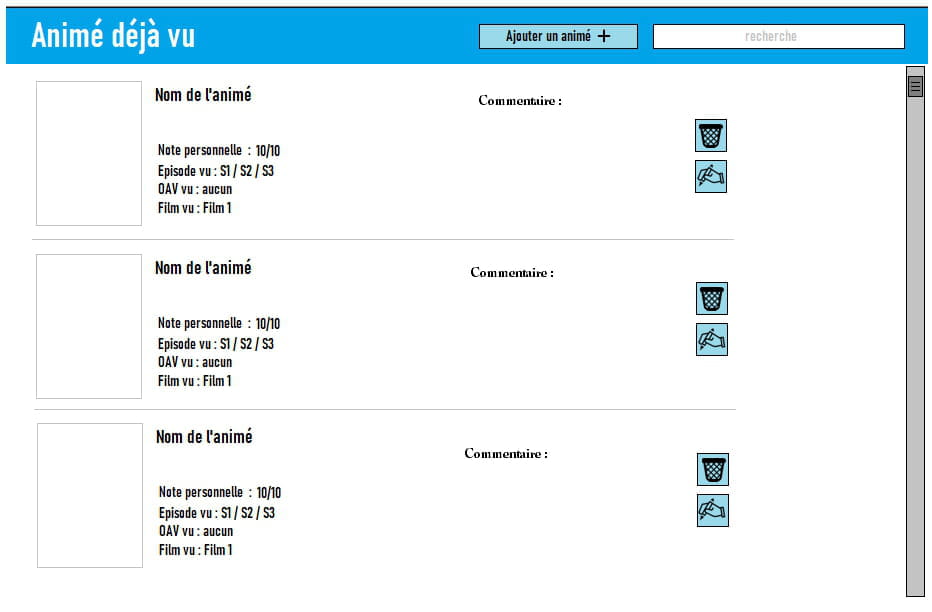
I would like to make a page to enter the name/rating/image [...] and thus automatically display it on the main page. I've created a visual of the only three things I want the page to do.
Visual of the page:


Thank you for your replies.
I'm asking for your help with something that seems quite simple but, given my level (only HTML/CSS), I can't manage it.
I have a project to create a site that will remain local (meaning it will never go online) that allows displaying a list of anime that the user will have added beforehand by clicking a button named "Add an anime +". This is where my problem lies.
I would like to make a page to enter the name/rating/image [...] and thus automatically display it on the main page. I've created a visual of the only three things I want the page to do.
Visual of the page:


Thank you for your replies.
1 answer
-
Hello,
To accomplish this, you will need to add server-side code and possibly store the information in a database.
Locally on your computer, you can emulate a server using software such as LARAGON, XAMPP, WAMP, or EASYPHP... (I recommend Laragon: https://laragon.org/download/index.html)
For the rest, you will find many tutorials online for creating HTML/PHP forms and inserting data into a database.
Note: For connecting to the database, you will find old tutorials that use the deprecated mysql_* extension. Instead, you need to use either the mysqli extension or PDO (I prefer PDO).
Example of connection and insertion code into the database: https://forums.commentcamarche.net/forum/affich-37584941-php-pdo-gerer-les-erreurs
It should also be noted that to create your third window (with the confirmation modal for deletion), you will additionally need to add a bit of JavaScript code.
--
Best regards,
Jordane-
First of all, thank you for your response.
After reading what you sent, I don't think I have the skills for what I want in HTML at all. So sorry to redirect the question, but would it be simpler to do it in the form of software (.exe) and if so, in which language?
Thank you ^^- To create an exe, there are many languages.
C#, VB.NET ... Python ...
And then, maybe simpler but with a less beautiful result... AutoIt (very close to VB)
And there's also Java...
The choice of language depends on your needs, constraints, and skills.
In any case, you'll need to learn to program... and I'm not sure these languages are actually simpler than PHP/JavaScript/HTML.
-
