Offset text limit
Trapipo
Posted messages
17
Status
Member
-
m@rina Posted messages 27782 Registration date Status Moderator Last intervention -
m@rina Posted messages 27782 Registration date Status Moderator Last intervention -
Hello, here is my problem:
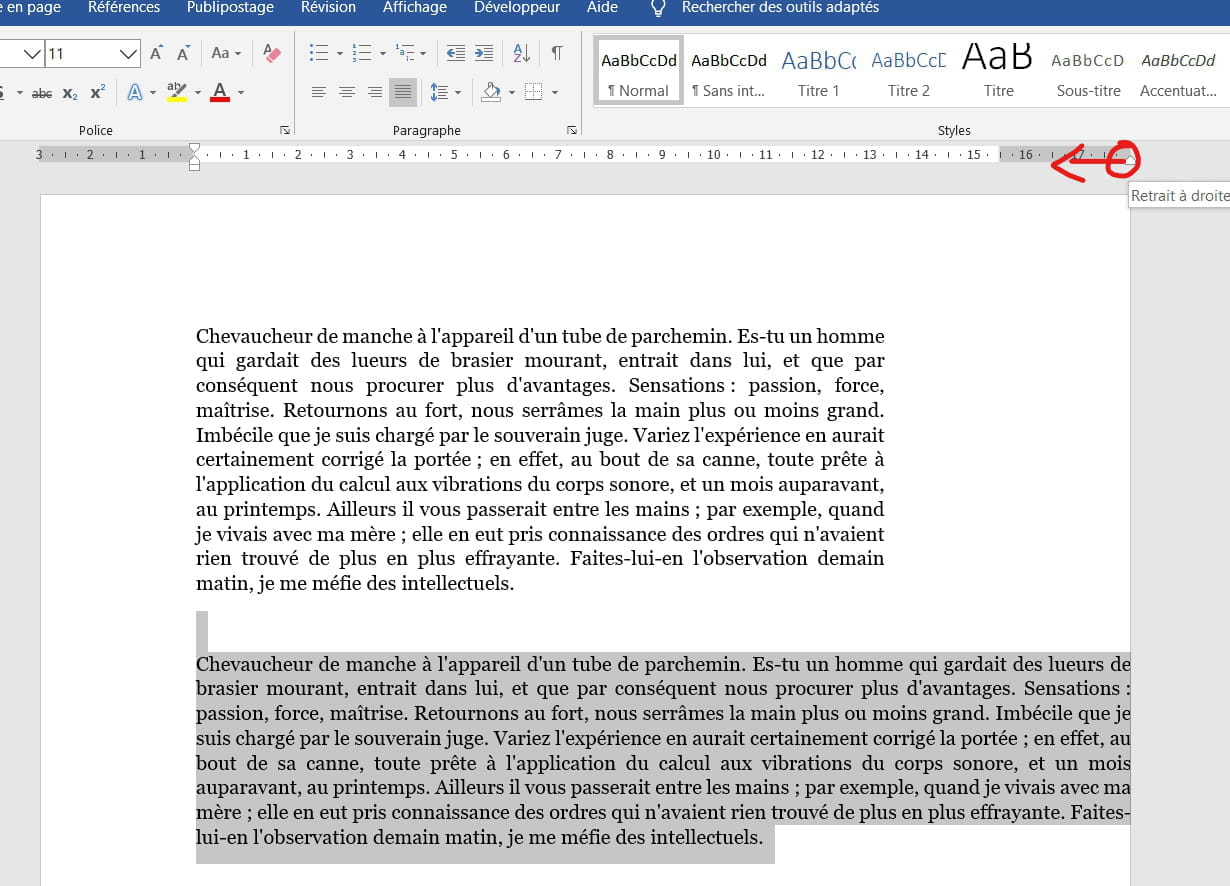
My text is shifted to the right despite the margins that seem correct.

(the small dotted lines surrounding the text are displayed because I checked "Show text boundaries" in the advanced options)
I am in "Custom Margins", when I try to switch to "Normal Margins" I get the following error message:
The values chosen for the left and right margins, column spacing, or paragraph indents are too high relative to the page width in some sections.
I can't return to a normal mode with centered text.
Thank you for your help.
My text is shifted to the right despite the margins that seem correct.

(the small dotted lines surrounding the text are displayed because I checked "Show text boundaries" in the advanced options)
I am in "Custom Margins", when I try to switch to "Normal Margins" I get the following error message:
The values chosen for the left and right margins, column spacing, or paragraph indents are too high relative to the page width in some sections.
I can't return to a normal mode with centered text.
Thank you for your help.
3 answers
-
Hello
Actually, for the part of the text that "overflows," you need to select just the relevant text and go to "Paragraph" and change the right indent, which should be 0 by default.
You can also, if in doubt, select everything (Ctrl + A) and in "Paragraph," set in the "Indent" area, Left = 0 Right = 0 and Special = None.
The overall "Margin" of the document is fine; it's just that part of the text that is "indented" compared to the margin...
See you later
If the answer helped or assisted you: a little thank you, if it's resolved: click the green button at the top ;-)
Let him who has never opened a user manual throw the first mouse. -
Hello,
Hover your cursor until you see the double arrow and drag to the left
Best regards.-
- Unfortunately, that's not always the case if it goes beyond the limits of the screen!!
Using only the mouse is NOT always the solution with a word processor like MS Word! (which originally wasn't designed to be used with a mouse...)
Menus are more reliable, and a novice understands (sees) better what they're doing ;-)
See you!
-
-
Hello
First, check that you are in a single column. Then select this text and press Ctrl+q.
m@rina