Gigaset How to manually force the registration number?
bigbernie
Posted messages
419
Registration date
Status
Member
Last intervention
-
bigbernie Posted messages 419 Registration date Status Member Last intervention -
bigbernie Posted messages 419 Registration date Status Member Last intervention -
Good evening
I have been using 4 Gigaset on a base A 420 for a long time
When you change a device, you shouldn't believe that if you replace device 3 with another, it will automatically take the 3. It's not enough to unregister the 3 before putting another one of the same name. YOU MUST unregister all 4 devices and the one you register first will be 1, then 2, etc. in order. I've understood this for years.
Yes, but I just ordered several 660s that will later replace the 420s (I haven't set up the new base 660) so on base A 420. I haven't installed the 660 base for the moment. Not necessary. I'm not going to put 6 handsets instead of 4 for now
Yes, but this time, no matter what I do, I always have 2 devices with the same number.
All of this because we can't manually number the registrations. I haven't seen that in the big web manuals. Could we? A mystery.
I wonder if having two 420s + one 540 + one 660 confuses the numbering? But that has nothing to do with the registrations.
Moreover, the 660 doesn't have the ability to unregister the handset at all. I would have noticed. You can only factory reset... which I did.
Ah, if only we could force that manually...
Thank you and see you later
Configuration: Windows / Firefox 77.0
I have been using 4 Gigaset on a base A 420 for a long time
When you change a device, you shouldn't believe that if you replace device 3 with another, it will automatically take the 3. It's not enough to unregister the 3 before putting another one of the same name. YOU MUST unregister all 4 devices and the one you register first will be 1, then 2, etc. in order. I've understood this for years.
Yes, but I just ordered several 660s that will later replace the 420s (I haven't set up the new base 660) so on base A 420. I haven't installed the 660 base for the moment. Not necessary. I'm not going to put 6 handsets instead of 4 for now
Yes, but this time, no matter what I do, I always have 2 devices with the same number.
All of this because we can't manually number the registrations. I haven't seen that in the big web manuals. Could we? A mystery.
I wonder if having two 420s + one 540 + one 660 confuses the numbering? But that has nothing to do with the registrations.
Moreover, the 660 doesn't have the ability to unregister the handset at all. I would have noticed. You can only factory reset... which I did.
Ah, if only we could force that manually...
Thank you and see you later
Configuration: Windows / Firefox 77.0
5 answers
-
Hello,
Not very aware of this numbering issue... But anyway.
If I understood correctly, you have 4 devices registered on the A420 base: 2 A420h handsets - 1 540 handset (A540h?) and a 660 one (CL660h??).
I think the numbering problems you see are related to the fact that the 540 and 660 handsets, although associated with the A420 base, remain linked to their original bases and have retained their numbering.
Try making a call from one of the other three handsets
from the 1 420 by dialing , then 4 you should make all 4 handsets ring.
Then if your 660 is a CL660, there is indeed a procedure to unregister a handset.
PS: regarding numbering during a new registration, the manual states: If numbers 1 to 4 are already assigned to other devices, number 4 will be replaced.
Very difficult to catch a black cat in a dark room.
Especially when it’s not there... -
Thank you
It's annoying for internal conversations in intercom mode.
You are right about the old numbers being kept in memory. Yes, but the fact
that resetting to factory settings erases everything. I noticed that a few years ago. And it is not indicated at all in the manuals and FAQs. In fact, it's rather bothersome, this automatic numbering system.
For example, you have 1 2 3 4. You want to replace device 3. You will unpair the 3 before removing it, not forgetting to take out its battery to prevent it from communicating.
Then, before putting in your new device, you will reset it to factory settings.
Next, you will initiate the pairing with the base. Well, it will not necessarily be called 3.
That's what I did twice to make sure.
You unpair your 4 devices, or 6 or 3, etc.... So your 4 handsets will blink while calling mom. And the numbering will increment in the order you perform the action.
Yes, but this time it doesn’t work anymore. I get 1 then 2 but the third is also called 2.
The firmware is not perfect. It does not allow changing the numbering (which is used for internal use) afterwards.
And when incrementing goes wrong.......
Just for your information. The Customer Service by phone from Cordon (distributor in France) is not working at the moment.
Siemens Gigaset has no helpers. Cordon does. But not right now.
Good evening. -
You want to replace device 3. You will need to disconnect the 3 before removing it, not forgetting to take out its battery to prevent it from communicating.
If it’s no longer communicating, I struggle to see how we can disconnect it...
Since it’s no longer communicating, it can’t lose its number.
That said... regarding the handsets of other bases... before pairing them, in my opinion, it’s better to turn off their base during the operation to avoid interference between the bases.
Lastly, is the 540 an A540? Is the 660 the CL660 or not?
--
Very difficult to catch a black cat in a dark room.
Especially when it’s not there... -
Hello
This is the 660 CL and it's an A 540 and two A 420
I haven't set up the new base A 660 CL for now. As long as I stay at 4 combines, it's fine.
It was purchased with a future expansion in mind.
The 660 CL has correctly taken number 3. But it's the 540 that took number 2 while number 2 was already assigned to a 420.
To re-register everything, the 660 CL was disabled, without a battery and without a charger. So it's not responsible for the two combines having the same number.
When I have a moment, I'll start from scratch with the 4....
All uncoupled but taking your advice into account, I will unplug the chargers.
And if it still malfunctions, I will reset all to factory settings.
However, following your advice about the 660 CL, there are no unregistration lines like in the others that have Settings, register, withdrawal, factory reset.
After closely looking, it's the long press on Hang Up in standby mode that allows it.
When everything is in Settings, it's quicker to understand.... for users of the previous models.
And even though I have 35 years of experience in IT across 9 to 10 different systems, I find the automated system and sometimes faulty numbering annoying.
The client should be able to manually choose the numbers... with a prohibition against taking the same ones twice. Or the firmware that should also prevent having the same number twice.
Best wishes and looking forward to it.....-
I'm not talking about unplugging the chargers... but about unplugging the bases of the handsets that are to be added to the A420.
there are no unregistration lines like in the others
Uh!!!
Excerpt from the manual on page 55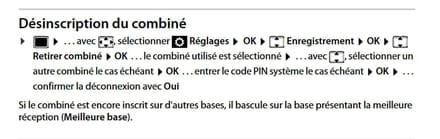
The manual: https://gse.gigaset.com/fileadmin/gigaset/images/CustomerCare/Manuals/CLxx/CL660/A31008-M2804-F101-1-2X19_01-12-2018_fr_CH.pdf
Edit:
Note: Additionally, on the CL660, you can change the internal number (Int1,2 etc.) to whatever name you want
see manual on page 56
-
-
Re thanks
I will tackle it step by step.
Oh yes.... This CL 660 is confusing. For example, on all the Gigaset phones I have used, the charge gauge is black and the black gauge progresses in a "white" frame = empty. On the CL 600, it's when it's all white that it's charged...
I thought for a while that the device wasn't charging......
I am currently reading the complete online manual. I don't see the point of changing basic things like this, but oh well.....
Have a good day.